Nettio Designs

Design + Creativity + Adventure = LOVE

  • HOME
  • JOIN THE 2023 MONTHLY FAVES
  • THE SHOP
  • ABOUT
  • CONTACT

Summer Love Mini Course | Our Fave Summer Kits

POSTED ON July 4, 2013 IN Summer Love 2013 Mini Course

summerlovemini-logoThe Summer Love Mini Course continues today with Team Awesome member Natalie sharing our team’s favorite summer kits. Take it away Natalie!

One of my very favorite things about summer is it’s the perfect time to be active and doing fun things. For the scrapbooker in us all, this also means it’s the perfect time to take fun pictures and buy super amazing kits and templates to help preserve the memories associated with all of our summer activities!

Nettio’s Team Awesome put together a list of some of their favorite, tried and tested, summer kits available on the market today. We hope you find one (or more) that are perfect for your own summer adventures!

nettiodesigns_summerlove-kits-image-1nettiodesigns_summerlove-kits-image-2

Row 1: 1. By The Seaside by Zoe Pearn; 2. Everyday Storytelling: Summer by Kristin Cronin Barrow and Jenn Barrette; 3. Nantucket Pretties by Forever Joy
 
Row 2: 4. Summer Nights by Julie Billingsley and Meghan Mullens; 5. Summer Camp by Kate Hadfield & Sahlin Studio; 6. Ready for Summer by Kristin Cronin-Barrow
 
Row 3: 7. Beachy Keen: With Eva Kipler By Flergs; 8. Hello Summer by Zoe Pearn; 9. 100 Days of Summer by Meghan Mullens
 
Row 4: 10. Best Summer Ever by Sugarplum Paperie; 11. Summertime Fun Collection by Jady Day Studio; 12. Sunshine In My Soul by Zoe Pearn
 
Row 5: 13. Let the Sunshine In by Julie Billingsley; 14. Water Play Days by Heather Roselli; 15. Ignite the Night by Julie Billingsley


What are your favorite Summer tried and true kits? Link us up in the comments below!

Coming up next…On Tuesday, July 9th, Team Awesome and I will be sharing pages 3 & 4 of our Summer Love mini albums, including our Summer Bucket lists! Have an awesome 4th of July weekend and we’ll see you then!

[catalyst_hook_box name=”summerlovesignup”]

__________________________________________________________________

Previous Summer Love Mini Course posts:

  • Introducing the FREE Summer Love Mini Course
  • Summer Love Mini Course FAQ
  • Cover & Intro Pages

How do I purchase Levitra without going to the doctor

POSTED IN Summer Love 2013 Mini Course

Summer Love Mini Course | Cover & Intro Page Share

POSTED ON July 2, 2013 IN Summer Love 2013 Mini Course

summerlovemini-logo
Hello hello and welcome to Day 1 of the Summer Love Mini Course! Today Team Awesome and I will be sharing our Cover and first two intro pages of our mini albums. But before we get to that I wanted to give you a quick, friendly reminder: new content will be posted on the Nettio Designs blog every Tuesday and Thursday through August 15th. If you want to make sure you don’t miss out on any of the fun, you can sign up for Summer Love Mini Course email updates right here.

Now on to our first set of pages…

Summer Love | Cover & Intro Pages 1-2

Our goal as a team is to each complete 3-4 pages a week, or basically two two-page mini spreads, which means if you play along with us, by August 15th you should have a completed Summer Love mini album. To kick things off today, we’re sharing our inside cover pages as well as pages 1 & 2 of the album which include an intro page and an accent page.

If you haven’t purchased the templates, here’s a little peek at what the Summer Love 6×6 Mini Album templates for these pages look like:

nettiodesigns_SummerLove-pg0-2-Templates

And here’s what Team Awesome and I did with them:

By Lynnette

For my Summer Love mini album I’m planning to use a mix of summer kits because really, how can you choose amongst all the summery goodness? For my first three pages I used a mix of Zoe Pearn’s Hello Summer and Kristin Cronin-Barrow’s Ready for Summer kits which are both available at Sweet Shoppe Designs.

I haven’t completely decided how embellished I want my pages to be but right now I’m liking the mix of some pages being more simple and others more accented. I’m excited to see how it comes together as the summer progresses.

nettiodesigns_SummerLove-pg0-2-Lynnette

By Brittney

For her intro page, Brittney went graphic by extracting a photo of her son holding an iPad and replacing the iPad with the intro card from the template. How cool is that!

nettiodesigns_SummerLove-pg0-2-Brittney

By Jen

Jen is fully embracing hybrid scrapbooking for her album and I have to say, it’s so fun seeing my templates paired up with paper products! I especially love how she used her Silhouette to cut out the “hello summer” text from the templates. If you’re wondering how she did that stay tuned because she’ll be sharing her Silhouette tips and tricks in a future post.

nettiodesigns_SummerLove-pg0-2-Jen

By Jenn

Jenn has a knack for mixing papers and elements and she’s done so beautifully here using Kristin’s Ready for Summer kit. She also adapted her title page to something more her which is always a great way to personalize any template.

nettiodesigns_SummerLove-pg0-2-Jenn

By Jennifer

Jennifer is embracing the color for her album by recoloring each title in the templates. While I lot of work I’m sure, it’s such a fun look and I can’t wait to see how her completed album turns out.

nettiodesigns_SummerLove-pg0-2-Jennifer

By Sara

For her intro pages, Sara embraced blending by blending the text from the templates into her background papers. I especially love the large blending photo she used for her accent page. It’s such a great way to add a bit of texture and dimension to a digital mini album.

nettiodesigns_SummerLove-pg0-2-Sara

By Sherly

Sherly worked her clustering magic on her first three pages to really give them a paper look. I especially love the way she added a tag to hold the album info from the intro page template – such a smart idea!

nettiodesigns_SummerLove-pg0-2-Sherly

One of the reasons I purposely kept the design of the Summer Love Mini Album templates clean and simple was exactly for what you see above – so you could really use them to jumpstart your creativity and add your own spin and style to them. I hope these examples from Team Awesome and me give you some ideas for your own album!

How to Share Your Pages with Us

And of course, Team Awesome and I would love to see how YOU are using the Summer Love Mini Album templates! So if you’d like to share your pages using the Summer Love Mini Album templates with us, all you have to do is:

1) Navigate over to the Sweet Shoppe Designs gallery and add your page to my designer (Nettio Designs) gallery when you upload.

nettio_pageshareSS

2) Then head to this thread in the Long Term projects section of the Sweet Shoppe forum, add your page and check out what everyone else is up to. You can also ask any questions you may have there as well or ask them below in the comments section of this post.

As I’ve said several times before: I am super excited you’ve chosen to join us on this summer-tastic adventure and I can’t WAIT to see how your album turns out!

Coming up next…if you’re haven’t decided what summer kit or kits you’d like to use for your Summer Love mini album, never fear! Team Awesome and I have got you covered because on Thursday, July 4th, we’ll be sharing our favorite summer kits. See you then!

[catalyst_hook_box name=”summerlovesignup”]

__________________________________________________________________

Previous Summer Love Mini Course posts:

  • Introducing the FREE Summer Love Mini Course
  • Summer Love Mini Course FAQ


Benefits Of Using Canadian Pharmacy

POSTED IN Summer Love 2013 Mini Course

New Release | FAVE-O-RITES 2013: Jun Faves

POSTED ON June 29, 2013 IN Monthly Faves 2013, Shop News & Releases

Happy Sweet Shoppe Saturday everyone! This week’s release heralds month number six of one of my absolute FAVE (pun-intended) scrapbooking projects: the Monthly Faves! Can you believe we’re halfway through the year already? 2013 is flying by!

For those new to Nettio Designs & the Faves, my Monthly Faves project is a year-long scrapbooking project where each month you scrapbook one layout documenting your top-ten favorite things from that month. Your faves can be anything: events, food, tv shows, technology, clothing – the sky’s the limit!

I’ve done my Monthly Faves project twice before, once in 2009 & again in 2011, and I love it so much I’m doing it again here in 2013. I can’t even tell you how much fun it is to look back on those layouts and see what’s changed and what’s stayed the same. It’s like a mini time-capsule of your favorite things from way-back-when.

Here’s how my 2013 Monthly Faves layouts are shaping up so far this year…

nettio_faves2013-jun

I’ve written before about why I believe everyone should scrap a Faves layout but here’s the cliff-notes version:

Because scrapbooking lists is fun
Because you don’t remember nearly as much as you swear you do
Because it captures an easy snapshot of your life at the moment
Because it’s the easiest All About Me layout you’ll ever do. Seriously.

And this year I wanted to make it even easier for you to creatively capture your faves. So on the last(ish) Saturday of every month, I’m releasing that month’s Faves layout as a new Sweet Single template. Which should give you plenty of time to capture your Faves for that month before the new month arrives.

Which brings me to this week’s release…

FAVE-O-RITES 2013: Jun Faves

This week’s release is the sixth FAVE-O-RITES Sweet Single digital scrapbooking template of the year, FAVE-O-RITES 2013: Jun Faves. It features room for two photos of your lovely smiling face, your top 10 faves for this month and a bold triangle paper-lovin’ design.

nettiodesigns_FAVE-O-RITES2013_06JunFaves-preview-1400

Is it just me or are triangles everywhere lately? I don’t know about you, but I’m totally lovin’ them! I’m calling it now: triangles are the new hexagon, which was the new chevron. You heard it here first, folks.

Here’s a bigger look at my 2013 Jun Faves layout that inspired this template. As you can see, my faves list is super random, which is exactly what I love! It’s not something you have to stress out over: make a list of 10 things, scrap it and boom, you’ve captured an easy snapshot of YOU in your scrapbooks. Just think how much fun it’ll be for you or your kids & grandkids to look back on one day!

nettio_15-2013Faves-06Jun-1400

Team Awesome Inspiration

Of course my team had a ton of fun this month scrapbooking their own take on the Jun Faves:

nettiodesigns_news-CTLayouts-JunFaves

And I have to give a special shoutout to SugarBabe Erin who made this awesome faves layout. My template for a California Faves list? Be still my CA-lovin’ heart…

babe-erin_062813califaves700

New Release Discount: SAVE 20% thru Saturday

And of course, as with every Sweet Shoppe Saturday, you can save 20% off all new releases thru Saturday.

nettio_NR-SAVE20-JunFaves-1400

Want to save 20% off this weekend?

Pick up FAVE-O-RITES 2013: Jun Faves here today!

Also one final reminder, don’t forget to sign up for the free Summer Love Mini Course if you haven’t yet! I’ve already shared two posts but we’re just getting started and Team Awesome and I would love to have you join us! More details can be found here or sign up here to receive free Summer Love email updates.

nettiodesigns-summerlove-ecourse-1200

Well, that’s it from me today! Have a great weekend everyone and if you’re unlucky enough to be caught in the heatwave, try not to melt too much!

Benefits Of Using Canadian Pharmacy

POSTED IN Monthly Faves 2013, Shop News & Releases

FAQs about the Summer Love Mini Album & E-Course

POSTED ON June 27, 2013 IN Summer Love 2013 Mini Course

The Summer Love FREE Mini Course will officially start next Tuesday, July 2nd but I wanted to take today to answer a few of the questions I’ve been getting about the Summer Love Mini Templates and Mini Course.

Summer Love Mini Album Templates

How exactly do the Summer Love Mini Album templates work?

Much like my popular Holiday Faves Mini Album templates, the Summer Love Mini Album templates are designed to give you a fun & easy foundation for capturing all your favorite things about summer. The core of the album is built around a top ten list of “Summer Love” journaling cards with summer-themed photo and accent pages sprinkled throughout. But unlike the Holiday Faves Mini Album, you don’t have to do any prep work before the summer starts because this album is designed to be filled in as you go.

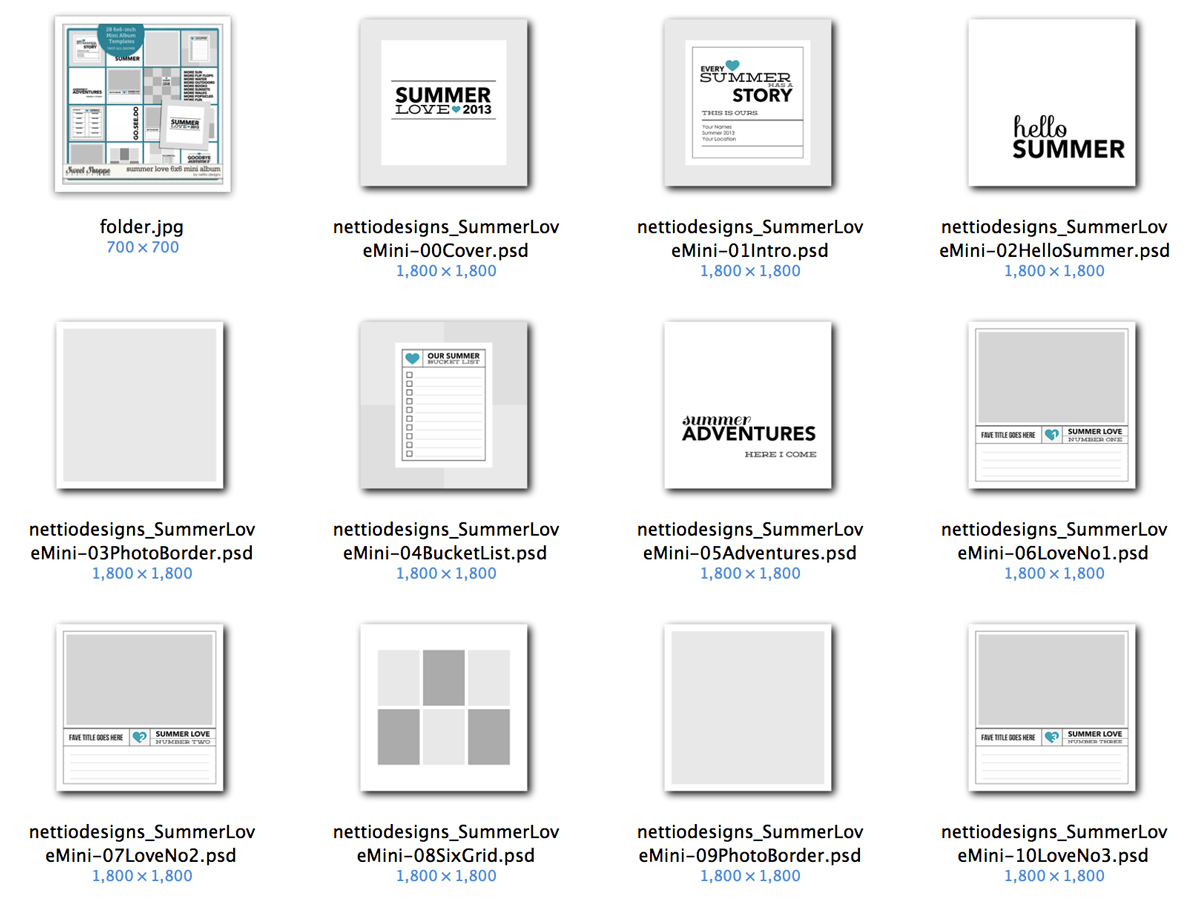
nettio_FAQ-folder-lg

What’s included with the Summer Love Mini Album templates?

Included in the Summer Love Mini Album Templates are 28 6×6-inch layered summer-themed Photoshop page templates including:
• 1 6×6 Summer Love 2013 cover page
• 1 6×6 Summer Story intro page
• 5 6×6 Text accent pages – perfect for creating overlays or cutouts
• 6 6×6 Photo grid pages with room for up to 9 photos
• 10 6×6 Summer Love photo journaling cards, numbered 1-10
• 1 6×6 Summer Bucket List themed page
• 1 6×6 Summer Currently themed page
• 1 6×6 Summer Insta-Love themed page with room for up to 15 square photos
• 1 6×6 Summer Highlights themed page with room for up to 5 photos
• 1 6×6 Goodbye Summer back cover page

There is also a font list and a sample layout PDF included to give you a visual guide of how the album will flow once it’s finished.

What is the exact size of the Summer Love Mini Album templates?

All of the Summer Love Mini Album templates are exactly 6×6-inches square. Each template represents one page in the finished mini album.

Do I have to use the templates in a certain order?

Unlike my Holiday Faves Mini Album templates which are designed to be mixed and matched, the Summer Love Mini is designed to flow through summer, starting with your summer bucket list, moving through your loves and ending with your summer highlights. Each mini template is labeled with Of course you’re always welcome to do your own thing and move the pages around to fit your stories, but Team Awesome and I will all be using the pages in order to keep things consistent for the mini course.

Do my Summer Loves have to captured in chronological order?

Nope! Other than the Summer Love journaling cards being numbered #1-10, there are no date references anywhere in the album. If you want to have Summer Love #8 be from June and Summer Love #9 be from August, no one will ever know. That’s one of the reasons I love the list format over a date format for these kinds of mini albums. It gives you the flexibility to have weeks where you have lots of loves you want to capture balancing out other weeks where you don’t.

Do you recommend digi or hybrid for my album?

It’s really up to you! I chose the 6×6-inch size for these mini templates because it’s so friendly for either a digi or hybrid album. If you want to create a hybrid mini album, you can easily print all your pages at home on an 8.5×11 sheet of card stock (I use Epson Premium Presentation Paper Matte) and then write directly on them in your own handwriting. Or if you want to create your album digi-style, you can design your pages and print them all at the end as a photo book or individual pages like you would any regular layout.

Where can I get my 6×6-inch pages printed once I’m done with my album?

Well of course, you can print your pages at homem but if you’d like to send out your pages for print, Persnickety Prints offers 6×6 prints for $0.99 each. Once you have your printed pages, you can either put them in a handmade mini album or a store-bought album like the American Crafts 6×6-inch album.

If you’d like to print them as a 6×6 photo book, both Artscow and Persnickety Prints offer 6×6-inch photo book options. Keep in mind that with a photo book, you may have to adjust the sizes of the templates to allow for the correct bleed & edge margin for that specific book printer.

Can I resize the 6×6 templates to 8×8?

Because the majority of the text in the templates is rasterized, I would recommend against increasing the Image Size to 8×8 at its current resolution of 300ppi. But you can increase the image size to 8×8 with the Resample Image unchecked in the Image Size dialog box, which will give you an image of 2400×2400 pixels with a resolution of 225ppi. I normally scrapbook 8×8 and have occasionally printed my layouts at 12×12 at 200ppi and they always turn out great so they should print just fine. Just keep in mind that if you do this, all of your scrapbooking elements which are 300 ppi will look oversized when you initially drag them onto the canvas but it’s nothing a little transforming can’t fix.

The other option would be to increase the Canvas Size instead of the Image Size and just have an additional border around the pages. That could look really nice too.

I’m not really a fan of mini albums. Do you have a regular 12×12 template option for summer scrapbooking?

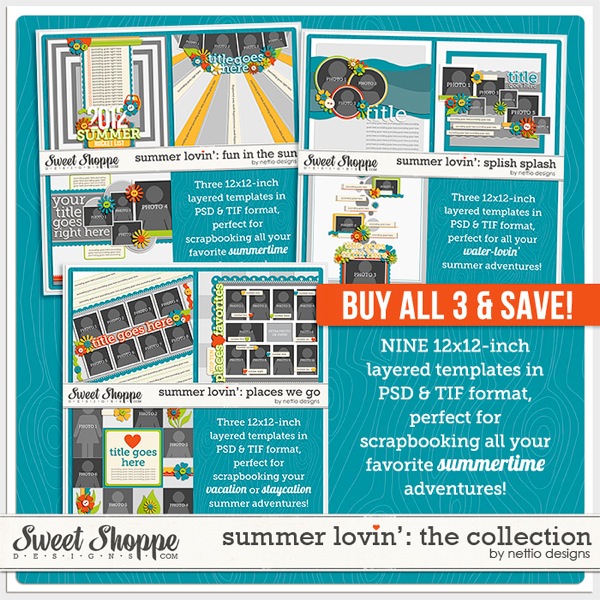
Indeed I do! Last summer I released the Summer Lovin’ collection which featured nine 12×12-inch summer-themed templates which would be perfect for this.

nettio-SummerLovin-Collection-preview.jpg

Summer Love Mini Course

How long does the Summer Love Mini Course last?

The Summer Love Mini Course will officially begin Tuesday, July 2nd and continue through Thursday, August 15th. New content will go live Tuesdays and Thursdays on the Nettio Designs blog.

How much does it cost?

It’s totally 100% FREE.

Do I have to buy the Summer Love Mini Templates to be a part of the class?

Nope! Anyone who’d love some Summer Love inspiration is welcome to follow along. Just keep in mind that all of the examples will use the Summer Love Mini Templates but the tips/ideas should be relevant for anyone.

How can I make sure I don’t miss out any of the fun?

Sign up for the Summer Love Mini Course email list! This list is completely separate from my regular Nettio Designs email list so you’ll only receive summer-tastic updates through it. Click here to sign up or use the signup form at the bottom of this post.

Is there somewhere I can share my own Summer Love Mini pages with Team Awesome?

There will be but I’ll be sharing those details in Tuesday’s post.

Using the Summer Love Mini Templates

What’s the easiest way to recolor the flattened text layers/elements in the templates?

Because I used non-standard fonts for the majority of the text in the templates, all of the text layers have been flattened. So what’s an easy way to recolor these flattened layers? Well here are my two favorite options depending on whether you’re using Photoshop or Photoshop Elements:

In Photoshop:

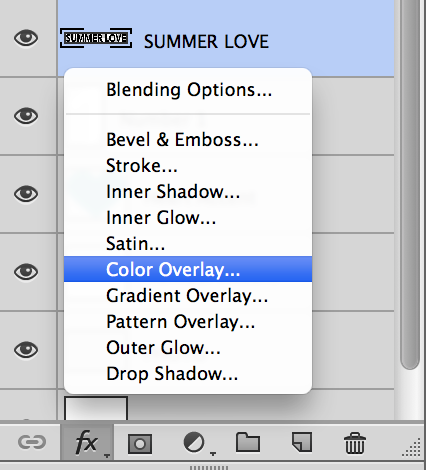
For recoloring flat, non-textured elements like text or accent lines in Photoshop, I like to use a Color Overlay layer style. Layer styles are non-only quick to use because you can easily apply them to multiple layers but they’re also non-destructive which means I can easily recolor or remove the color completely by adjusting the layer style.

To apply a Color Overlay layer style in Photoshop:

1) Select the layer in the Layers Panel

2) Click on the FX symbol at the bottom of the Layers Panel and choose Color Overlay

nettio_FAQ-coloroverlay

3) In the pop-up window, click on the color box to select the color you’d like. By default it’s a crazy shade of red. You can also select a color from your Swatches palette.

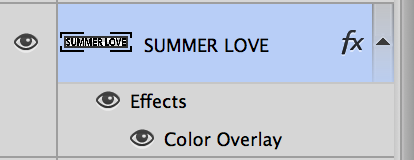
4) Click Ok and then Ok again and your layer should be recolored with a little FX next to the layer name in the Layers Panel.

nettio_FAQ-coloroverlay2

If at any time you’d like to change the color, simply double click on the FX symbol and adjust. You can also drag the FX layer style to the trash to remove it or hold down the Alt key and click and drag the layer style to another layer or right-click on the FX symbol to copy and paste the layer style to other layers.

In Photoshop Elements:

To recolor a non-textured element in Photoshop Elements, you can use the Fill option to fill the selected element with the color of your choice.

To Fill an element in Photoshop Elements:

1) Cmd/Ctrl+Click on the layer thumbnail in the Layers Panel. If you’ve done it right you’ll see a selection (marching ants) around your element.

2) Hit Shift+F5 to open the Fill dialogue box.

3) In the drop-down menu, choose whether you’d like to use your pre-selected Foreground or Background color or select Color to bring up the color picker.

4) Select your color and choose OK.

5) Hit Cmd/Ctrl+D to deselect your newly filled layer.

How can I easily get my digital journaling to match the journaling lines in the templates?

If you’d like to type out your journaling digitally, you have two options. You can either turn off the Journaling Lines layer in the template and simply add a new text box in the open space or if you’d like to use a handwriting type font and make it look like you wrote on the page, you can adjust the spacing between the lines of text, also known as the leading, until the text lines up with the journaling lines.

To do this:

1) Select your Type Tool (T) and drag out a new Type box in the area where you want to add text.

2) Add your journaling or type in some placeholder text like so:

3) Double-click on your text paragraph to select the text.

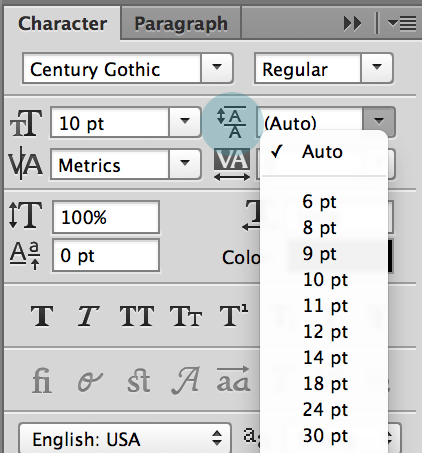
4) In your Character Panel (Window>Character), open the Leading drop down, it’s the one with the two A’s on top of each with an up and down arrow next to them.

nettio_FAQ-leading

5) Adjust the leading size until the lines of text match up nicely with the journaling lines. In my example I used a 10pt Century Gothic font with a 20pt leading.

A quick tip for Photoshop users: If you hover your cursor over the Leading symbol next to the drop down, you should see a hand with two little arrows next to it. If you drag the cursor slightly to the left or right, it’ll adjust your leading accordingly without you having to guess on numbers. Not sure if this works in Photoshop Elements or not  but if someone wants to try it and let me know, I’ll be happy to edit the post.

Any tips for planning/finishing my album?

Yes, don’t stress! The point of the Summer Love mini is not to stress you out or make you feel guilty if you don’t keep up or finish your album. In fact, that’s the awesome thing about this format: if you get to the end of the summer and you’ve only filled in say, five Loves instead of all ten, no worries! Simply remove those pages and call it done. You’ve still captured your summer adventures and no one but you will ever be the wiser.

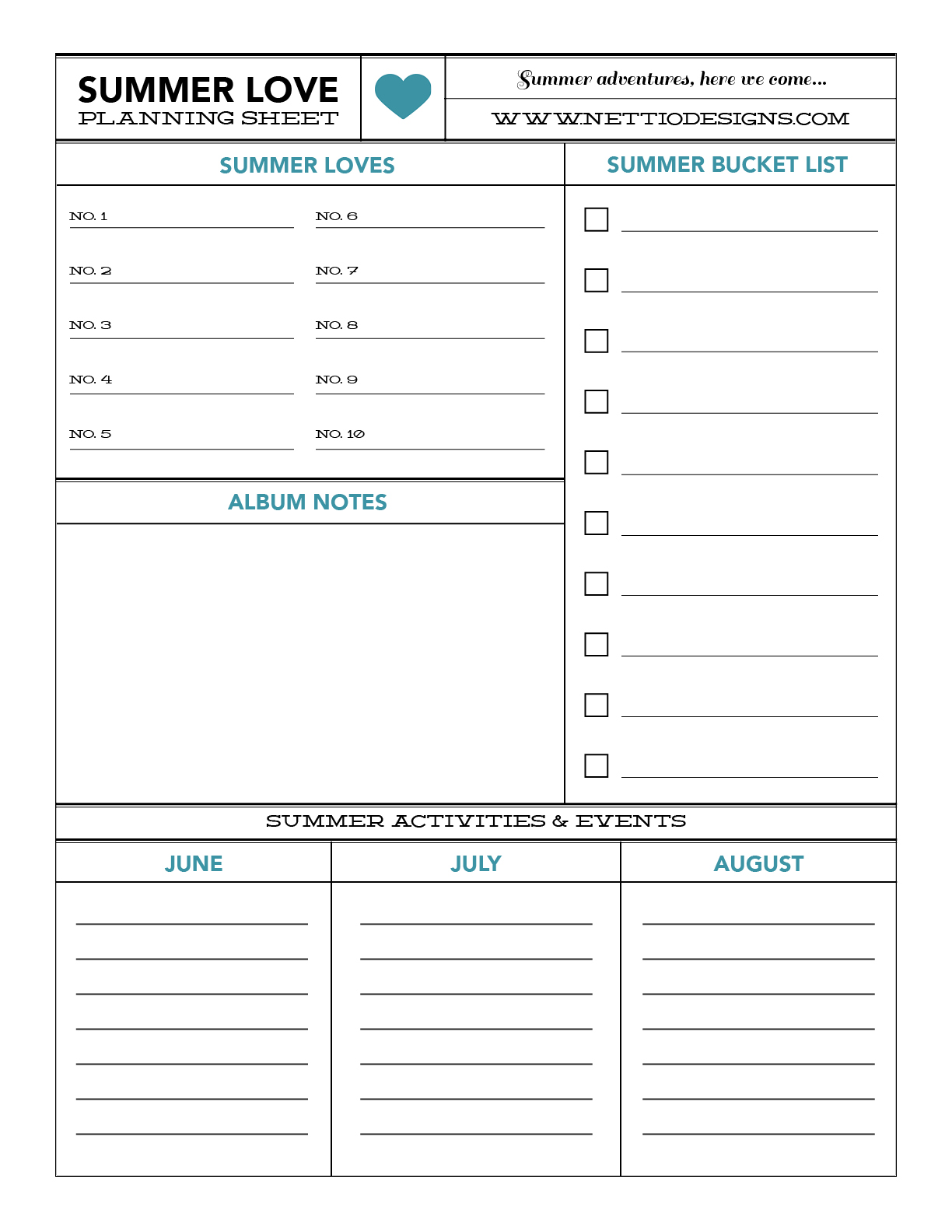
nettiodesigns_summerlove-planningsheet

Of course, if you’d like a little help with your album planning, I’ve also put together this free downloadable planning sheet to get you started. It includes room for your summer bucket list, a list of Loves, space for any album notes and room for listing activities, etc, you’ve got coming up that you might want to include in your album. Just click the button below to download!

[wp_eStore_download_now_button id=54]


Well I think that’s it for this FAQ! If you have any other questions I didn’t answer above, feel free to ask them in the comments below. And don’t forget to sign up below for Summer Love Mini Course email updates. Wouldn’t want you to miss out on the fun!

[catalyst_hook_box name=”summerlovesignup”]

Can diabetes cause erectile dysfunction

POSTED IN Summer Love 2013 Mini Course

Introducing the FREE Summer Love Mini Course

POSTED ON June 26, 2013 IN Summer Love 2013 Mini Course

Summer, summer, summertime…Nothing like kicking off summer with a little old skool Will Smith, right?

We passed the Summer Solstice  here in the Northern Hemisphere this past weekend which means summer is officially here. Woohoo! Have I mentioned I LOVE summer? Even though it means we’ll be battling the pits of hell dealing with crazy hot weather here in Texas, there’s just something about flip-flops, popsicles and summer adventures that make me feel like a little kid again. Well minus the perks of sleeping in everyday with no responsibilities other than swimming and relaxing. Can I put in a vote for adults getting a summer vacation too?

Of course, what would summer be without a little summertime scrapbooking, right? So this past weekend at Sweet Shoppe Designs, I released a new set of mini album templates, the Summer Love 6×6 Mini Album Templates:

nettiodesigns_SummerLoveMini-prev-1400

Much like my Holiday Faves Mini Album templates, my goal with these Summer Love templates is to give you a fun and easy way to creatively capture your summer adventures. I will be using these templates to create my own album as will quite a few members of Team Awesome.

FREE Summer Love Mini Course

I know with the busy-ness of summer, it’s easy to let a project like this fall to the wayside into the land of forgotten projects. So to keep you on track, Team Awesome and I have put together a FREE mini course where will be sharing tips and inspiration for completing your album.

nettiodesigns-summerlove-ecourse-1200

The Summer Love Mini Course will run thru August 15th with new content being posted here on the Nettio Designs blog on Tuesdays and Thursdays.

Tomorrow I’ll be sharing a FAQ post with more about how the mini templates and the class work and then Tuesday my team and I will start sharing our pages. We’ll be aiming to complete about four mini pages a week so if you keep up with us, by the end of the summer you should have an awesome album capturing all your summer adventures.

Sign Up For Email Updates

If you want to make sure you don’t miss out on any of the Summer Love Mini Course content, be sure to sign up for email updates by clicking here or using the form below.

This Summer Love email list is completely separate from my regular Nettio Designs email list so even if you’re already signed up for emails from me, you’ll have to sign up again. But this way anyone who’s interested in only the mini course won’t have to be distracted by new release or From the Desk emails from little ol’ me.

I can’t even tell you how excited I am about this Summer Love mini album. Seriously, just picture me doing a totally dork happy dance over here. My Holiday Faves mini albums are some of my absolute favorite scrapbooking projects to look back on so I’m excited to mix it up with a summer-tastic version. I hope you’ll join us in the summer fun!

Have a question about the Summer Love Mini Album templates or the Mini Course? Ask your question below and I’ll make sure it gets answered in tomorrow’s FAQ post.

Who’s up for some summer scrapbooking? I know I am!

[catalyst_hook_box name=”summerlovesignup”]

How do I purchase Levitra without going to the doctor

POSTED IN Summer Love 2013 Mini Course

Summer Love | New Release From Nettio Designs

POSTED ON June 22, 2013 IN Shop News & Releases

Happy Sweet Shoppe Saturday everyone!

I’m really excited about this week’s new release at Sweet Shoppe Designs because it combines two of my favorite things, mini albums and summer!

Summer Love 6×6 Mini Album Templates

I don’t know about you, but I LOVE summer! There’s just so much fun stuff going on, from vacations, to beach days and everything in between. But let’s face it, in the midst of all the summer fun, it can be tricky to squeeze in time for your scrapbooking.

Which is exactly why I designed the Summer Love 6×6 Mini Album Templates.

nettiodesigns_SummerLoveMini-prev-1400

Much like my popular Holiday Faves Mini Album templates, the Summer Love 6×6 Mini Album Templates include everything you need for creatively capturing your summer adventures in a fun and easy way. These mini album templates include 28 individual page designs including 10 Summer Love journaling cards, 6 photo/paper accent pages and 12 themed summer pages for capturing details like your summer bucket list or fave summer highlights. And at 6×6 inches they’re the perfect size for printing at home and creating your own hybrid mini album or digital photo book.

I will be using these templates to create my own Summer Love mini album throughout the summer but here’s a little peek at my album pages using Zoe’s adorable Hello Summer kit…

nettio_SummerLove-Sample1-1400

Of course, my team had a ton of fun getting a jumpstart on their summer minis as well…

Team Awesome Inspiration

nettiodesigns_news-CTLayouts-1200 Free Summer Love Mini E-Course

As an added bonus, all summer long Team Awesome and I will be sharing our own summer mini progress, as well as ideas and inspiration to keep you motivated to create your own album. The fun begins Wednesday, June 26th here on the Nettio Designs blog.

nettiodesigns-summerlove-ecourse-1200

SAVE 20% thru Saturday

And finally as with every Sweet Shoppe Saturday you can save 20% off all new releases thru Saturday….

nettiodesigns_news-20off-600

Want to save 20% off this weekend?

Pick up the Summer Love 6×6 Mini Album Templates today!

Well that’s it from me today! Have a great weekend everyone!

How Can Customers Lower Their Remedy Costs

POSTED IN Shop News & Releases

  • « Previous Page
  • 1
  • …
  • 15
  • 16
  • 17
  • 18
  • 19
  • …
  • 51
  • Next Page »
HI I'M LYNNETTE. Graphic designer, tech-lovin’ memory keeper and lover of bold colors & patterns, good food and the great outdoors. Here at Nettio Designs, I share a behind the scenes peek at my own creative & life adventures. Read more...

KICKSTART YOUR CREATIVITY


By popular demand, photo book templates are back! Grab all three sets in the shop.
ADVENTURES IN ORGANIZING
GOAL-SETTING
MEMORY KEEPING
PROJECT LOVE
LIFE ADVENTURES
TIPS & TRICKS
BEHIND THE SCENES

POPULAR PROJECTS

TO SEE ALL MY PROJECTS, CLICK HERE

MUST READ POSTS

  • WHY EVERY SCRAPPER SHOULD SCRAP A FAVES PAGE
  • HOW TO CREATE A SCRAP-WORTHY MAP WITH PHOTOSHOP
  • REMEMBERING THE IMPORTANCE OF TELLING YOUR STORY
  • WHAT DOES IT MEAN TO CREATIVELY CAPTURE YOUR LIFE ADVENTURES?
  • BROWSE BY CATEGORY

    BROWSE THE ARCHIVES

    GET IT FOR FREE

    Testing testing

    links goes here

    Copyright © 2026 ·Dynamik Website Builder · Genesis Framework by StudioPress · WordPress · Log in