Nettio Designs

Design + Creativity + Adventure = LOVE

  • HOME
  • JOIN THE 2023 MONTHLY FAVES
  • THE SHOP
  • ABOUT
  • CONTACT

Well the Cat’s Out of the Bag…

POSTED ON April 3, 2012 IN Announcements

Did you happen to see a certain announcement over the weekend? Perhaps one from a rather sweet digital scrapbooking store?

It may have included a little something that looked like this…

That’s right, after 4 years as a Sweet Shoppe Sugarbabe, I am officially taking on a new role as official template designer of awesomeness* for Sweet Shoppe Designs!

*clearly not an official title


No, but seriously, the Sweet Shoppe revealed this weekend the SIX(!) new designers who will be joining the team and I couldn’t be more excited and honored to be one of them. The Sweet Shoppe has been my digi home for practically as long as I’ve been scrapbooking and I am so thrilled to be starting this next chapter of my digi designer career alongside all the people I already know and love. It’s definitely a dream come true!

And let me tell you – you guys are in for a treat because ALL of the new designers are seriously amazing. No joke. Start saving your pennies now because if you like to shop for digital scrapbooking supplies at all, you’re going to be in trouble.

What This Means for NettioDesigns

Now if you’re wondering what this means for NettioDesigns and this little website of mine, the answer is: all good things, I hope!

As much as I’ve loved the adventure of having my own little shoppe this past year, I know that moving to a much bigger and more established store will allow me to focus more on what I do best: creating amazing products, sharing inspiring projects and tips & tricks, and chatting about scrapbooking, design & so much more.

Don’t worry, NettioDesigns and the blog aren’t going anywhere but I will be simplifying some things, so  here are a few changes you can expect:

1) New Releases will now be on Saturdays as part of Sweet Shoppe Saturdays. (Yay for consistent release days!) The 20% off New Release discount will be on Saturdays and ONLY at Sweet Shoppe Designs.

2) The NettioDesigns Shoppe will remain open but I will be making the majority of my digital scrapbooking products available exclusively at Sweet Shoppe Designs. Which means the product description pages will remain so you can check out all the CT layouts and such, but in order to make a purchase, you’ll be redirected to the product at the Sweet Shoppe.

While this might seem like an extra step, this will give you a much, much better shopping experience overall since the Sweet Shoppe cart system is WAY more robust (and less quirky, haha) than mine. You can check past purchases, save items to your wish list and of course, take advantage of storewide sales without a coupon code. Plus you’ll have the amazing Robin taking care of any issues you may run into so I know you’ll be in good hands.

My store at Sweet Shoppe Designs will be officially opening this Friday, April 6th, as part of an Easter weekend-long extravaganza, but in the meantime I’ve got a brand-new sweet freebie available for you over at Sweet Shoppe Designs…

Check out my sweet freebie here!

I’m beyond excited to be starting on this new adventure at Sweet Shoppe Designs and I hope you’ll all come along with me! It truly is the sweetest spot in digi.


How Can Customers Lower Their Remedy Costs

POSTED IN Announcements

Web Faves: March

POSTED ON March 29, 2012 IN Stuff I Love

A little list of stuff I’m currently lovin’…

The new Instagram 2.0 app. Love the new filters and the option to turn borders off and on.

Instagram blogheader

This adorable vintage-style art from handz:

Handz prints

The bold colors at this hotel (via Apartment Therapy):

Saguaro 375 rect540

This awesome Project Life album & tips from Elise:

Elise projectlife

This post on why being a quitter can be a good thing. Especially love this quote, “Letting go of an interest allows you to free up room for new projects.” So true.

This DIY painted cork board from the happy home:

Happyhome paintedcork14

This cute & simple highlights album by Elsie:

Elsie scrapbook

These tips from Marta on overcoming blog stage fright: five tips / getting personal with blogging

This reminder (pinned here):

231231762087746271 QsgO5GQb c

Anything caught your eye online lately? Link me up!

How Can Customers Lower Their Remedy Costs

POSTED IN Stuff I Love

Burning Question: Do You Suffer From Scrapbooker’s Guilt?

POSTED ON March 28, 2012 IN Burning Questions, Memory Keeping

Welcome to another installment of Burning Question, where it’s your turn to share your thoughts!

A couple of days ago on Facebook, I saw an interesting conversation about Project Life on Christine Newman aka Listgirl‘s FB page that went something like this:

Random Male FB Friend: Hobbies shouldn’t be causing you anxiety. The moment it stops being fun… stop. My $0.02.

Christine: Tell that to every scrapbooker. I don’t know any scrapbooker that doesn’t feel some kind of anxiety or guilt about NOT scrapbooking, or even scrapbooking.

Which got me thinking…

Why is it that scrapbooking and guilt seem to go hand in hand?

Nettio guilttrip

Guilt trip notepad from ModCloth

I’d say just about every scrapbooker could tell you that it does, but why is that?

Is it due to the time-focused nature of scrapbooking? Is it somehow a female-based trait (since men don’t seem to have these same reservations)? Or is it simply something that has become accepted as a part of scrapbooking culture?

I admit despite my best intentions to keep my scrapbooking relatively guilt-free, there are definitely times when I feel like I’m not doing enough. Which is kind of crazy because shouldn’t I be playing by my own rules?

So I’m curious to hear from you!

Do you suffer from scrapbooker’s guilt? Where do you think this whole crazy idea of scrapper’s guilt comes from? And what can we do to banish guilt from our scrapbooking once and for all?

How do I purchase Levitra without going to the doctor

POSTED IN Burning Questions, Memory Keeping

The Foolproof Guide to Backing Up Your Files

POSTED ON March 27, 2012 IN Adventures in Organizing

So with the 2nd Annual Great Computer Spring Clean-a-thon coming to a close yesterday, I thought today would be a good day to talk about one of my biggest digital pet peeves: backing up.

Why pet peeve, you say? Because of stories like this:

“I just lost 200GB of photos from my baby’s first years because I never backed anything up.”

Tragic stories like this make me sad and wee bit frustrated because while you can’t always prepare for every eventuality (like your computer and backup external hard drive all dying on the same day), there is absolutely no excuse for having no backup at all. You’re doing yourself a disservice by not make sure you have a backup plan in place in case your computer or external hard drive decides to move on to that great electronics store in the sky.

After all, you loved those photos enough to taken them save them, why not make sure they’re as safe as possible?

I know backing up your files can seem tedious, daunting or overwhelming, especially if you don’t feel terribly tech-saavy and aren’t sure where to start. It can be a lot of pressure to know whether you’re doing the right things when such important files are at risk.

But I promise you it’s much easier than you think which is why I’ve put together this foolproof backup guide for you to get you started.

These are the rules I follow for my backups and while I can’t promise you nothing bad might ever happen, I can guarantee you’ll be in a MUCH better position than if you had no backup at all.

My Rules for Backing Up Important Files

Nettio timemachine

Rule #1: Save all files in a minimum of 2 different locations.

This is by definition the meaning of a backup – any file you care about should have a duplicate copy of that file stored somewhere else, either on another external hard drive, another computer, online, a DVD, etc.

As long as you can count two copies of that file in two different locations, you have a backup.

For example, if you store a photo on your computer hard drive and have a duplicate copy of that photo stored on your external hard drive, you have a backup. But if you then delete that photo from your computer hard drive and only leave it on your external hard drive, you no longer have a backup.

The same is true if you’re storing photos or scrapbooking supplies on your external hard drive. you need to have a copy of those files stored somewhere else. Please don’t store your files on your external hard drive without a duplicate copy saved elsewhere as they are notorious for dying without warning and I would hate for that to happen to you.

Rule #2: The more important a file, the more diligent you should be about backing it up.

Now I’m not saying you should have 8 or 9 copies of a file, but the more important a file is to you, like say photos, the more diligent you should be about backing those files up.

For example, when I upload new photos from my camera, I never delete them off my Compact Flash card until I have run a backup of my computer onto my backup external hard drive. This way my photos are always in two places at once. If I’m traveling and can’t run my normal backup but need to empty and format my CF card, I will upload the photos to my computer and copy a temporary backup of the photos onto my portable external hard drive.

Extreme? Maybe. But my considering photos are irreplaceable, I’m willing to go the extra mile.

Rule #3: Simplify your backup process as much as possible.

I’m a firm believer that the more complicated you make your backup process, the less likely you are to actually do it. And a backup that isn’t kept up to date is only slightly better than no backup at all.

Which means investing in proper hardware, like an external hard drive over DVDs, and software that will track your backups for you is key to staying current with your backups.

If you’re a Mac user, Time Machine comes standard with the OS and is super easy to use with an external hard drive. When I was PC user, I used Acronis True Image to sync all my files and it worked great.

While yes you can copy files over by hand, I promise you that letting backup/syncing software do the work for you makes it SO much quicker and easier. Think of all the backup time you can spend scrapping instead!

Rule #4: Never go longer between backups than you care to lose.

This seems like an obvious one but it bears mentioning – the longer you go between backups, the more files you stand to lose. This is why simplicity is key. The easier your backup is to do, the more likely you are to do it and the less likely you are to lose a bunch of files at once.

Rule #5: You should have both an on-site AND off-site backup.

An on-site backup is a backup you keep in your home (like on an external hard drive) where as an off-site backup is a backup you store outside your home, whether on an external hard drive you store at work or in a P.O. Box or an online backup using a program like BackBlaze or Carbonite.

I highly recommend you have both forms of backup for this reason: while an off-site/online backup is better than no backup and can be great in the event of a disaster like a fire or flood, it can take a LONG time to download all your files off of an online server in the event of a hard drive crash. This is when an on-site backup, like an external hard drive, can come in handy since you can just plug it in and you’re ready to go.

I’m currently using an external hard drive and Time Machine for my on-site backup and BackBlaze for my off-site backup.

Rule #6: Double-check your backups periodically to make sure they work.

All media degrades over time, which means no matter what method or tools you use for backing up your files, you should always check periodically to make sure your backups are still good quality and actually backing up the files you want. Nothing worse than needing your backup and realizing then your backup external hard drive has died or your online backup didn’t actually back up the files you wanted.

Well I hope there you have it, my rules for awesomely backing up your files. Hope it helps gets you started on your way to computer backup bliss! As always if you have any thoughts or questions, feel free to leave them in the comments section.

Benefits Of Using Canadian Pharmacy

POSTED IN Adventures in Organizing, Tips & Tricks

So How Did You Do? The 2012 Great Computer Spring Clean-a-thon

POSTED ON March 26, 2012 IN The Great Computer Spring Clean-a-thon 2012

Happy Monday everyone! Today marks the final day of the 2nd Annual Great Computer Spring Clean-a-thon which means it’s time to share the progress you’ve made this week!

As a refresher, here were the goals I set for the 2012 Computer Spring Clean-a-thon:

1) Clean out my Downloads, Documents and Current Projects folders. I set these up last year and have mostly kept them updated so they should only need a little work.

2) Reorganize my NettioDesigns folder. This folder is a hot mess right now. And not in a template-y goodness kind of way.

3) Get started organizing my photos in Aperture. This is a major major task and definitely not one I will complete this week but I am going to get started on it and see what I can get done. Started is better than nothing, right?

When I last updated you on my progress, I had completed the first 2 of my 3 Clean-a-thon goals, as well as a little extra credit digiscrap supplies purging.

So how did the rest of my week go?

Well…as much as it pains me to say it, I’m afraid I never did get to tackle goal number 3.

Because despite my best intentions, the universe had different plans for me and decided instead of spending my evenings happily purging photos while I watched my favorite reality TV shows, I should spend the week wallowing in my misery sick with the flu. Oh and just to add to the fun, I should wake up at 4am Wednesday morning with intense ear pain requiring a trip to urgent care and a round of antibiotics.

Believe me, I would have much rather been organizing photos.

But despite my initial disappointment, I’ve realized it’s ok.

Because while I would have loved to come in here today with a big splashy photo-tastic update, the reality is that’s not what the Great Computer Spring Clean-a-thon is about.

The goal of the Computer Spring Clean-a-thon is to kickstart your organizing progress, get you excited about organizing again and maybe even help you think about organizing in a different way.

And I definitely feel like I’ve done that. 

So while I may not have tackled everything I hoped this week, I’m still feeling good about my progress. For the first time in a long time I’m feeling excited about the prospect of organizing photos and I’m ready to move forward and keep working on my goals. And that IS what this week is all about.

So how about you? How did your Computer Spring Clean-a-thon week go? Did you make the progress you hoped? Did you run into any unexpected roadblocks?

I’d love to hear about the progress (or lack of progress) you’ve made this week!

Oh and if you’d like to check out all the Clean-a-thon posts from this past week, here’s a handy list for ya:

The 2nd Annual Great Computer Spring Clean-a-thon Intro

The Key to Matching Your Organizing Style to Your Scrapbooking Style

Downloads, Documents & NettioDesigns: Day 1 Update

How To Organize Your DigiScrap Supplies Using Adobe Bridge

From A to Z: How To Organize Your Alphas Without Tearing Out Your Hair

Why I Switched From Adobe Lightroom to Apple Aperture

How do I purchase Levitra without going to the doctor

POSTED IN The Great Computer Spring Clean-a-thon 2012

Why I Switched From Adobe Lightroom to Apple Aperture

POSTED ON March 23, 2012 IN Stuff I Love, The Great Computer Spring Clean-a-thon 2012

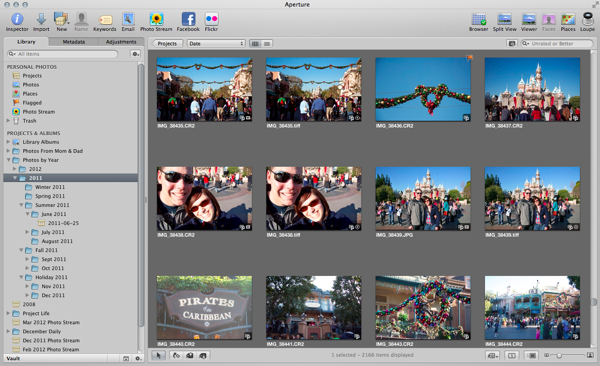
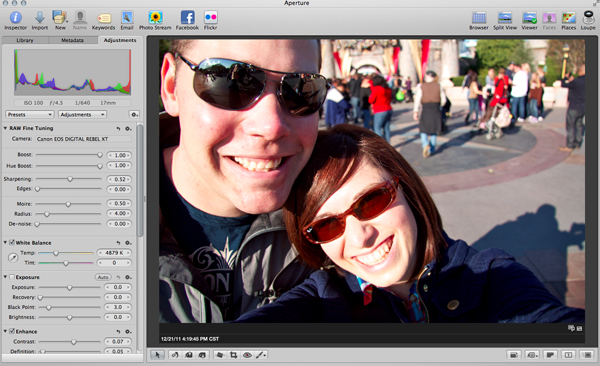
Happy Great Spring Clean-a-thon Day 5 everyone! Today’s post is perhaps a bit too specific for the Clean-a-thon being that it’s both Mac-specific and highly based on my own personal experience, but because one of my goals for this week was to organize my photos in Aperture, this seemed like a good time to write this much overdue post about why I decided to make the switch from Adobe Lightroom to Apple Aperture.

A few things to note before we get started:

1) Aperture is designed by Apple which means it’s Mac only. My apologies in advance to any of you PC users since this post will probably not be quite as useful for you as I would like.

2) My experience is based off Lightroom 2 and Aperture 3. But other than lens correction, I haven’t seen any features in Lightroom 3 or 4 that have made me regret my decision.

3) I am not a professional photographer. I have no desire to be a professional photographer. So if you are one or hope to be one, your needs are likely different than mine. This is just my opinion based off my needs as a tech-lovin’ digital scrapbooker.

Ok, so with that in mind, here we go…

Why I Decided To Switch To Aperture

Nettio aperture

Last summer, I decided it was high time I get my photos in order. At the time I was planning to start Project Life as one of my 29th birthday goals and I knew in order to keep up with it, I would need an easy way to manage my photos. Up to that point I had been using Lightroom for organizing and editing all of my photos in tandem with Photoshop and while I liked it, there was something about it that never felt quite right to me.

Yes, I understood how it worked. Yes, I could organize and edit my photos and get good results. But I didn’t enjoy using it.

For one, I found the module design to be overly clunky. While I’m sure it’s fantastic when you’re editing 100s of photos from a shoot in a linear fashion, I never do and so even with shortcut keys, I found it annoying to switch between modules all the time. I especially found the separation between folders, collections, smart collections and tags made it difficult to organize everything easily in a way that made sense to me.

So when Apple announced they were lowering the price of Aperture to less than what it would cost me to upgrade to Lightroom 3, I decided to download the 30-day trial and give it a shot.

And I have to tell you, I was sold from day 1.

  • I LOVED the simplicity of the interface. In fact, it was almost one of those, that’s really all I need to do? kind of moments. It seemed overly easy compared to Lightroom.
  • I could organize, tag and edit my photos all in the same window. It was quick and easy to switch from a slideshow to a folder to a smart collection and I could group them all together in one spot.
  • I was getting better edits out of my photos with less work and the colors in the photos popped in a way I could never get them to do in Lightroom.
  • Even though it’s not an Adobe product, I was still able to easily open my photos in Adobe Photoshop for more editing.
  • I love the integration it has with my Mac. Auto-downloading of iPhone photos? Yes please.


It all just felt so much less complicated and better suited to my needs as a scrapbooker.

No, Aperture is not perfect. I find it runs slower than Lightroom 2 on my almost 4 year-old MacBookPro (although I suspect the same would be true for LR 3 & 4. Poor compy is just getting to that age.). I find the import options, especially when it comes to renaming files and not importing duplicates, to be more robust in Lightroom. And I think having built-in lens correction for lens distortion, etc., would be really handy to have.

But ultimately, I’m willing to deal those issues in exchange for the overall experience of using Aperture. Because I enjoy using it in a way I never enjoyed using Lightroom. Much like how I felt when I originally switched from a PC to a Mac.

Which ultimately is what I think this debate boils down to. In much the same way as the never-ending Mac vs PC debate, it ultimately comes down to personal preference. Both Lightroom and Aperture are amazing programs. They’ll get you where you need to go.

But which one works best with the way your brain works? For me, that’s Aperture.

Anyway, I realize this is a highly untechnical review of a largely technical program, but I realized when I sat down to write about why I switched, it wasn’t because of any tech specs or specific features. It was the overall experience and flow of the program that sold me.

So if you’re a Mac user, check it out or download the trial and give it a try! If you like it great, if not, Lightroom is a pretty awesome program too. And if you’re an iPhoto user, Aperture is kind of like iPhoto advanced but you can read more about the differences here.

Well I hoped you enjoyed this little insight into why I made the switch from Lightroom to Aperture! As always, if you have any questions, feel free to ask them in the comments.

Can diabetes cause erectile dysfunction

POSTED IN Stuff I Love, The Great Computer Spring Clean-a-thon 2012, Digital Scrapbooking

  • « Previous Page
  • 1
  • …
  • 34
  • 35
  • 36
  • 37
  • 38
  • …
  • 51
  • Next Page »
HI I'M LYNNETTE. Graphic designer, tech-lovin’ memory keeper and lover of bold colors & patterns, good food and the great outdoors. Here at Nettio Designs, I share a behind the scenes peek at my own creative & life adventures. Read more...

KICKSTART YOUR CREATIVITY


By popular demand, photo book templates are back! Grab all three sets in the shop.
ADVENTURES IN ORGANIZING
GOAL-SETTING
MEMORY KEEPING
PROJECT LOVE
LIFE ADVENTURES
TIPS & TRICKS
BEHIND THE SCENES

POPULAR PROJECTS

TO SEE ALL MY PROJECTS, CLICK HERE

MUST READ POSTS

  • WHY EVERY SCRAPPER SHOULD SCRAP A FAVES PAGE
  • HOW TO CREATE A SCRAP-WORTHY MAP WITH PHOTOSHOP
  • REMEMBERING THE IMPORTANCE OF TELLING YOUR STORY
  • WHAT DOES IT MEAN TO CREATIVELY CAPTURE YOUR LIFE ADVENTURES?
  • BROWSE BY CATEGORY

    BROWSE THE ARCHIVES

    GET IT FOR FREE

    Testing testing

    links goes here

    Copyright © 2026 ·Dynamik Website Builder · Genesis Framework by StudioPress · WordPress · Log in