Nettio Designs

Design + Creativity + Adventure = LOVE

  • HOME
  • JOIN THE 2023 MONTHLY FAVES
  • THE SHOP
  • ABOUT
  • CONTACT
You are here: Home / Archives for Memory Keeping

The Key to Matching Your Organizing Style to Your Scrapbooking Style

POSTED ON March 20, 2012 IN Memory Keeping, The Great Computer Spring Clean-a-thon 2012

Welcome to the 2nd Annual Great Computer Spring Clean-a-thon Day 2! If you’re just popping in for the first time, be sure to check out Monday’s post explaining the details of this week-long organizing event! I’ll be back this afternoon to share my Day 1 progress but in the meantime I wanted to share some tips about the importance of matching your organizing style to your scrapbooking style.

As scrapbookers, we all understand this idea of finding your scrapbooking style – that common thread that runs through each of your layouts and makes them “yours”. But have you ever stopped to think about how your scrapbooking style relates to your organizing style?

I can tell you as a newbie scrapbooker, I never did. And as a result, I wasted a LOT of time following the organizing advice of much more established scrapbookers than I, building systems that didn’t mesh with the way I scrapped. Even though I felt like my supplies were technically “organized,” there were times when I felt like I couldn’t find anything! But what I learned overtime was it wasn’t that their advice or system was bad or that I had done anything wrong, it’s just what they were doing wasn’t right for me.

The Key to Organizing Anything

And ultimately that’s the key to organizing anything. It’s not about finding the perfect solution or system, it’s about finding the perfect solution or system for you.

Easy peasy, right?

I know, you’re probably thinking, yeah right Lynnette, if it was so easy we’d all be organizing gurus by now.

So perhaps easy isn’t the right word, but there is a simple key to organizing anything and that is this:

Before you begin organizing anything, whether it be scrapbooking supplies, photos or anything else, you need to first understand HOW you actually LOOK for those items. What goes through your head in that moment?

Because once you understand how you look for things, you can then tailor your organizing system to help you find things in a way that matches how your brain works.

How to Match Your Organizing Style to Your Scrapbooking Style

Let’s take for example scrapbooking. When you’re working on a layout and find yourself in need of something, say an element, what runs through your head?

For me it’s two things:

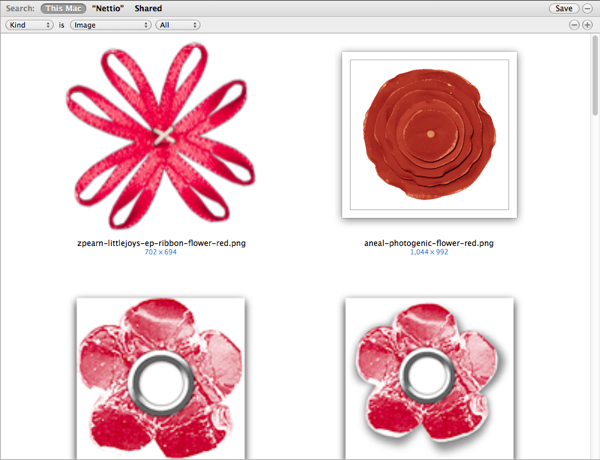
1) The basic type of element – ex: a flower

2) A color – ex: red

Essentially, I’ll think, I would really love to add a red flower right here.

Which means for me, organizing my elements into fairly broad categories like flowers, ribbons, etc and then tagging those elements by color so I can narrow them down is probably the way to go. Since I don’t ever think, say, I need a red gingham ribbon or I need a piece of twine not string, it’s probably not the best use of my time organize my elements to that level of detail.
Nettio organizingelements

The Key Questions to Ask Yourself Before Organizing

But of course we all think about things differently when it comes to our creative process, so how can you determine how the key to matching your organizing style to your scrapbooking style?

Well here’s a couple of questions to ask yourself:

  • Are you a kit scrapbooker or do you like to mix and match?
  • Do you look for supplies by designer or store?
  • Do you think about color? Style? Pattern?

The more detailed you can get about HOW you look for things, the easier it’ll be to know how to organize your files and more importantly how detailed to get in your organizing. No point tagging all your files when you only scrap from kits, right?

And, the same key to organizing holds true for your photos. Ask yourself, what are the most common types of photos you look for?

For me it tends to be people, seasons and themes because of my CT requirements, but for you it might be something else. Maybe you’re big on chronology or maybe you’re not. Do you think in terms of seasons or months/years?

Choose a Style That Works For You

Ultimately, what it comes down to is this: there is no right or wrong way to organize your supplies.

Yes, you heard that right.

There is no right or wrong way to organize your supplies. There is only a right or wrong way to organize your supplies for YOU. And the more attention you pay to your scrapbooking style and how your brain works when looking for things, the better and more efficient your organizing system will be.

Well, I hope you found today’s organizing tip helpful! I’d love to hear your thoughts about matching your organizing style to your scrapbooking style so feel free to share in the comments.
How Can Customers Lower Their Remedy Costs

POSTED IN Memory Keeping, The Great Computer Spring Clean-a-thon 2012, Digital Scrapbooking, Tips & Tricks

Tips & Tricks from Team Awesome: Jennifer

POSTED ON March 15, 2012 IN Tips from Team Awesome

Editor’s Note: Happy Thursday everyone! Welcome to the first ever installment of Tips & Tricks from Team Awesome, where the amazingly talented ladies from my Creative Team will be sharing how they use NettioDesigns templates to embrace their scrapbooking awesomeness. Our first brave soul is Jennifer so if you like her post and want to see more posts like this in the future, be sure to leave her some love in the comments!

Hi Everyone!

Lynnette asked me to post today on how I take her awesome templates, and put my own spin on them.

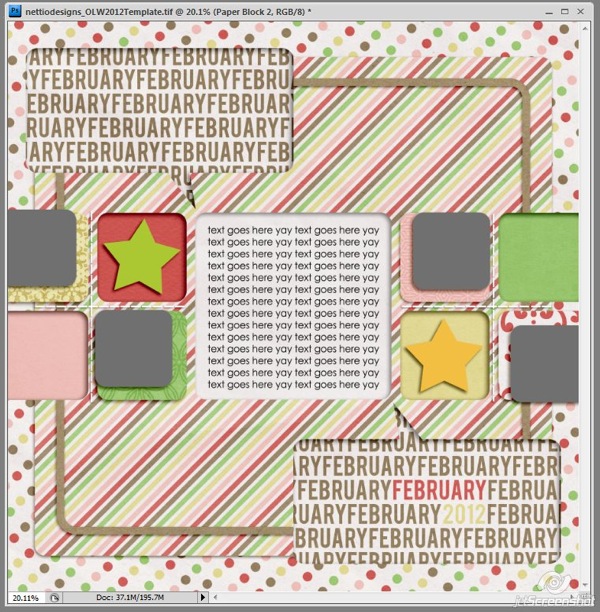
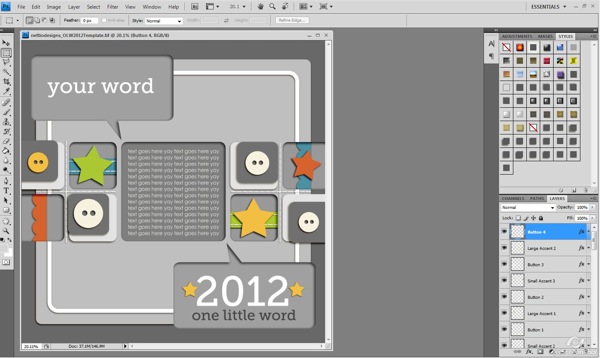
One of the reasons Lynnette’s templates work so great for me is that I love yearlong projects. One of my projects this year is to do a monthly He & She layout, based on the idea by Elise Blaha. I try to use a different template every month to make this project a lot of fun, and for my February layout I have chosen to use a template from the It’s Goal-tastic Template set.

Jenn guest screenshot 01

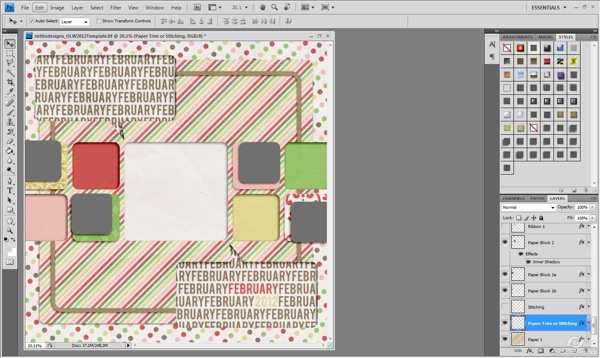
I’ve chosen to use Penny Springmann’s This Life series for my layouts, and will be using the February Edition for this particular layout. The first thing I do when I start a layout is turn off all text and element layers and start playing with the papers I want to use. I start by placing my patterns, then filling in with solids to add contrast.

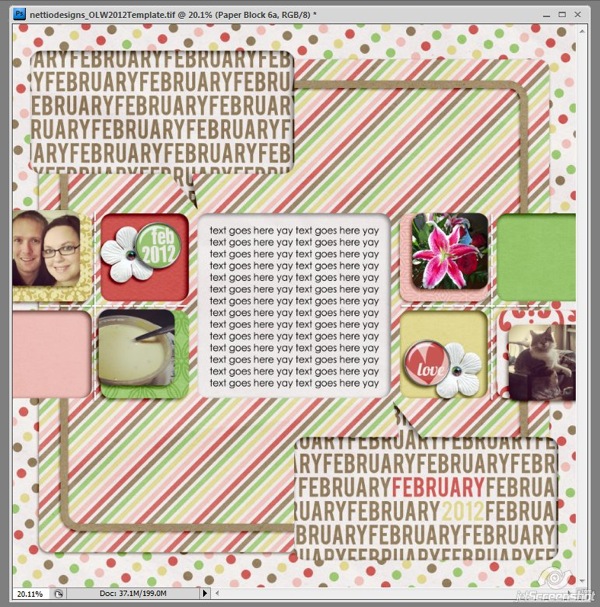
Jenn guest screenshot 02

Once I have all my papers in place, I start turning back on the element layers. I look at which elements I want to use, and how I want to change things. I knew I wanted to include some photos, so I chose to remove the buttons and swap them out for photos. I wanted to focus on the story, and decided to remove the paper strips from the inset blocks as well to help clean things up.

Jenn guest screenshot 03

This left me with a few basic elements placed, and space for four photos. Now it was time to fill those spaces and add any additional elements I felt were needed.

Jenn guest screenshot 04

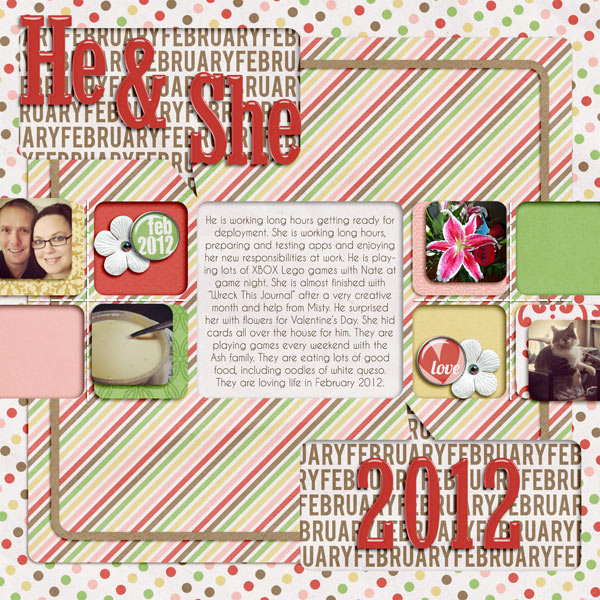
Once the elements and photos are in place, it’s time to add journaling and a title. I wanted to keep things really simple, and just played with alphas to ensure that. Then I take a look at the page and start tweaking. After I’ve completed this much, I know I need to change my papers a bit to make things work. I tweak little things until it sits right. Then, it’s time to save and walk away.

Jenn guest web

I’m really happy with how this page turned out. I don’t take notes throughout the month on what happened, but I pull photos from our phones to see just what we did in the last month, and it’s been a fun way to capture snippets of our lives.

If I have any tips to share with you guys for embracing your own awesomeness, it would be these three things:

  • Perfection is highly overrated. Just enjoy the page, use what photos you have, and tell your story. In 10 years you won’t care that the photos aren’t perfect, just that you have the story told.
  • Phoneography is fun. I love my nice camera, but it’s so much easier to just use my phone camera. Most cell phone cameras are pretty good these days, and can make for some fun photos to scrap. Add a filter, change it to black and white, crop it, just do whatever it takes to embrace those photos.
  • Scrap for YOU. Don’t spend time worrying about if you are doing things right, or if someone else will like it. Tell your story, your way. You are awesome, and don’t doubt that.

 
Happy Scrapbooking Everyone!

Jennifer

Thanks so much Jennifer! Awesome tips!

Psst…Is your computer in need of a spring cleaning? Then you won’t want to miss what we’ve got coming for you next week! The fun begins Monday morning so be sure to stop by!

Benefits Of Using Canadian Pharmacy

POSTED IN Tips from Team Awesome, Template-y Goodness

For the Love of: Fonts

POSTED ON March 8, 2012 IN Memory Keeping, Stuff I Love

Today’s font-tabulous post topic is brought to you courtesy of my awesome creative team, as they requested I write up a post sharing some of my favorite fonts. Since looking for new fonts is my idea of a good time, this seemed like an easy one! So without further ado, here’s a look at some of the fonts that are rocking my world right now and best of all, they’re (almost) all FREE!

Font #1: The Museo Family

Museo slab

Museo, Museo Sans and Museo Slab are currently my go-to font family. Museo Slab is the font I used for the NettioDesigns logo and the majority of the NettioDesigns website as well. I just love those little slab-tastic feet on each letter! I don’t use Museo and Museo Sans quite as often but when I need a subtle change of pace, one of them will usually fit the bill.

Font #2: Bebas

Bebas

I can’t take credit for this font find as I found it through the lovely Elise Blaha but oh how I love it. It’s an all-caps font so use it sparingly unless you want to be shouting at everyone, but when you need to squeeze in a bunch of letters in a tight space, this font is your man.

Font #3: Grandby

Grandby

This font is one of the few non-free fonts in my arsenal but I love it just as much today as the day I bought it. It’s a lesser known font so it doesn’t suffer from font overexposure like some fonts do, but with it’s clean lines and sans-style, it’s perfect for titles, journaling and even the tagline up there on my blog header.

Font #4: Lobster

Lobster

This font is new-to-me but I used it recently in the promo graphics for my 1st Anniversary Celebration and I fell in love with it’s swishy vintage look. I’m already looking for more opportunities where I can squeeze this puppy into my designs.

Font #5: DJB 4 Lynnette

Djb4lynnette

This final font on my list should come as no surprise: my custom handwriting font courtesy of Darcy Baldwin at Sweet Shoppe Designs. If you have not had your handwriting turned into a custom font by Darcy yet, you should RUNLIKETHEWIND over to the Sweet Shoppe and get yourself one. Seriously. I will wait until you get back.

Because this little font is hands-down my most used font when it comes to scrapbooking. The personal touch it adds to my digital pages thrills me to know end. If my handwriting were to put on a tuxedo and don a top-hat, this is what it would look like – a more perfectly perfect version of my writing. Seriously. Go get yourself one.

And there you have it, my top 5 most currently used fonts! If you’re wondering where I find a lot of my fonts, MyFonts and Font Squirrel are two of my go-to places. MyFonts has a mix of free and paid fonts but Font Squirrel fonts are all 100% free for commercial use.

And for all you extra-credit font lovers, here’s a peek at a few more fonts that have caught my eye but I haven’t had a chance to use yet:

Pacifico

Walkway

Raleway

Ostrichsans

Caviardreams

Ok team, hope you enjoyed this font-tastic post! Now I’d love to hear, what’s one of your favorite fonts? You know I love me some fonts so link me up in the comments!

Psst…Looking for even more font-terrific tips? Check out this tutorial I wrote for the Sweet Shoppe blog about getting the most out of your typography.

Pssst…As always, I was not perked to mention any of these fonts or websites. I’m just a hardcore font lover. 

How Can Customers Lower Their Remedy Costs

POSTED IN Memory Keeping, Stuff I Love, Tips & Tricks

Are You Embracing Your Scrapbooking Awesomeness?

POSTED ON February 21, 2012 IN 1st Anniversary, Memory Keeping

If you’ve been to the NettioDesigns website since the 1st Anniversary revamp was revealed last week, you may have noticed that in addition to a shiny new graphic up at the top of the site, there’s also brand new tagline to go along with it: NettioDesigns – Embrace Your Scrapbooking Awesomeness.

Since this new tagline is a big clue into where we’re headed in year two, I wanted to share some insight into what this whole idea of embracing your scrapbooking awesomeness is all about.

One of my goals since opening NettioDesigns has been to find an easy way to break down my personal scrapbooking process in a way that would be applicable to any scrapbooker. For me, it’s not just about sharing my tips & tricks for drop shadowing or how I mix and match papers, but it’s also about sharing how I approach scrapbooking from a big picture perspective.

Which is is where embracing your scrapbooking awesomeness comes in.

What it boils down to is this:

Embracing your scrapbooking awesomeness is all about finding your own style, telling your own story and learning to use all the tools in your scrapbooking arsenal in a creative way so you can embrace what makes YOU an awesome, unique scrapbooker.

 
These three things are at the heart of every scrapbook layout I do.

1) Find Your Style

Finding your style is all about learning the basics of design, embracing what you LOVE, and challenging yourself so that you can ultimately find a style that is 100% you. It’s about pushing yourself to step outside the box of what everyone is doing and create layouts that are so uniquely you that they make you want to jump up and do a that’s-so-me! happy dance each and every time you create a page.

2) Tell Your Story

I’m a firm believer that the number one most important story you can tell is your own. Your thoughts, your feelings, your words, your perspective.

I know, I know. The thought of scrapbooking yourself kind of terrifies you. And the thought of having to actually be in front of the camera scares you even more. But here’s the thing. Your spouse, your children, your family will all have their own memories of their lives: the birthdays, the Christmas, the trips to the park – but only  you can share your own unique story.

And you know what? Your story is pretty dang amazing because your thoughts, your likes, your dislikes: they’re what makes you, YOU. And that is definitely a story worth scrapbooking.

3) Learn to Love Your Tools

As digital scrapbookers we are blessed to have an arsenal of digital tools at our disposal: digital photography, Photoshop, and of course, templates.

But when trying to combine design+story+technology all together, it can sometimes get a bit overwhelming!

Which is why step 3 of embracing your scrapbooking awesomeness is all about learning how use the tools in your scrapbooking bag of tricks in an effective, yet creative way that not only enhances your personal style but allows it to take center stage.

Embrace Your Scrapbooking Awesomeness

Ultimately what embracing your scrapbooking awesomeness boils down to is this: your life isn’t cookie-cutter – and your scrapbooking shouldn’t be either! We each have our own stories, our own perspectives, our own views of the world and your scrapbooking should represent that.

When someone looks at my scrapbooks, I want them to feel like they’re getting a slice of ME on a page. Not just in the stories I tell or the photos I take, but in the design, look and feel as well. I want there to be no doubt that my scrapbooks are 100% me which is what embracing your scrapbooking awesomeness is all about.

So with one year under my belt here at NettioDesigns, this is going to be the focus for year number two. Showing you how to find your own unique style, tell your story in new and interesting ways and learn to creatively take advantage of all the tools in your scrapbooking arsenal so you can take your scrapbooking layouts to the next level.

I am beyond excited to get started so I hope you’re ready to step outside your box and come along on this adventure with me!

And to get things started, how about a chance to win a prize or two for showing off YOUR scrapbooking awesomeness…

Introducing the Show Off Your Awesomeness Contest

Here’s your chance to start embracing your scrapbooking awesomeness and show us what you’ve got by using any NettioDesigns template in a new, creative, awesome way. Shrink it, scale it, flip it, combine it – it’s totally up to you. What matters most is that you push yourself to step outside your box and create a layout that is awesomely YOU.

Here are the rules:

  1. Choose any NettioDesigns template currently available in the NettioDesigns Shoppe (this includes the free Oh the Places We Go map template found here) and create a NEW layout showing off that template in a fun, creative way that is 100% YOU.
  2. You may enter as many times as you like but you must use a different template for each entry.
  3. Post your layout in any online gallery and then link us up to that layout in the comments section of this post. You have until Sunday, 2/26, 11:59PM ET to enter.
  4. The NettioDesigns Team Awesome and I will select our favorite, most creative entries and the winners will be announced next Wednesday, 2/29 as part of the final day of the NettioDesigns 1st Anniversary Celebration.


I can’t wait to see what you create so don’t be shy! You never know which layouts might catch our eye!

How Can Customers Lower Their Remedy Costs

POSTED IN 1st Anniversary, Memory Keeping

Is It Possible Digital Is a Little Too Perfect?

POSTED ON January 20, 2012 IN Memory Keeping

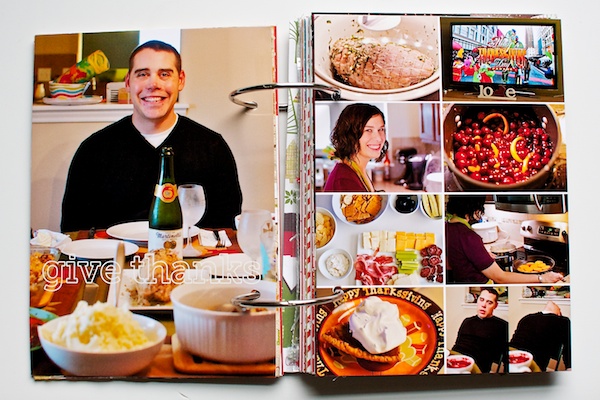
So an interesting thing happened to me as I was putting together my Holiday Faves hybrid mini album last month.

If you read my first Holiday Faves album update post, you might have seen that my album and I got off to a bit of a rocky start…

I’m not going to lie – this little Holiday Faves album and I got off to a bit of a rocky start this weekend, due to some printing issues and my inability to punch holes on the proper side of the page, haha.

But despite that little non-digital reality check, I’m feeling good about how things are coming together so far.

Well the real story here is we didn’t just get off to a rocky start, we got off to an OMG-why-did-I-choose-to-do-this-as-a-hybrid-album start. The kind of start that seriously had me questioning why I didn’t just stick with my trusty Photoshop and digital scrapbooking since it certainly would have been whole lot easier.

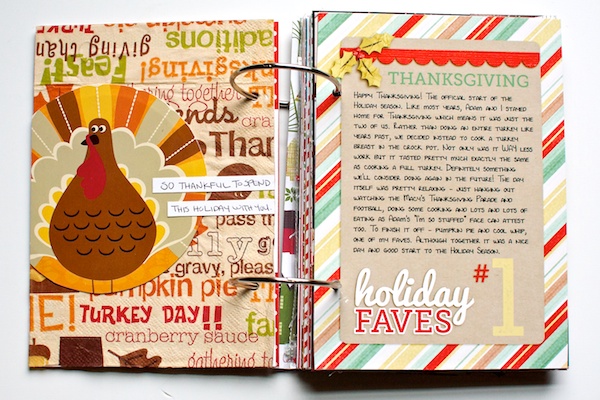
You see, not only did I have to create this turkey page twice due to my not realizing that napkins are 3-ply and therefore would not actually stay glued down to the page…

Nettio Faves1 2 7

But I also had to print and reprint…and reprint the journaling page on the right after my attempts at printing my journaling resulted in the text printing over the ribbon instead. Nevermind that my non-color test print came out just fine, of course.

Then there was this lovely photo of Adam which at one point ended up with text printed directly over his face. Not exactly the look I was going for, haha.

Nettio Faves1 2 9

The final straw came when after finally getting all the printing, gluing and trimming figured out, I went to insert the page into the book and realized I had punched the holes on the wrong side resulting in the entire page being upside down in the album.

#hybridFAIL

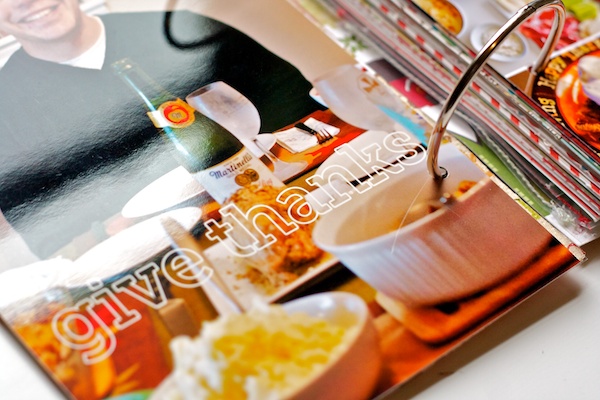
Nettio Faves1 2 10

Yes, give thanks indeed. I would have given a whole lot of thanks at that point to be able to crawl back to the safety and comfort of my beloved Photoshop.

But I pushed through and by the end I had completed one pretty sweet little Holiday Faves hybrid mini album.

Holiday Faves Mini Album 2011 from Lynnette Penacho on Vimeo.

Now let’s fast forward to this past weekend where as part of my Operation Home Sweet Home birthday goal, I decided to spiff up our office wall with some stripes, which seemed like a simple enough project…

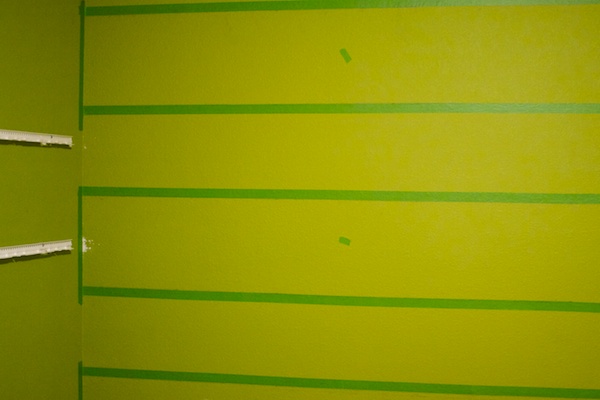
…that it is until I actually started measuring, spacing, leveling and taping off the lines and realized this was a WAY more tedious project than I thought.

Nettio walltape

And as I measured and taped and fought with the level, the one thing running through my head over and over again was…

This would be so much easier in Photoshop.

Because really, how easy would it have been to draw out some shape boxes and fill them with the chosen color?! It would take all of what, 0.2 seconds?

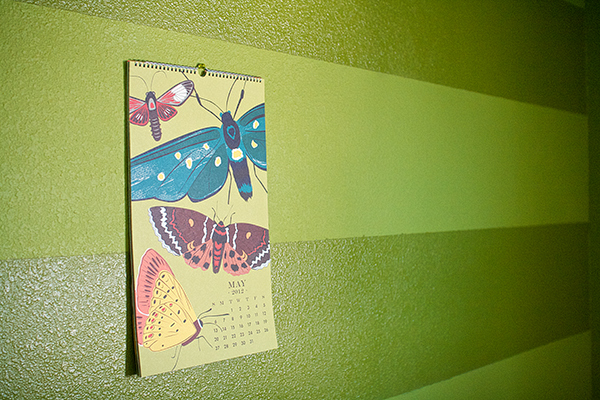
But I pushed on with the project using you know, regular paint, haha, and despite some paint bleeding through the tape, which probably only I will notice (apparently I didn’t pre-paint over the tape quite enough), I’m pretty happy with how it turned out.

And once we get the office all put back together I think it’s going to look really cool.

Nettio wallstripes

But as much as it I hate to admit it, it took me a couple of days to get to that point. Because my first reaction when I pulled the painter’s tape off and saw the bleeding lines was…

These lines would have been perfect in Photoshop.

Which is more than a bit crazy, no?

I mean, life is NOT Photoshop. Obviously. I know that.

Yet there’s a little part of me that has gotten so used to the ease of achieving perfection in digital scrapbooking, like clean straight lines, perfect evenly spaced squares, etc., that it almost irks me a little bit when I can’t get that all the time.

And it got me thinking…

Are we as digital scrapbookers possibly too used to perfection?

Has our love of Photoshop spoiled us so much that we now set an impossibly high standard for what is and isn’t possible in the non-digital world?

Because if I’m being really honest, I kind of think it has for me.

I mean, this isn’t the first time I’ve thought “This would be so much easier if I could do it with Photoshop.” Or wished I could Cmd+Z (undo) something for real. Or recolor something in real life (although wouldn’t that be amazing? Just think of the home decor/fashion possibilities!).

Then again I’ve also wished I could Google something when it’s gone missing in my house so perhaps technology and I are just a little too intertwined, haha.

So I’d love to know…do you think your love for digital scrapbooking and/or Photoshop has blurred the lines of perfection in your real life? Have you ever wished you could Cmd+Z something? Or google the mustard? (Not that I’ve thought that before, no, never, hehe.)

Please tell me I’m not the only one, haha.

Can diabetes cause erectile dysfunction

POSTED IN Memory Keeping, Digital Scrapbooking

Ask Nettio: How Do You Remember Your Faves?

POSTED ON October 18, 2011 IN Ask Nettio, the Faves

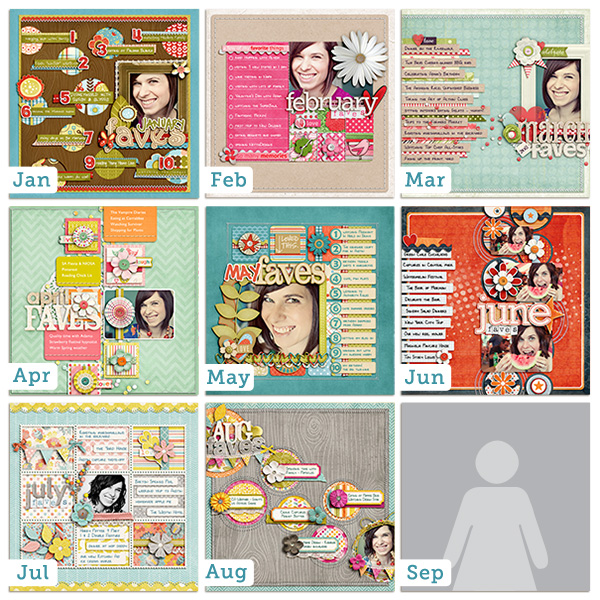
As I mentioned in my last post, after getting a bit behind over the summer on my 2011 Faves layouts, I have finally gotten caught up through August. Only September left to go!

Faves2011

But that brings up a question I have been asked quite a few times and that is:

How do you remember your Faves when your scrapbooking, say, a July page in September or a June page in October?

 
Well as much as I’d love to say I’m a super organized scrapbooker who keeps a running list of her Faves each month, I am most definitely not, haha.

But that’s good news for you because it means YOU can use the same tricks I do for creating your own awesome Faves pages long after any month is over.

So without further ado, here is a list of my go-to tricks for remembering my Faves each month:

1) Browse Your Photos

As a scrapbooker I take a lot of photos over the course of the month on a random variety of topics: events, places, people, things.

So the first place I look when I’m starting a new Faves page is my photos from that month.

Not only do they provide a visual representation of all the moments that mattered to me most that month but odds are if I took the time to document something, there’s a good chance it’s a fave of mine.

2) Browse Your Completed Layouts

In the same vein as photos, the stories I scrapbook say a lot about what matters most to me at a given time. If I take the time to scrap a certain story, like my love for Pinterest or our trip to Sea World, it’s probably something I was lovin’ at that time.

3) Check Your Social Media Accounts

Facebook, Twitter, IM, texts, emails and forums are all great places to look for your Faves because thanks to the wonders of technology, it’s easy to go  back in your history and see what loves you’ve been chatting about recently.

4) Include an Old Standby

We all have those favorite things of ours that don’t change month to month. For me this would include things like: hanging out with Adam, my iPhone, American Eagle jeans, cheese, margaritas, traveling, etc.

So anytime I need a few more Faves for my monthly list, I know I can call on one of these stand-bys to fit the bill.

5) Don’t Stress About the Date

Number 5 on this list is perhaps the most important lesson I have learned in 2 years of doing this Faves project, and that is this:

No one, including you, will remember a year or even a couple of months from now, whether something was actually a Fave of yours that specific month or not.

So if all you can remember is you loved a certain television show over the summer but don’t know whether it was on in June or July, don’t worry about it.

Yes, the foundation of the Faves project is themed around the idea of monthly Faves, but the truth is the date doesn’t matter. What is most important is that you took the time to document you and your Faves in the first place.

Don’t let your date perfectionism get in the way of getting more of YOU into your scrapbooks.

So there you have it! Five of my go-to tricks for getting my Faves scrapbooked. I hope this helps you get your Faves scrapbooked too! 

Psst…Want a little extra help documenting your Faves? Be sure to check out my FAVE-O-RITES templates Volumes 1, 2, 3 and 4 in the NettioDesigns Shoppe.

Psssst…have a burning question you’d like to see answered in a future installment of Ask Nettio? Send me a note or leave a comment and let me know!

Benefits Of Using Canadian Pharmacy

POSTED IN Ask Nettio, the Faves, Digital Scrapbooking, Tips & Tricks

  • « Previous Page
  • 1
  • …
  • 6
  • 7
  • 8
  • 9
  • 10
  • 11
  • Next Page »
HI I'M LYNNETTE. Graphic designer, tech-lovin’ memory keeper and lover of bold colors & patterns, good food and the great outdoors. Here at Nettio Designs, I share a behind the scenes peek at my own creative & life adventures. Read more...

KICKSTART YOUR CREATIVITY


By popular demand, photo book templates are back! Grab all three sets in the shop.
ADVENTURES IN ORGANIZING
GOAL-SETTING
MEMORY KEEPING
PROJECT LOVE
LIFE ADVENTURES
TIPS & TRICKS
BEHIND THE SCENES

POPULAR PROJECTS

TO SEE ALL MY PROJECTS, CLICK HERE

MUST READ POSTS

  • WHY EVERY SCRAPPER SHOULD SCRAP A FAVES PAGE
  • HOW TO CREATE A SCRAP-WORTHY MAP WITH PHOTOSHOP
  • REMEMBERING THE IMPORTANCE OF TELLING YOUR STORY
  • WHAT DOES IT MEAN TO CREATIVELY CAPTURE YOUR LIFE ADVENTURES?
  • BROWSE BY CATEGORY

    BROWSE THE ARCHIVES

    GET IT FOR FREE

    Testing testing

    links goes here

    Copyright © 2026 ·Dynamik Website Builder · Genesis Framework by StudioPress · WordPress · Log in