Nettio Designs

Design + Creativity + Adventure = LOVE

  • HOME
  • JOIN THE 2023 MONTHLY FAVES
  • THE SHOP
  • ABOUT
  • CONTACT
You are here: Home / Archives for Project Love

Summer Love Mini Course | Summer Loves 1 & 2

POSTED ON July 11, 2013 IN Summer Love 2013 Mini Course

summerlovemini-logoHello hello and welcome back to the Summer Love Mini Course! Today Team Awesome and I are diving into the meat of our mini albums by sharing our first two Summer Love journaling spreads.

The purpose of these pages (and the album, really) is to give you an easy, non-overwhelming way to capture your favorite thing about summer. You can think of your summer loves as summer bucket list items, faves or summer highlights – it’s really up to you.

Summer Love | Summer Loves 1 & 2 Pages 5-8

Here’s a look at the Summer Love 6×6 Mini Album templates for pages 5-8:

Nettiodesigns SummerLove pg5 8 templates

By Lynnette

Here’s a look at my page 5-8 layouts. Both of my Summer Loves this week happen to items from my summer bucket list but I fully expect other weeks they won’t be. That’s what I love about mini albums like this – they can really evolve as you go.

Because I’m keeping my Summer Love journaling cards clean and simple, I’m balancing the opposite side of the two-page spread with a more scrappy embellished page. Since I’m not sure how I’m going to bind my finished album just yet, I may end up swapping some of these pages right or left depending on what works for the overall flow of the album, but for now,  I’m really liking it so far! These pages feature a combo of Zoe’s Hello Summer and By the Seaside kits and Kristin’s Ready for Summer kit.

Nettiodesigns SummerLove pg5 8 Lynnette

By Sara

I really love the way Sara’s mixing up large blended photos with a more consistent neutral background on her other pages. It’s a nice clean look.

Sara SummerLove pg5 8 1

By Jen

Jen’s rocking the hybrid and it’s so fun to see! I especially love her cutout pages and the fun lettering for her Love titles.

Nettiodesigns SummerLove pg5 8 JLM

By Sherly

I absolutely love the way Sherly is using color and embellishments in her album. It’s really pulling all the pages together in such a beautiful way.

Sherly SummerLove pg5 8 copy

By Brittney

Brittney’s pages just scream summer fun to me and I love how she’s adding in additional photos where she needs them.

Brittney nettiodesigns SummerLove pg5 8

By Jennifer

Jennifer is really embracing the summer bucket list combo and it’s so fun! I especially love how she used the 6-block grid template on page 8 for numbered photos of items from her list. So cute!

Nettiodesigns SummerLove pg5 8 JenniferH 3

Well that’s it from us today, but now we’d love to hear from you! How’s your Summer Love mini album coming along so far? We’d love to see how your creatively capturing your summer adventures, so if you’d like to share your mini album progress, feel free to add them to my designer gallery at SSD and link us up in this thread at Sweet Shoppe Designs.

Coming up next…Stuck in a summer photo rut? On Tuesday, July 16th, we’ll be sharing ideas for must-have summer photos. See you then!

[catalyst_hook_box name=”summerlovesignup”]

__________________________________________________________________

Previous Summer Love Mini Course posts:

  • Cover & Intro Pages
  • Our Fave Summer Kits
  • Our Summer Bucket Lists

View all Summer Love Mini Course posts here.

Can diabetes cause erectile dysfunction

POSTED IN Summer Love 2013 Mini Course

Summer Love Mini Course | Our Summer Bucket Lists

POSTED ON July 9, 2013 IN Summer Love 2013 Mini Course

summerlovemini-logoFor the last few years, every summer I’ve made a summer bucket list. Given my love for lists this probably comes as no surprise, haha, but there’s just something so fun about dreaming up summer plans and then crossing them off as you complete them. We haven’t always accomplished everything on our lists, far from it really, but they are definitely fun to look back on every year, especially living the somewhat-nomadic lifestyle we do.

Here’s a peek at what my 2011 Summer Bucket List looked like:

Nettio 2011summerlist

And here’s what my 2012 Summer Bucket List looked like:

Nettio 2012summerlist

Yes, I loved the design so much the first year that I used it again for the second year! If you’re wanting a similar design, you can find a template for it in my Summer Lovin’: Fun in the Sun template set.

Since I loved my previous Summer Bucket List pages so much, I knew when I started designing the Summer Love Mini Album templates for this year that I had to include a Summer Bucket List page. And I knew I wanted something clean & simple that could still be spiffed up with digi goodies if I chose to do so later. Here’s what I came up with for the templates:

Nettiodesigns SummerLove pg3 4 Template

And here’s what my completed Summer Bucket List spread (pages 3-4 in my Summer Love mini album) looks like. Because I embellished my bucket list page quite a bit, I decided to keep the opposite page a simple un-embellished photo of Adam and I (taken last summer) for balance:

Nettiodesigns SummerLove pg3 4 Lynnette2

Here’s a closer look at my Summer Bucket List page. I used Kristin’s AMAZING Ready for Summer kit for this page. The vellum pocket is by Mari. There wasn’t a pocket in her set large enough to fit my journaling card so I Macguyver’ed two together in Photoshop for a custom fit. I also added an additional wood mat behind the journaling card to make my list really pop.

Nettiodesigns SummerLove pg3 Lynnette BucketList

Because I’m planning to print all my pages at once when I finish my Summer Love mini album, I’ll be adding digital checkmarks to the page as we cross things off this summer. The “X” is simply the uppercase X from my custom handwriting font by Darcy. Figured it’d add a nice touch of realism to my otherwise digital page.

Of course Team Awesome had a blast capturing their summer bucket lists too. I have to say, so far my favorite part of this group Summer Love Mini Course is seeing all the different takes on the same pages. It’s so neat to see everyone’s creative ways of using the templates!

By Sara

I love how Sara added a tag and digital stitching to her large photo.

9234170695 a58ecb66fe o

Here’s a bigger peek at her summer bucket list:

9234171523 f1ace64e62 o

By Jen

Jen’s hybrid take on the Summer Love Mini Templates just blows my mind! I love the way she’s embellishing her pages with her paper goodies.

Jen nettiodesigns SummerLove pg3 4 JLM

Here’s a bigger peek at her summer bucket list:

Jen bucketlist 1

By Brittney

Brittney’s photo is so fun and I love the way she adapted the Summer Bucket List journaling card to make room for her longer list.

Brittney nettiodesigns SummerLove pg3 4 NAME

Here’s a bigger peek at her summer bucket list:

Brittney 04BucketList

By Jenn

I think I may tag along with Jenn as she completes her summer bucket list, haha. Seriously, who wouldn’t want to go where that photo was taken? Gorgeous! Plus her use of elements here is amazing. I especially love the way she angled the journaling card into the denim pocket.

Nettiodesigns SummerLove pg3 4 jenn

Here’s a bigger peek at her summer bucket list:

Jenn nettiodesigns SummerLoveMini 04BucketList

By Sherly

I love Sherly’s sweet photo and her amazing-as-always clustered elements. Plus “rest & relax” sounds like a pretty good bucket list item to me.

Sherly SummerLove pg3 4

Here’s a bigger peek at her summer bucket list:

sherly_04BucketList

by Jen H

I’m really loving Jen’s clean and colorful design here. The rainbow text and color scheme just scream summer.

JenHignite nettiodesigns SummerLove Je

Here’s a bigger peek at her summer bucket list:

JenHignite SummerLoveMini 0

I have to say, I am REALLY excited with how everyone’s albums are turning out so far and I’d love to see yours!

Want to share? Simply upload your page using the Summer Love Mini Templates to the Nettio Designs designer gallery at Sweet Shoppe Designs and then link us up in the Summer Love projects thread here.

Coming up next…On Thursday, July 11th we’ll be digging into the meat of our Summer Love Mini Albums by sharing our first Summer Loves #1 & 2. See you then!

[catalyst_hook_box name=”summerlovesignup”]

__________________________________________________________________

Previous Summer Love Mini Course posts:

  • Summer Love Mini Course FAQ
  • Cover & Intro Pages
  • Our Fave Summer Kits

View all Summer Love Mini Course posts here.

Can diabetes cause erectile dysfunction

POSTED IN Summer Love 2013 Mini Course

Summer Love Mini Course | Our Fave Summer Kits

POSTED ON July 4, 2013 IN Summer Love 2013 Mini Course

summerlovemini-logoThe Summer Love Mini Course continues today with Team Awesome member Natalie sharing our team’s favorite summer kits. Take it away Natalie!

One of my very favorite things about summer is it’s the perfect time to be active and doing fun things. For the scrapbooker in us all, this also means it’s the perfect time to take fun pictures and buy super amazing kits and templates to help preserve the memories associated with all of our summer activities!

Nettio’s Team Awesome put together a list of some of their favorite, tried and tested, summer kits available on the market today. We hope you find one (or more) that are perfect for your own summer adventures!

nettiodesigns_summerlove-kits-image-1nettiodesigns_summerlove-kits-image-2

Row 1: 1. By The Seaside by Zoe Pearn; 2. Everyday Storytelling: Summer by Kristin Cronin Barrow and Jenn Barrette; 3. Nantucket Pretties by Forever Joy
 
Row 2: 4. Summer Nights by Julie Billingsley and Meghan Mullens; 5. Summer Camp by Kate Hadfield & Sahlin Studio; 6. Ready for Summer by Kristin Cronin-Barrow
 
Row 3: 7. Beachy Keen: With Eva Kipler By Flergs; 8. Hello Summer by Zoe Pearn; 9. 100 Days of Summer by Meghan Mullens
 
Row 4: 10. Best Summer Ever by Sugarplum Paperie; 11. Summertime Fun Collection by Jady Day Studio; 12. Sunshine In My Soul by Zoe Pearn
 
Row 5: 13. Let the Sunshine In by Julie Billingsley; 14. Water Play Days by Heather Roselli; 15. Ignite the Night by Julie Billingsley


What are your favorite Summer tried and true kits? Link us up in the comments below!

Coming up next…On Tuesday, July 9th, Team Awesome and I will be sharing pages 3 & 4 of our Summer Love mini albums, including our Summer Bucket lists! Have an awesome 4th of July weekend and we’ll see you then!

[catalyst_hook_box name=”summerlovesignup”]

__________________________________________________________________

Previous Summer Love Mini Course posts:

  • Introducing the FREE Summer Love Mini Course
  • Summer Love Mini Course FAQ
  • Cover & Intro Pages

How do I purchase Levitra without going to the doctor

POSTED IN Summer Love 2013 Mini Course

Summer Love Mini Course | Cover & Intro Page Share

POSTED ON July 2, 2013 IN Summer Love 2013 Mini Course

summerlovemini-logo
Hello hello and welcome to Day 1 of the Summer Love Mini Course! Today Team Awesome and I will be sharing our Cover and first two intro pages of our mini albums. But before we get to that I wanted to give you a quick, friendly reminder: new content will be posted on the Nettio Designs blog every Tuesday and Thursday through August 15th. If you want to make sure you don’t miss out on any of the fun, you can sign up for Summer Love Mini Course email updates right here.

Now on to our first set of pages…

Summer Love | Cover & Intro Pages 1-2

Our goal as a team is to each complete 3-4 pages a week, or basically two two-page mini spreads, which means if you play along with us, by August 15th you should have a completed Summer Love mini album. To kick things off today, we’re sharing our inside cover pages as well as pages 1 & 2 of the album which include an intro page and an accent page.

If you haven’t purchased the templates, here’s a little peek at what the Summer Love 6×6 Mini Album templates for these pages look like:

nettiodesigns_SummerLove-pg0-2-Templates

And here’s what Team Awesome and I did with them:

By Lynnette

For my Summer Love mini album I’m planning to use a mix of summer kits because really, how can you choose amongst all the summery goodness? For my first three pages I used a mix of Zoe Pearn’s Hello Summer and Kristin Cronin-Barrow’s Ready for Summer kits which are both available at Sweet Shoppe Designs.

I haven’t completely decided how embellished I want my pages to be but right now I’m liking the mix of some pages being more simple and others more accented. I’m excited to see how it comes together as the summer progresses.

nettiodesigns_SummerLove-pg0-2-Lynnette

By Brittney

For her intro page, Brittney went graphic by extracting a photo of her son holding an iPad and replacing the iPad with the intro card from the template. How cool is that!

nettiodesigns_SummerLove-pg0-2-Brittney

By Jen

Jen is fully embracing hybrid scrapbooking for her album and I have to say, it’s so fun seeing my templates paired up with paper products! I especially love how she used her Silhouette to cut out the “hello summer” text from the templates. If you’re wondering how she did that stay tuned because she’ll be sharing her Silhouette tips and tricks in a future post.

nettiodesigns_SummerLove-pg0-2-Jen

By Jenn

Jenn has a knack for mixing papers and elements and she’s done so beautifully here using Kristin’s Ready for Summer kit. She also adapted her title page to something more her which is always a great way to personalize any template.

nettiodesigns_SummerLove-pg0-2-Jenn

By Jennifer

Jennifer is embracing the color for her album by recoloring each title in the templates. While I lot of work I’m sure, it’s such a fun look and I can’t wait to see how her completed album turns out.

nettiodesigns_SummerLove-pg0-2-Jennifer

By Sara

For her intro pages, Sara embraced blending by blending the text from the templates into her background papers. I especially love the large blending photo she used for her accent page. It’s such a great way to add a bit of texture and dimension to a digital mini album.

nettiodesigns_SummerLove-pg0-2-Sara

By Sherly

Sherly worked her clustering magic on her first three pages to really give them a paper look. I especially love the way she added a tag to hold the album info from the intro page template – such a smart idea!

nettiodesigns_SummerLove-pg0-2-Sherly

One of the reasons I purposely kept the design of the Summer Love Mini Album templates clean and simple was exactly for what you see above – so you could really use them to jumpstart your creativity and add your own spin and style to them. I hope these examples from Team Awesome and me give you some ideas for your own album!

How to Share Your Pages with Us

And of course, Team Awesome and I would love to see how YOU are using the Summer Love Mini Album templates! So if you’d like to share your pages using the Summer Love Mini Album templates with us, all you have to do is:

1) Navigate over to the Sweet Shoppe Designs gallery and add your page to my designer (Nettio Designs) gallery when you upload.

nettio_pageshareSS

2) Then head to this thread in the Long Term projects section of the Sweet Shoppe forum, add your page and check out what everyone else is up to. You can also ask any questions you may have there as well or ask them below in the comments section of this post.

As I’ve said several times before: I am super excited you’ve chosen to join us on this summer-tastic adventure and I can’t WAIT to see how your album turns out!

Coming up next…if you’re haven’t decided what summer kit or kits you’d like to use for your Summer Love mini album, never fear! Team Awesome and I have got you covered because on Thursday, July 4th, we’ll be sharing our favorite summer kits. See you then!

[catalyst_hook_box name=”summerlovesignup”]

__________________________________________________________________

Previous Summer Love Mini Course posts:

  • Introducing the FREE Summer Love Mini Course
  • Summer Love Mini Course FAQ


Benefits Of Using Canadian Pharmacy

POSTED IN Summer Love 2013 Mini Course

New Release | FAVE-O-RITES 2013: Jun Faves

POSTED ON June 29, 2013 IN Monthly Faves 2013, Shop News & Releases

Happy Sweet Shoppe Saturday everyone! This week’s release heralds month number six of one of my absolute FAVE (pun-intended) scrapbooking projects: the Monthly Faves! Can you believe we’re halfway through the year already? 2013 is flying by!

For those new to Nettio Designs & the Faves, my Monthly Faves project is a year-long scrapbooking project where each month you scrapbook one layout documenting your top-ten favorite things from that month. Your faves can be anything: events, food, tv shows, technology, clothing – the sky’s the limit!

I’ve done my Monthly Faves project twice before, once in 2009 & again in 2011, and I love it so much I’m doing it again here in 2013. I can’t even tell you how much fun it is to look back on those layouts and see what’s changed and what’s stayed the same. It’s like a mini time-capsule of your favorite things from way-back-when.

Here’s how my 2013 Monthly Faves layouts are shaping up so far this year…

nettio_faves2013-jun

I’ve written before about why I believe everyone should scrap a Faves layout but here’s the cliff-notes version:

Because scrapbooking lists is fun
Because you don’t remember nearly as much as you swear you do
Because it captures an easy snapshot of your life at the moment
Because it’s the easiest All About Me layout you’ll ever do. Seriously.

And this year I wanted to make it even easier for you to creatively capture your faves. So on the last(ish) Saturday of every month, I’m releasing that month’s Faves layout as a new Sweet Single template. Which should give you plenty of time to capture your Faves for that month before the new month arrives.

Which brings me to this week’s release…

FAVE-O-RITES 2013: Jun Faves

This week’s release is the sixth FAVE-O-RITES Sweet Single digital scrapbooking template of the year, FAVE-O-RITES 2013: Jun Faves. It features room for two photos of your lovely smiling face, your top 10 faves for this month and a bold triangle paper-lovin’ design.

nettiodesigns_FAVE-O-RITES2013_06JunFaves-preview-1400

Is it just me or are triangles everywhere lately? I don’t know about you, but I’m totally lovin’ them! I’m calling it now: triangles are the new hexagon, which was the new chevron. You heard it here first, folks.

Here’s a bigger look at my 2013 Jun Faves layout that inspired this template. As you can see, my faves list is super random, which is exactly what I love! It’s not something you have to stress out over: make a list of 10 things, scrap it and boom, you’ve captured an easy snapshot of YOU in your scrapbooks. Just think how much fun it’ll be for you or your kids & grandkids to look back on one day!

nettio_15-2013Faves-06Jun-1400

Team Awesome Inspiration

Of course my team had a ton of fun this month scrapbooking their own take on the Jun Faves:

nettiodesigns_news-CTLayouts-JunFaves

And I have to give a special shoutout to SugarBabe Erin who made this awesome faves layout. My template for a California Faves list? Be still my CA-lovin’ heart…

babe-erin_062813califaves700

New Release Discount: SAVE 20% thru Saturday

And of course, as with every Sweet Shoppe Saturday, you can save 20% off all new releases thru Saturday.

nettio_NR-SAVE20-JunFaves-1400

Want to save 20% off this weekend?

Pick up FAVE-O-RITES 2013: Jun Faves here today!

Also one final reminder, don’t forget to sign up for the free Summer Love Mini Course if you haven’t yet! I’ve already shared two posts but we’re just getting started and Team Awesome and I would love to have you join us! More details can be found here or sign up here to receive free Summer Love email updates.

nettiodesigns-summerlove-ecourse-1200

Well, that’s it from me today! Have a great weekend everyone and if you’re unlucky enough to be caught in the heatwave, try not to melt too much!

Benefits Of Using Canadian Pharmacy

POSTED IN Monthly Faves 2013, Shop News & Releases

FAQs about the Summer Love Mini Album & E-Course

POSTED ON June 27, 2013 IN Summer Love 2013 Mini Course

The Summer Love FREE Mini Course will officially start next Tuesday, July 2nd but I wanted to take today to answer a few of the questions I’ve been getting about the Summer Love Mini Templates and Mini Course.

Summer Love Mini Album Templates

How exactly do the Summer Love Mini Album templates work?

Much like my popular Holiday Faves Mini Album templates, the Summer Love Mini Album templates are designed to give you a fun & easy foundation for capturing all your favorite things about summer. The core of the album is built around a top ten list of “Summer Love” journaling cards with summer-themed photo and accent pages sprinkled throughout. But unlike the Holiday Faves Mini Album, you don’t have to do any prep work before the summer starts because this album is designed to be filled in as you go.

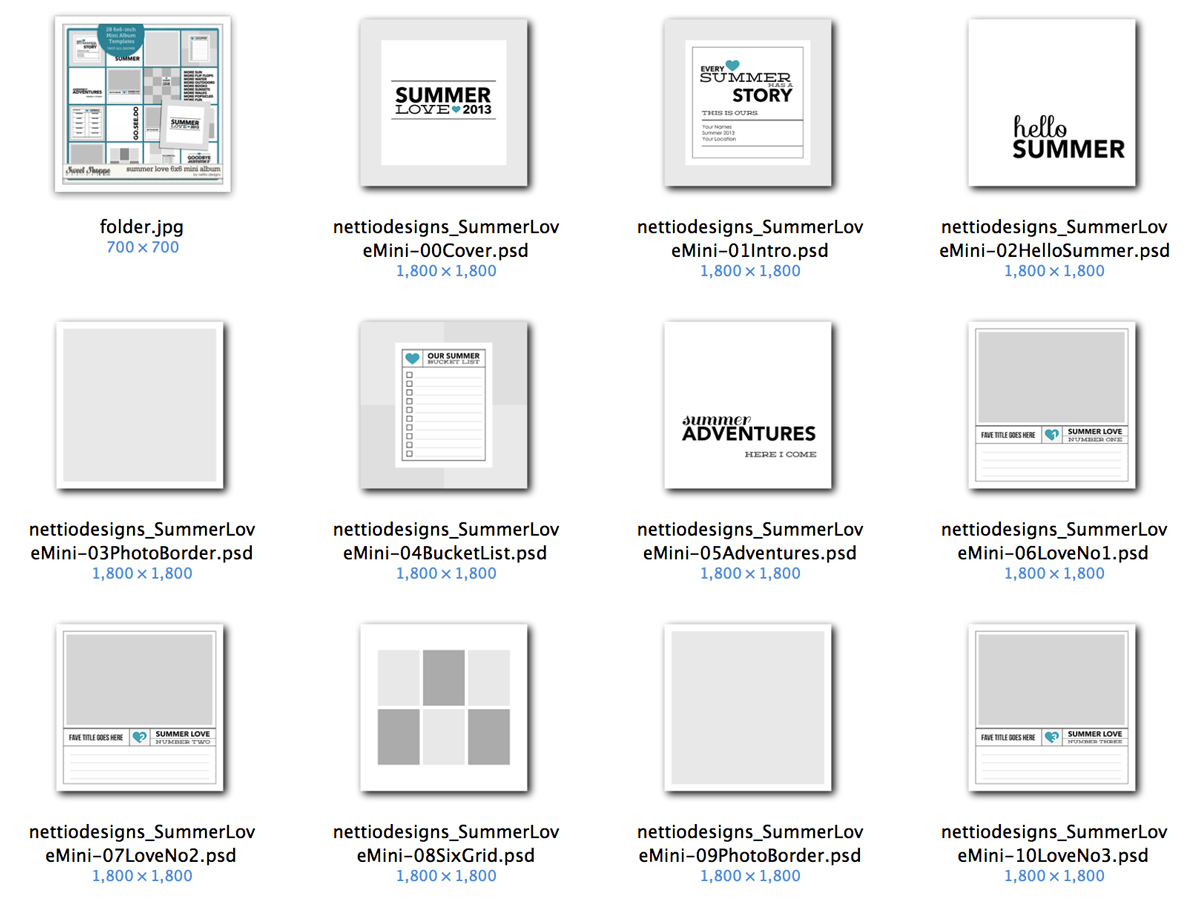
nettio_FAQ-folder-lg

What’s included with the Summer Love Mini Album templates?

Included in the Summer Love Mini Album Templates are 28 6×6-inch layered summer-themed Photoshop page templates including:
• 1 6×6 Summer Love 2013 cover page
• 1 6×6 Summer Story intro page
• 5 6×6 Text accent pages – perfect for creating overlays or cutouts
• 6 6×6 Photo grid pages with room for up to 9 photos
• 10 6×6 Summer Love photo journaling cards, numbered 1-10
• 1 6×6 Summer Bucket List themed page
• 1 6×6 Summer Currently themed page
• 1 6×6 Summer Insta-Love themed page with room for up to 15 square photos
• 1 6×6 Summer Highlights themed page with room for up to 5 photos
• 1 6×6 Goodbye Summer back cover page

There is also a font list and a sample layout PDF included to give you a visual guide of how the album will flow once it’s finished.

What is the exact size of the Summer Love Mini Album templates?

All of the Summer Love Mini Album templates are exactly 6×6-inches square. Each template represents one page in the finished mini album.
Do I have to use the templates in a certain order?

Unlike my Holiday Faves Mini Album templates which are designed to be mixed and matched, the Summer Love Mini is designed to flow through summer, starting with your summer bucket list, moving through your loves and ending with your summer highlights. Each mini template is labeled with Of course you’re always welcome to do your own thing and move the pages around to fit your stories, but Team Awesome and I will all be using the pages in order to keep things consistent for the mini course.
Do my Summer Loves have to captured in chronological order?

Nope! Other than the Summer Love journaling cards being numbered #1-10, there are no date references anywhere in the album. If you want to have Summer Love #8 be from June and Summer Love #9 be from August, no one will ever know. That’s one of the reasons I love the list format over a date format for these kinds of mini albums. It gives you the flexibility to have weeks where you have lots of loves you want to capture balancing out other weeks where you don’t.
Do you recommend digi or hybrid for my album?

It’s really up to you! I chose the 6×6-inch size for these mini templates because it’s so friendly for either a digi or hybrid album. If you want to create a hybrid mini album, you can easily print all your pages at home on an 8.5×11 sheet of card stock (I use Epson Premium Presentation Paper Matte) and then write directly on them in your own handwriting. Or if you want to create your album digi-style, you can design your pages and print them all at the end as a photo book or individual pages like you would any regular layout.

Where can I get my 6×6-inch pages printed once I’m done with my album?

Well of course, you can print your pages at homem but if you’d like to send out your pages for print, Persnickety Prints offers 6×6 prints for $0.99 each. Once you have your printed pages, you can either put them in a handmade mini album or a store-bought album like the American Crafts 6×6-inch album.

If you’d like to print them as a 6×6 photo book, both Artscow and Persnickety Prints offer 6×6-inch photo book options. Keep in mind that with a photo book, you may have to adjust the sizes of the templates to allow for the correct bleed & edge margin for that specific book printer.

Can I resize the 6×6 templates to 8×8?

Because the majority of the text in the templates is rasterized, I would recommend against increasing the Image Size to 8×8 at its current resolution of 300ppi. But you can increase the image size to 8×8 with the Resample Image unchecked in the Image Size dialog box, which will give you an image of 2400×2400 pixels with a resolution of 225ppi. I normally scrapbook 8×8 and have occasionally printed my layouts at 12×12 at 200ppi and they always turn out great so they should print just fine. Just keep in mind that if you do this, all of your scrapbooking elements which are 300 ppi will look oversized when you initially drag them onto the canvas but it’s nothing a little transforming can’t fix.

The other option would be to increase the Canvas Size instead of the Image Size and just have an additional border around the pages. That could look really nice too.

I’m not really a fan of mini albums. Do you have a regular 12×12 template option for summer scrapbooking?

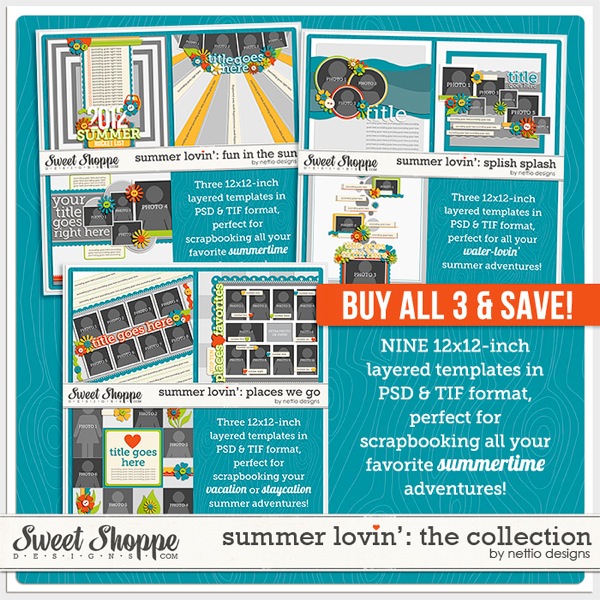
Indeed I do! Last summer I released the Summer Lovin’ collection which featured nine 12×12-inch summer-themed templates which would be perfect for this.

nettio-SummerLovin-Collection-preview.jpg

Summer Love Mini Course

How long does the Summer Love Mini Course last?

The Summer Love Mini Course will officially begin Tuesday, July 2nd and continue through Thursday, August 15th. New content will go live Tuesdays and Thursdays on the Nettio Designs blog.

How much does it cost?

It’s totally 100% FREE.

Do I have to buy the Summer Love Mini Templates to be a part of the class?

Nope! Anyone who’d love some Summer Love inspiration is welcome to follow along. Just keep in mind that all of the examples will use the Summer Love Mini Templates but the tips/ideas should be relevant for anyone.

How can I make sure I don’t miss out any of the fun?

Sign up for the Summer Love Mini Course email list! This list is completely separate from my regular Nettio Designs email list so you’ll only receive summer-tastic updates through it. Click here to sign up or use the signup form at the bottom of this post.

Is there somewhere I can share my own Summer Love Mini pages with Team Awesome?

There will be but I’ll be sharing those details in Tuesday’s post.

Using the Summer Love Mini Templates

What’s the easiest way to recolor the flattened text layers/elements in the templates?

Because I used non-standard fonts for the majority of the text in the templates, all of the text layers have been flattened. So what’s an easy way to recolor these flattened layers? Well here are my two favorite options depending on whether you’re using Photoshop or Photoshop Elements:

In Photoshop:

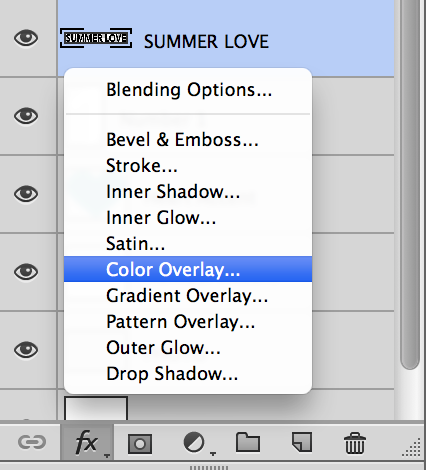
For recoloring flat, non-textured elements like text or accent lines in Photoshop, I like to use a Color Overlay layer style. Layer styles are non-only quick to use because you can easily apply them to multiple layers but they’re also non-destructive which means I can easily recolor or remove the color completely by adjusting the layer style.

To apply a Color Overlay layer style in Photoshop:

1) Select the layer in the Layers Panel

2) Click on the FX symbol at the bottom of the Layers Panel and choose Color Overlay

nettio_FAQ-coloroverlay

3) In the pop-up window, click on the color box to select the color you’d like. By default it’s a crazy shade of red. You can also select a color from your Swatches palette.

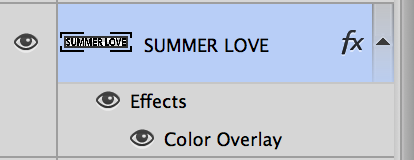
4) Click Ok and then Ok again and your layer should be recolored with a little FX next to the layer name in the Layers Panel.

nettio_FAQ-coloroverlay2

If at any time you’d like to change the color, simply double click on the FX symbol and adjust. You can also drag the FX layer style to the trash to remove it or hold down the Alt key and click and drag the layer style to another layer or right-click on the FX symbol to copy and paste the layer style to other layers.

In Photoshop Elements:

To recolor a non-textured element in Photoshop Elements, you can use the Fill option to fill the selected element with the color of your choice.

To Fill an element in Photoshop Elements:

1) Cmd/Ctrl+Click on the layer thumbnail in the Layers Panel. If you’ve done it right you’ll see a selection (marching ants) around your element.

2) Hit Shift+F5 to open the Fill dialogue box.

3) In the drop-down menu, choose whether you’d like to use your pre-selected Foreground or Background color or select Color to bring up the color picker.

4) Select your color and choose OK.

5) Hit Cmd/Ctrl+D to deselect your newly filled layer.

How can I easily get my digital journaling to match the journaling lines in the templates?

If you’d like to type out your journaling digitally, you have two options. You can either turn off the Journaling Lines layer in the template and simply add a new text box in the open space or if you’d like to use a handwriting type font and make it look like you wrote on the page, you can adjust the spacing between the lines of text, also known as the leading, until the text lines up with the journaling lines.

To do this:

1) Select your Type Tool (T) and drag out a new Type box in the area where you want to add text.

2) Add your journaling or type in some placeholder text like so:

3) Double-click on your text paragraph to select the text.

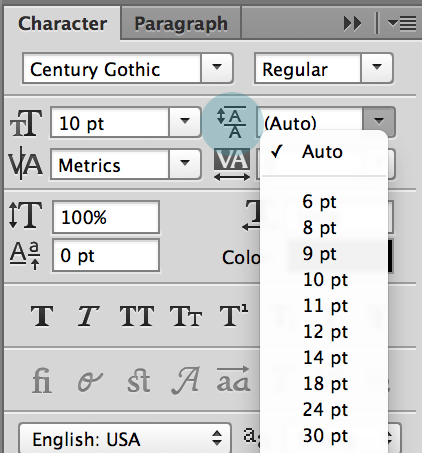
4) In your Character Panel (Window>Character), open the Leading drop down, it’s the one with the two A’s on top of each with an up and down arrow next to them.

nettio_FAQ-leading

5) Adjust the leading size until the lines of text match up nicely with the journaling lines. In my example I used a 10pt Century Gothic font with a 20pt leading.

A quick tip for Photoshop users: If you hover your cursor over the Leading symbol next to the drop down, you should see a hand with two little arrows next to it. If you drag the cursor slightly to the left or right, it’ll adjust your leading accordingly without you having to guess on numbers. Not sure if this works in Photoshop Elements or not  but if someone wants to try it and let me know, I’ll be happy to edit the post.

Any tips for planning/finishing my album?

Yes, don’t stress! The point of the Summer Love mini is not to stress you out or make you feel guilty if you don’t keep up or finish your album. In fact, that’s the awesome thing about this format: if you get to the end of the summer and you’ve only filled in say, five Loves instead of all ten, no worries! Simply remove those pages and call it done. You’ve still captured your summer adventures and no one but you will ever be the wiser.

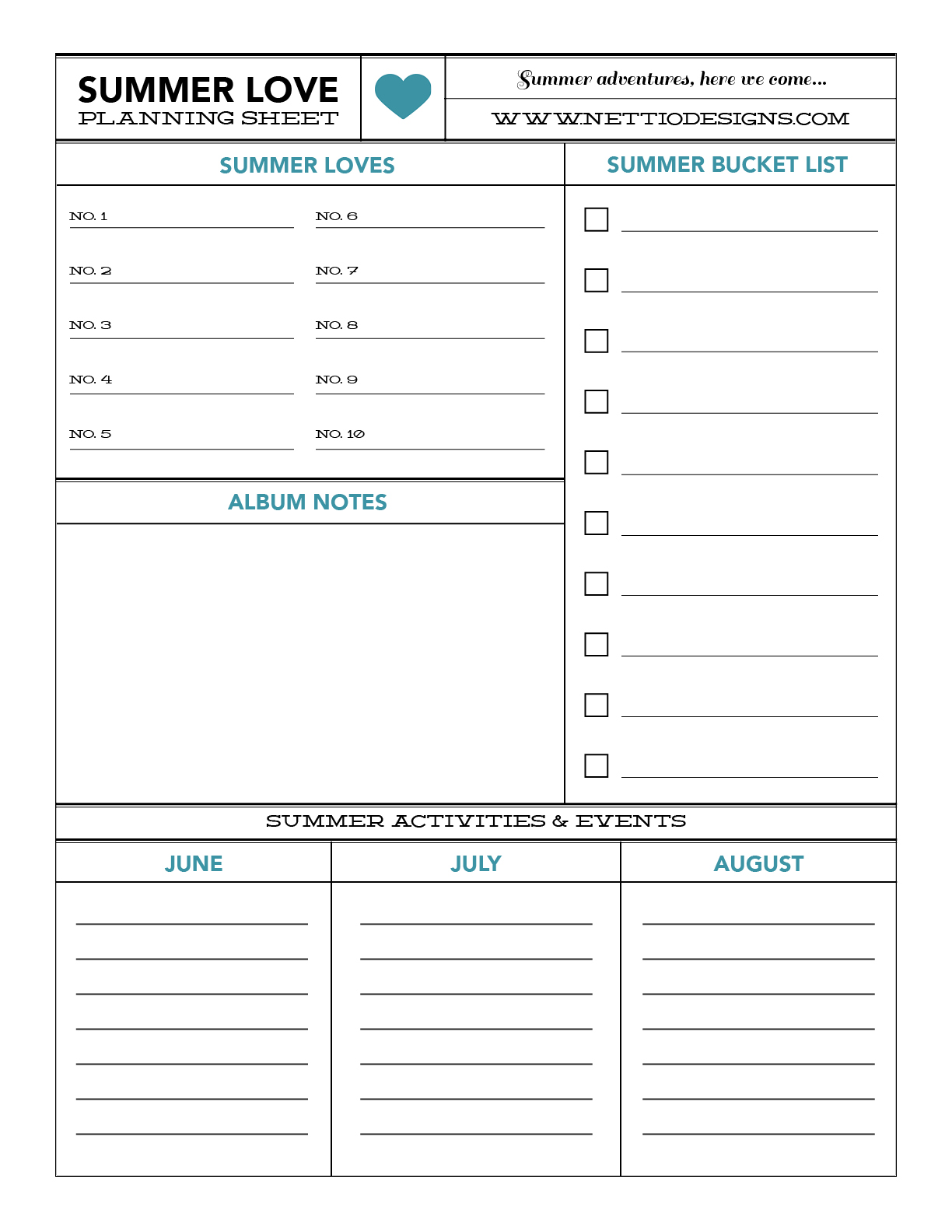
nettiodesigns_summerlove-planningsheet

Of course, if you’d like a little help with your album planning, I’ve also put together this free downloadable planning sheet to get you started. It includes room for your summer bucket list, a list of Loves, space for any album notes and room for listing activities, etc, you’ve got coming up that you might want to include in your album. Just click the button below to download!

[wp_eStore_download_now_button id=54]


Well I think that’s it for this FAQ! If you have any other questions I didn’t answer above, feel free to ask them in the comments below. And don’t forget to sign up below for Summer Love Mini Course email updates. Wouldn’t want you to miss out on the fun!

[catalyst_hook_box name=”summerlovesignup”]

Can diabetes cause erectile dysfunction

POSTED IN Summer Love 2013 Mini Course

  • « Previous Page
  • 1
  • …
  • 5
  • 6
  • 7
  • 8
  • 9
  • …
  • 18
  • Next Page »
HI I'M LYNNETTE. Graphic designer, tech-lovin’ memory keeper and lover of bold colors & patterns, good food and the great outdoors. Here at Nettio Designs, I share a behind the scenes peek at my own creative & life adventures. Read more...

KICKSTART YOUR CREATIVITY


By popular demand, photo book templates are back! Grab all three sets in the shop.
ADVENTURES IN ORGANIZING
GOAL-SETTING
MEMORY KEEPING
PROJECT LOVE
LIFE ADVENTURES
TIPS & TRICKS
BEHIND THE SCENES

POPULAR PROJECTS

TO SEE ALL MY PROJECTS, CLICK HERE

MUST READ POSTS

  • WHY EVERY SCRAPPER SHOULD SCRAP A FAVES PAGE
  • HOW TO CREATE A SCRAP-WORTHY MAP WITH PHOTOSHOP
  • REMEMBERING THE IMPORTANCE OF TELLING YOUR STORY
  • WHAT DOES IT MEAN TO CREATIVELY CAPTURE YOUR LIFE ADVENTURES?
  • BROWSE BY CATEGORY

    BROWSE THE ARCHIVES

    GET IT FOR FREE

    Testing testing

    links goes here

    Copyright © 2026 ·Dynamik Website Builder · Genesis Framework by StudioPress · WordPress · Log in