Nettio Designs

Design + Creativity + Adventure = LOVE

  • HOME
  • JOIN THE 2023 MONTHLY FAVES
  • THE SHOP
  • ABOUT
  • CONTACT
You are here: Home / Archives for Project Love

Summer Love Mini Course | Summer Currently & Loves 7 & 8

POSTED ON August 1, 2013 IN Summer Love 2013 Mini Course

summerlovemini-logoHappy August everyone! Can you believe we’re only two short weeks away from the end of the Summer Love Mini Course? Craziness! In today’s installment, Team Awesome and I are showing off our Summer Currently and Loves No. 7 & 8, which are pages 17-20 in our Summer Love Mini Albums.

Summer Loves 7 & 8 Pages 17-20

Here’s a look at the Summer Love 6×6 Mini Album templates for pages 17-20:
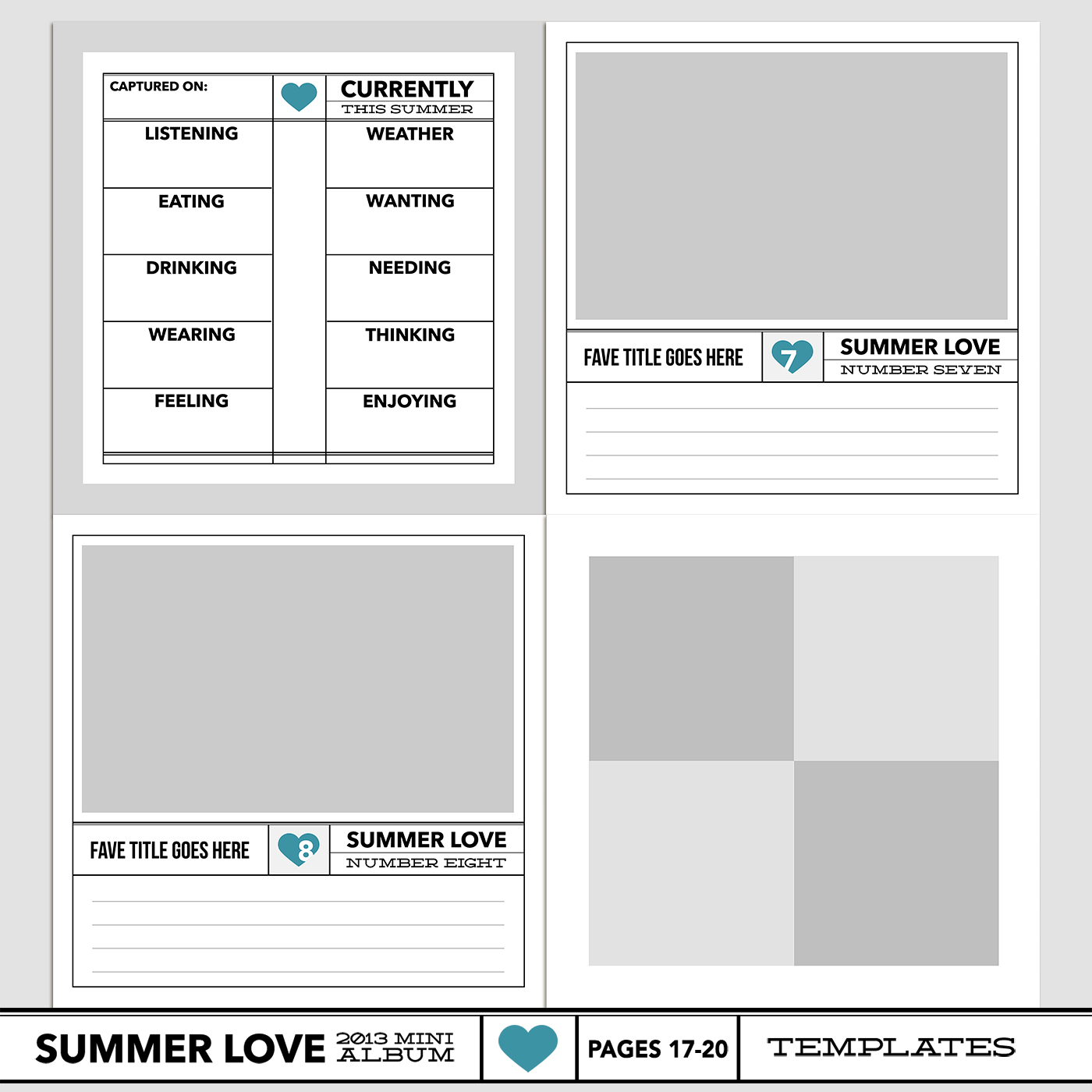
nettiodesigns_SummerLove-pg17-20-templates-1400

By Lynnette

Here’s a look at my page 17-20 layouts. I’ve been waiting for this Currently page to come since I first designed it so I’m geekily excited it’s finally time to use it! I’m also really digging the clean & graphic vs paper-lovin’ balance in my page design this week.
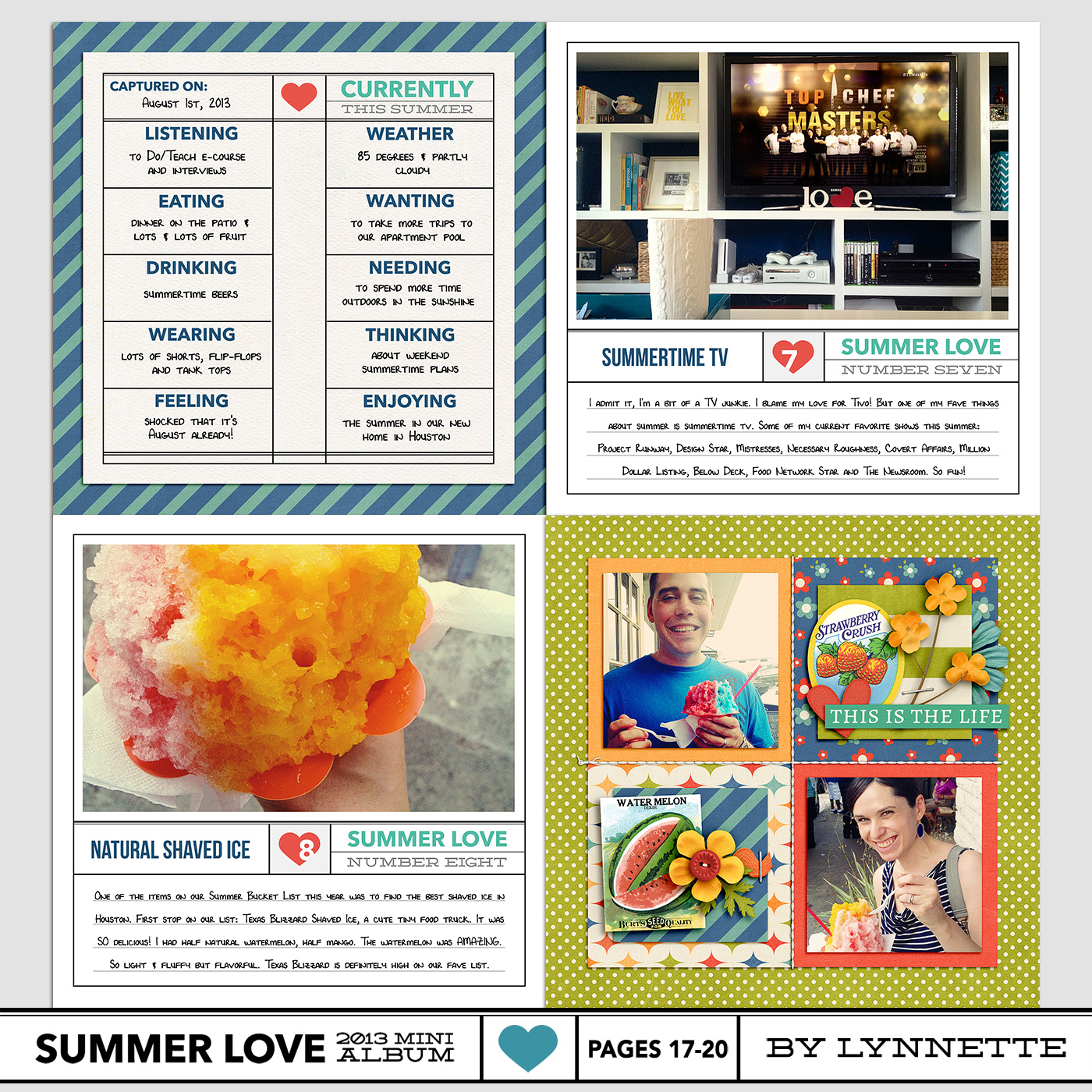
nettiodesigns_SummerLove-pg17-20-Lynnette-1400

Here’s a look at Team Awesome’s pages 17-20:

By Sara

I’m loving the way Sara’s pages are coming together. The clean and simple kraft background paper grounds everything nicely.
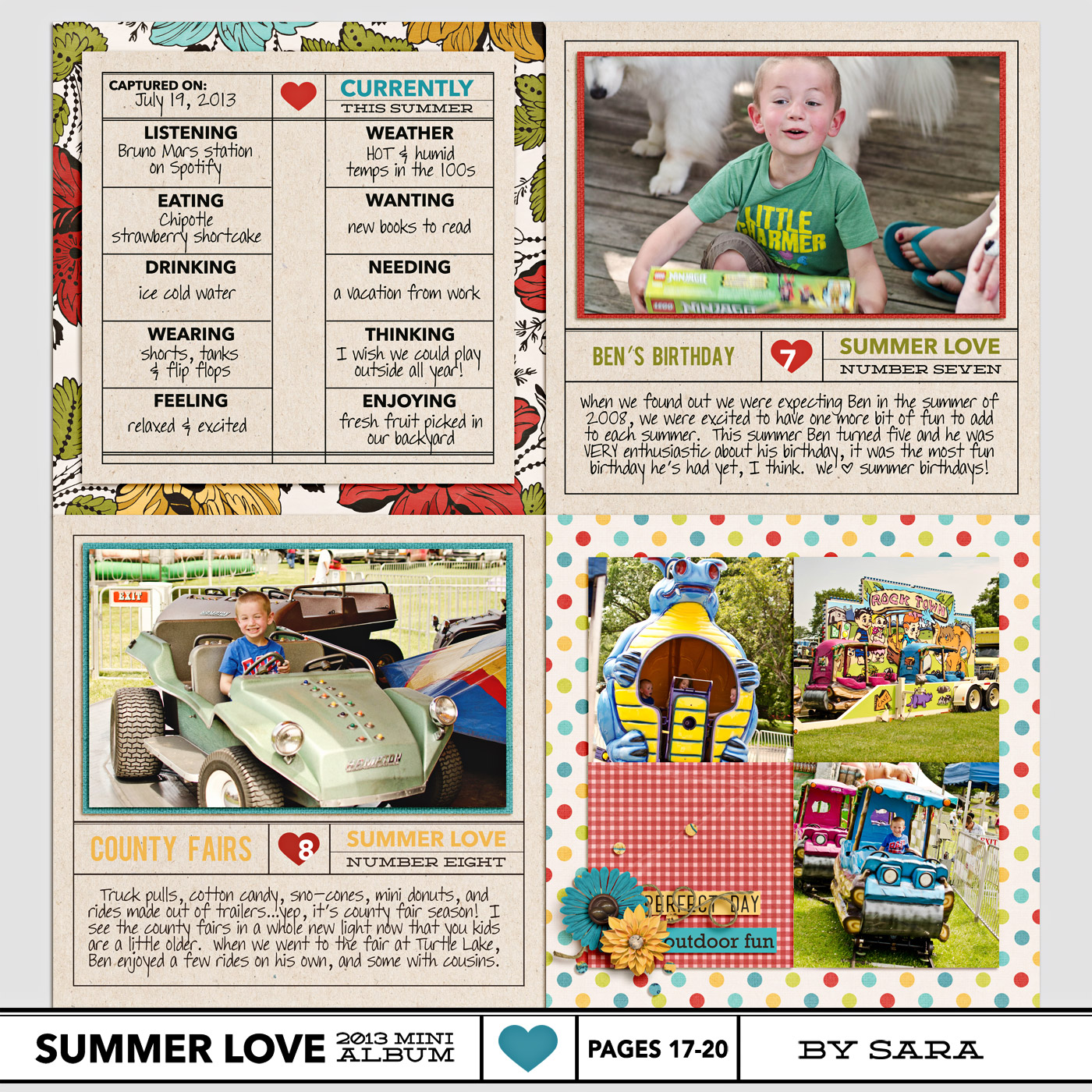
nettiodesigns_SummerLove-pg17-20-sara

By Jen

Another week, another round of hybrid pages from Jen! Really love how her album is coming together so far.
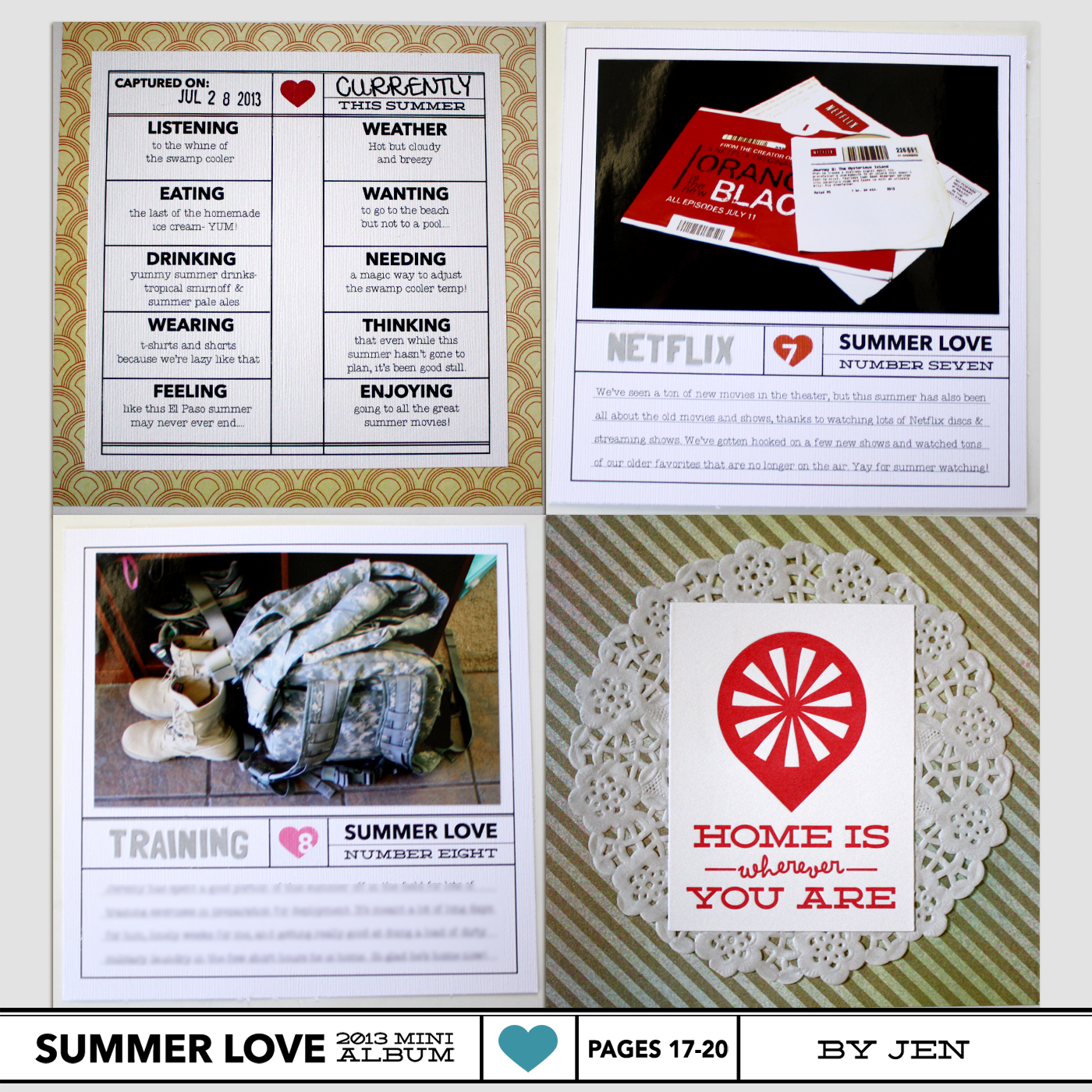
nettiodesigns_SummerLove-pg17-20-Jen

By Brittney

I love the way Brittney used the four-grid page this week with her chalk drawing photos. Very cute!
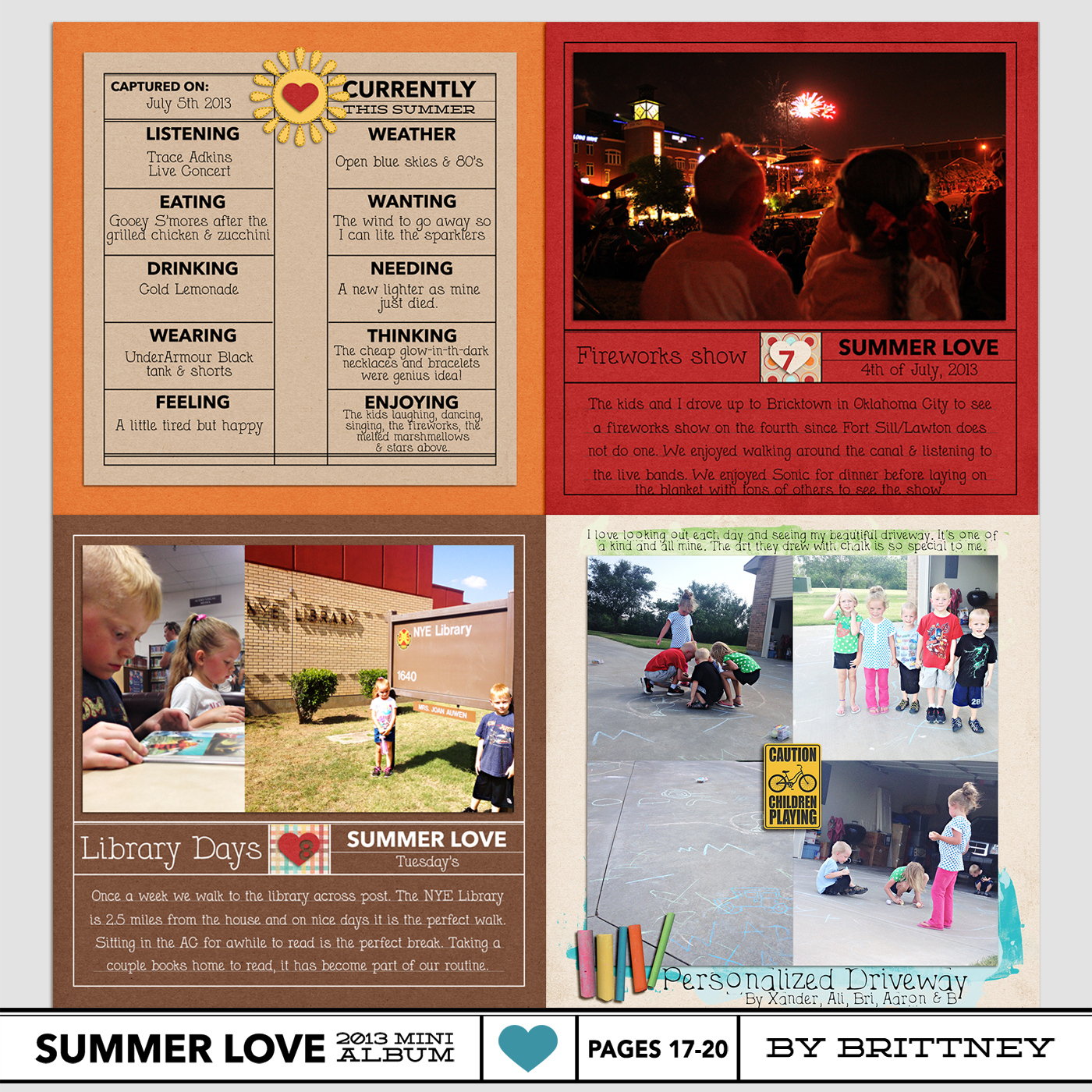
brittney_nettiodesigns_SummerLove-pg17-20

By Jennifer

I really love the way Jennifer’s adapting the Summer Love mini album templates to her summer. It looks like they’re having a blast!
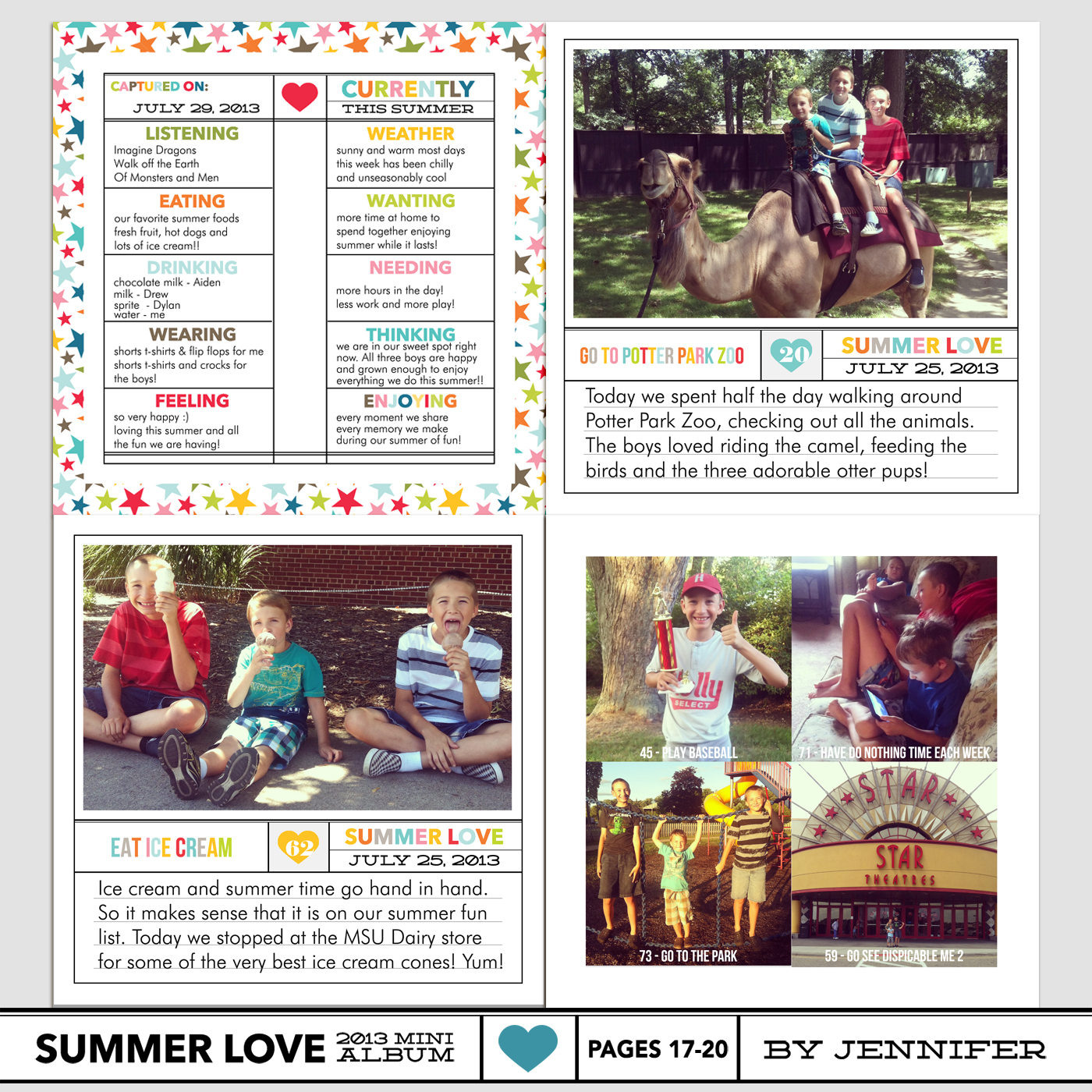
JenniferH_SummerLove-pg17-20-

By Jenn

I’m really loving all of Jenn’s photography and big photos in her album. Such a great way to tell her story!
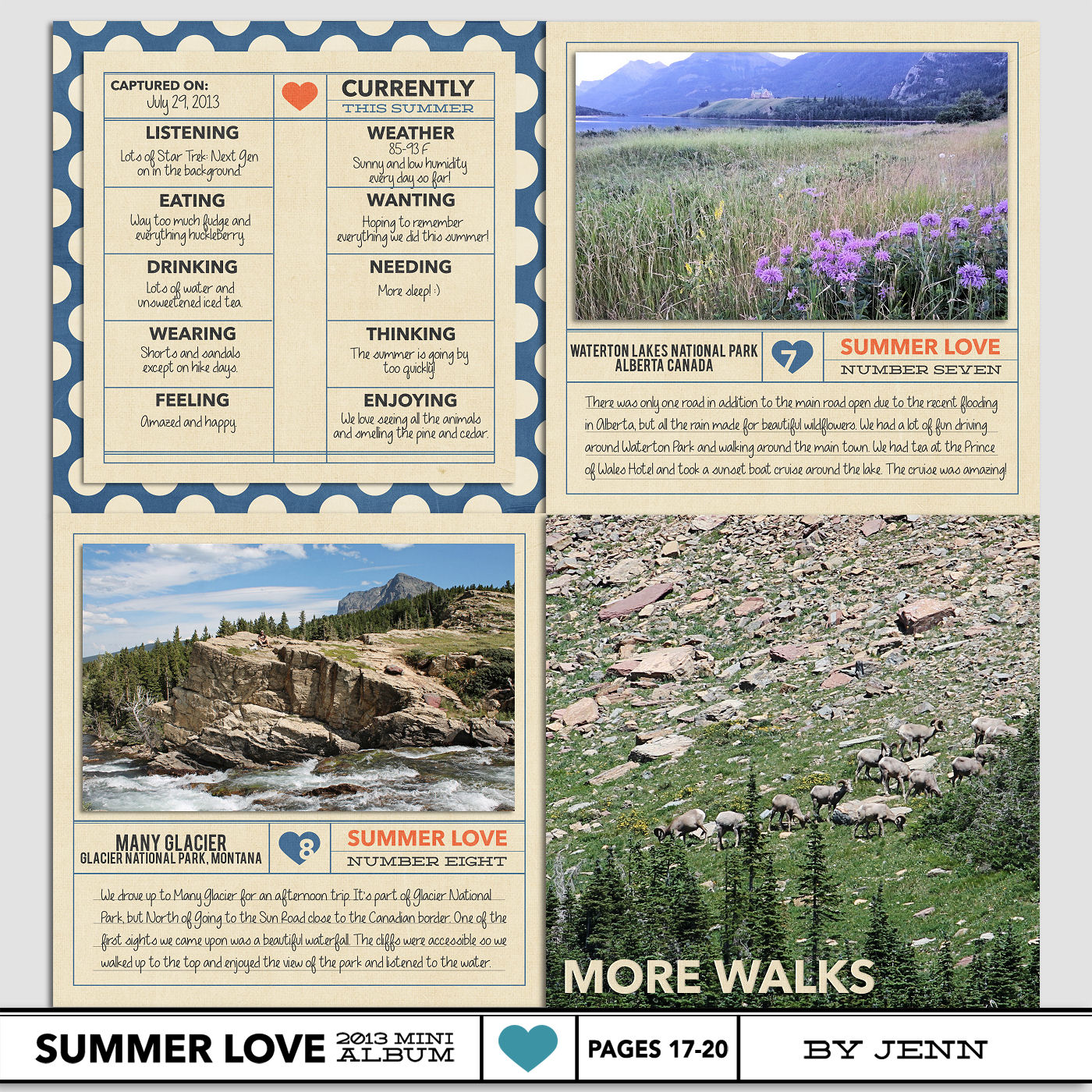
nettiodesigns_SummerLove-pg17-20-Jenn

That’s it from us today, but now we’d love to hear from you! How are you feeling now that we’re halfway through our mini albums?

Want to share your mini album progress? Feel free to add them to my designer gallery at SSD and link us up in this thread at Sweet Shoppe Designs.

Coming up next…On Tuesday, Aug 6th, I’ll be sharing ideas for binding your Summer Love Mini Album. See you then!

[catalyst_hook_box name=”summerlovesignup”]

__________________________________________________________________

Previous Summer Love Mini Course posts:

  • Silhouette Mini Album Tutorial
  • Summer Loves No. 5 & 6
  • Tips for Printing Your Mini Album

View all Summer Love Mini Course posts here.
How Can Customers Lower Their Remedy Costs

POSTED IN Summer Love 2013 Mini Course

Summer Love Mini Course | Printing Your Summer Love Mini Album

POSTED ON July 30, 2013 IN Guest Posts, Summer Love 2013 Mini Course, Tips from Team Awesome

summerlovemini-logoWe’re nearing the end of our Summer Love Mini Course which means it’s time to start thinking about finishing touches, like printing. Today Team Awesome member Amy is sharing her tips for printing your Summer Love Mini Album. Take it away, Amy!

By now our Summer Love Mini Album is getting close to being finished which means it’s time to start thinking about on important aspect of any album: printing!

There are so many different album printing options to choose from, but the main two are printing as a bound photo book, or printing on photo paper and putting in an album. Both are great options, but it’s up to you to decide how you want to gaze upon these lovely summer memories you’ve compiled in the coming seasons and years.

Photo Book Printing

First we’ll look at some photo book options available. The Summer Love Mini templates are designed to print at 6×6 inches so it would be important to make sure the company you choose has that size available. Both AdoramaPix and Artscow offer 6×6 photobooks.

If your photobook printer of choice doesn’t offer 6×6 photobooks, 7×7 or 8×8 would also be acceptable as long as you save your layouts at the highest quality possible. You could also add a simple border to your 6×6 pages to make them 7×7 or 8×8 as well.

This site has a breakdown of the top ten photo book printing services: 2013 Best Photo Book Services. That website provides you with the links to those 10 service websites, so take a look at the comparison charts and see if there is an option or two for you there.

Two services not on that list that are still worth looking into are Blurb and Mpix. Lynnette has previously published articles sharing her experiences with both companies so be sure to check out the following helpful links:

  • It’s Blurbtastic
  • Designing a Hybrid Mini Photo Book (and printing with Mpix)
  • Video Tutorials on Creating a Photo Book and Uploading to Blurb

The Daily Digi also has a great review of 12 photobook printers here.

The only service I’ve personally tried is Blurb, and I am a happy customer so I have not seen the need to try anything else 🙂

What to Look for in a Photo Book Service

The things you want to keep an eye out for when you’re choosing a photo book service are:

  1. Good quality printing and paper options. Upgrading your paper option will cost more, but it’s usually worth it. Your pictures really pop when they are printed properly and on great paper.
  2. The ability to create a custom cover. I love my Blurb books all the more since I was in charge of the design process from start to finish, including the cover created by me in Photoshop!
  3. The ability to customize the pages yourself. Some photo books will force you to use their pre-made templates, but for printing our Summer Love Mini Album, we need to be able to upload our layouts and have them print full bleed on every page.
  4. Fair pricing. Upgrades will cost you more money, so you need to figure out what’s important to you. Also, most printing companies are based in the USA so if you live in a different country, take shipping and customs costs into effect. Sometimes this can double the cost of your photo book! Before you order, check online for coupon or promo codes that can save you some pennies, or sign up for e-mail newsletter lists and order during the next sale.

Individual Page Printing

Your other option is to print your layouts on photo paper and insert into a scrapbook. This site has a breakdown of 10 printing services: 2013 Best Scrapbook Printing Services so that is worth checking out. Lynnette uses Persnickety Prints for all her prints (her review can be found here) but I personally print all my digital layouts at my local Costco. I find that printing on glossy photo paper really bring out the detail in my photos, elements and shadows.

There are many printers to choose from, but I will show you a quick way to prepare your 6×6 Summer Love Mini Album pages on 12×12 prints ready to go for Costco (in Photoshop).

How to Print Four 6×6 Pages on One 12×12 Page at Costco

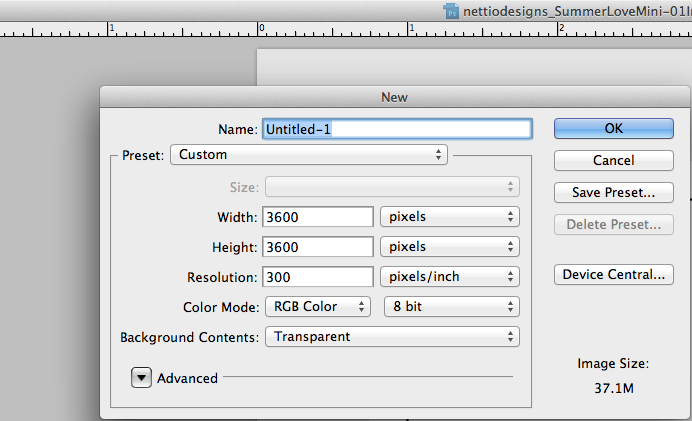
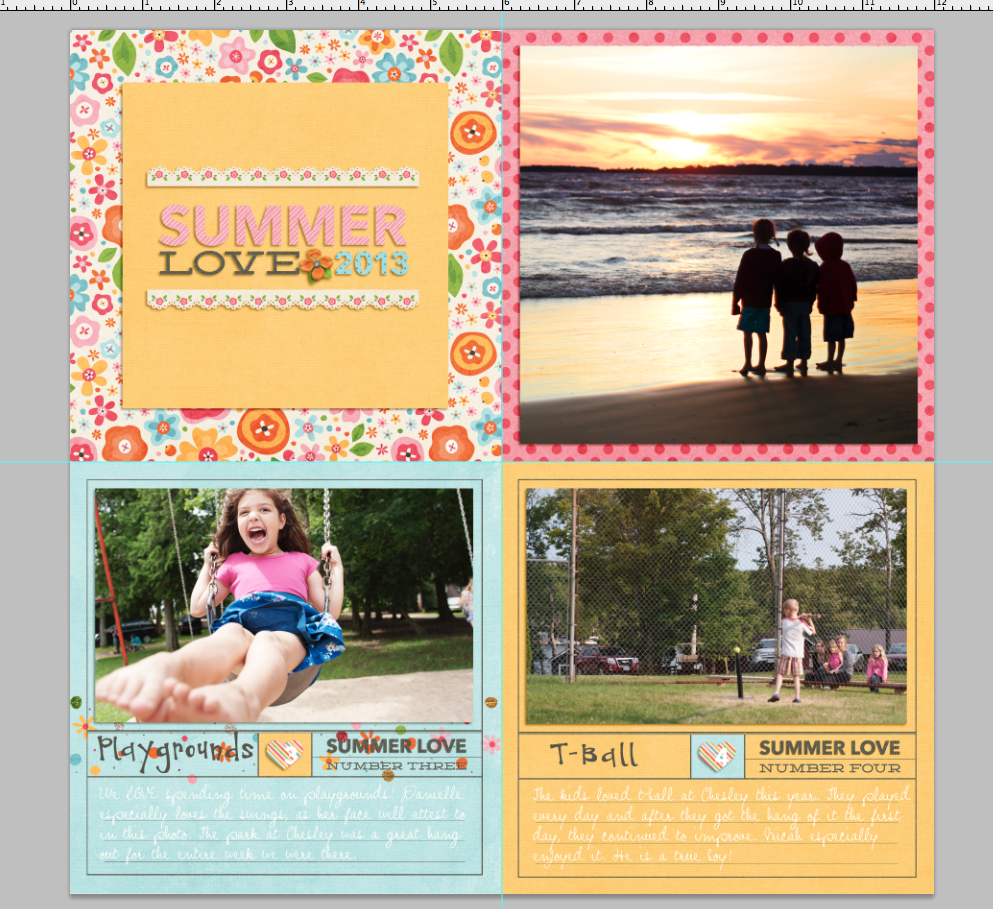
Step 1: Create a new document at 300dpi and 3600×3600 pixels or 12×12 inches.

Screen Shot 2013-07-16 at 9.59.48 PM

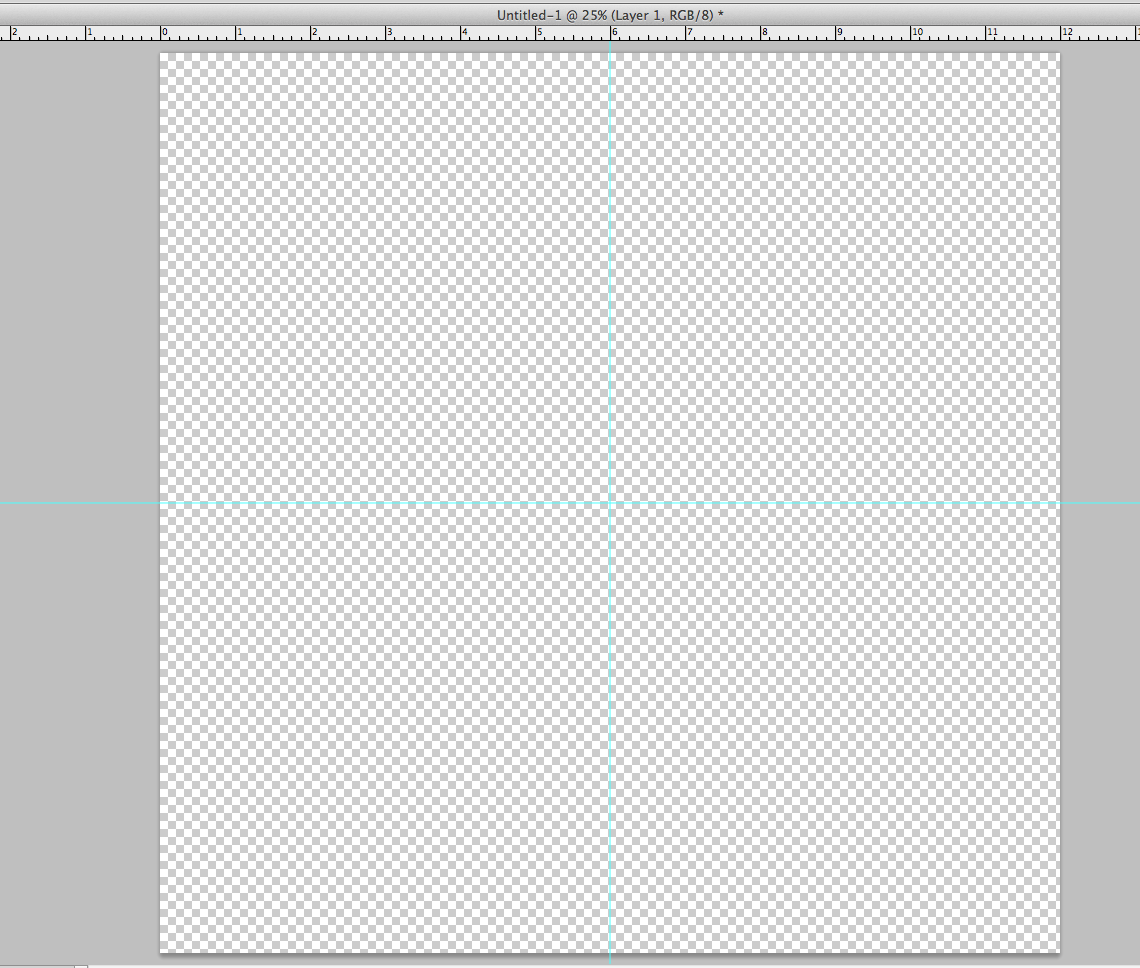
Step 2: Create guides at the 6 inch (or halfway) mark vertically and horizontally.  You can do this by selecting the move tool, turning your rulers on if they aren’t already (shortcut is ALT+R on PC or Command+R on a Mac) and dragging out from the rulers to reveal a blue guide line.

Screen Shot 2013-07-16 at 10.03.20 PM

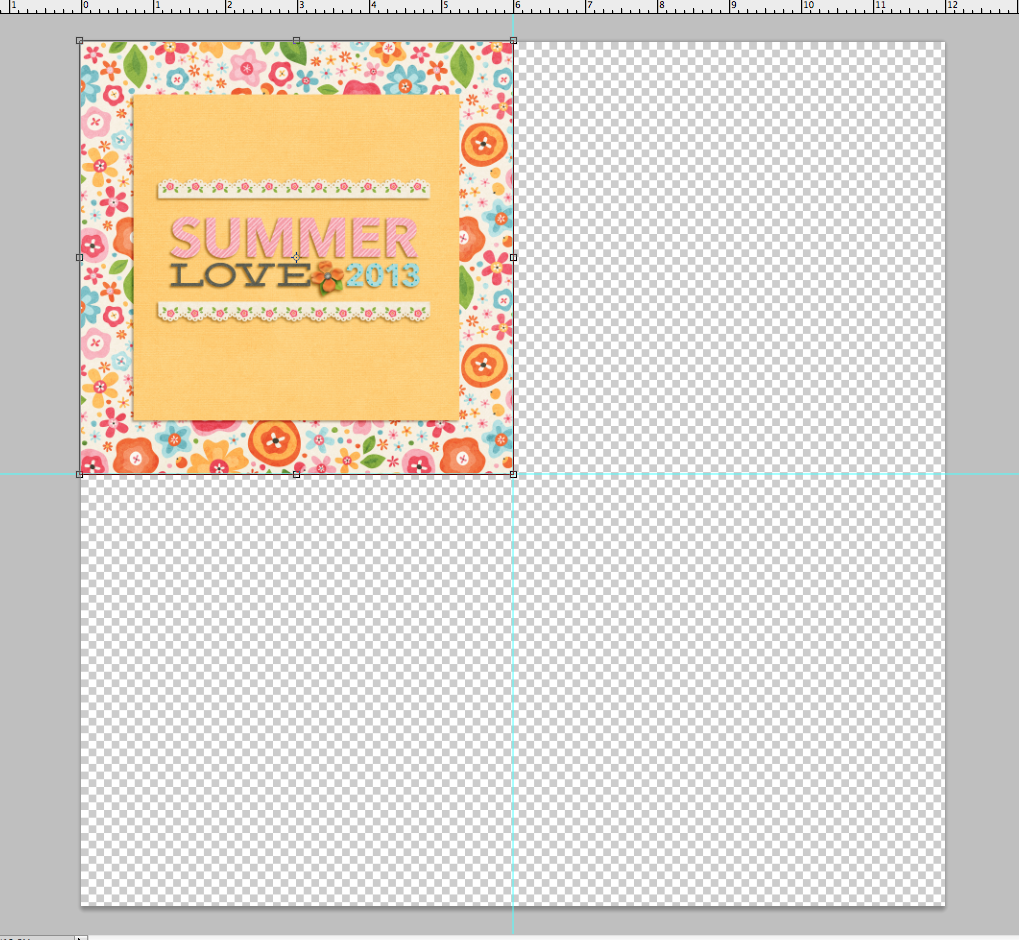
Step 3: Save your layouts at .jpgs and then drag them onto your 12×12 canvas, lined up with the guides you created.

Screen Shot 2013-07-16 at 10.17.35 PM

Screen Shot 2013-07-16 at 10.25.51 PM

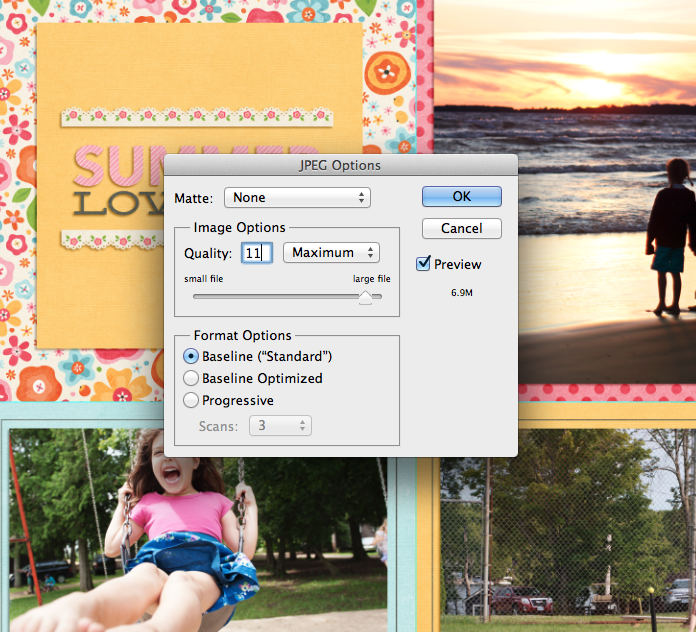
Step 4: Once you have four of your layouts on the canvas, save it as a .jpg. I save at the highest quality possible, which was 11 for this print since Costco will not allow uploads to their photo site over 8mb.

Screen Shot 2013-07-16 at 10.30.12 PM

Step 5: Once you have your album set up into these 12×12 .jpgs, upload them to the Costco website software and order them as 12×12 prints. Like I said, I prefer glossy, and make sure you have the border option unchecked and don’t allow them to color correct your prints. Once you pick them up (or have them shipped to you), use a paper cutter to chop them up into individual layouts and insert into the 6×6 album of your choice!

As you can see here, there are a lot of different printing options out there. I hope this helps you narrow it down a little bit. Happy Scrapping!

Thanks so much Amy! If you have any printing questions, feel free to ask them in the comments section below. And if you’re looking for ideas for binding your non-photobook printed pages, I’ll be sharing some ideas for that next Tuesday.

Coming up next…On Thursday, August 1st, Team Awesome and I will be sharing our Summer Loves No. 7 & 8 and our summer currentlys. See you then!

[catalyst_hook_box name=”summerlovesignup”]

__________________________________________________________________

Previous Summer Love Mini Course posts:

  • Summer Loves No. 3 & 4
  • Silhouette Mini Album Tutorial
  • Summer Loves No. 5 & 6

View all Summer Love Mini Course posts here.
Can diabetes cause erectile dysfunction

POSTED IN Guest Posts, Summer Love 2013 Mini Course, Tips from Team Awesome

Summer Love Mini Course | Summer Loves 5 & 6

POSTED ON July 25, 2013 IN Summer Love 2013 Mini Course

summerlovemini-logoWoohoo, it’s time for another installment of the Summer Love Mini Course! Today Team Awesome and I are sharing our third set of Summer Love journaling spreads, Summer Loves 5 & 6 or pages 13-16 in the mini album. Can you believe we’re halfway through our mini albums? Page 13 marks the midway of this 26-page mini album so we’re here!

I mentioned last week that at this point in the mini album process, it’s normal to feel a bit uneasy about how the album is all going to come together. So to ease your mind, I thought I’d show you a peek at how the first half of my mini album is shaping up so you can see how it flows even though each page is unique.

nettiodesigns_SummerLoveMini-firsthalf-new

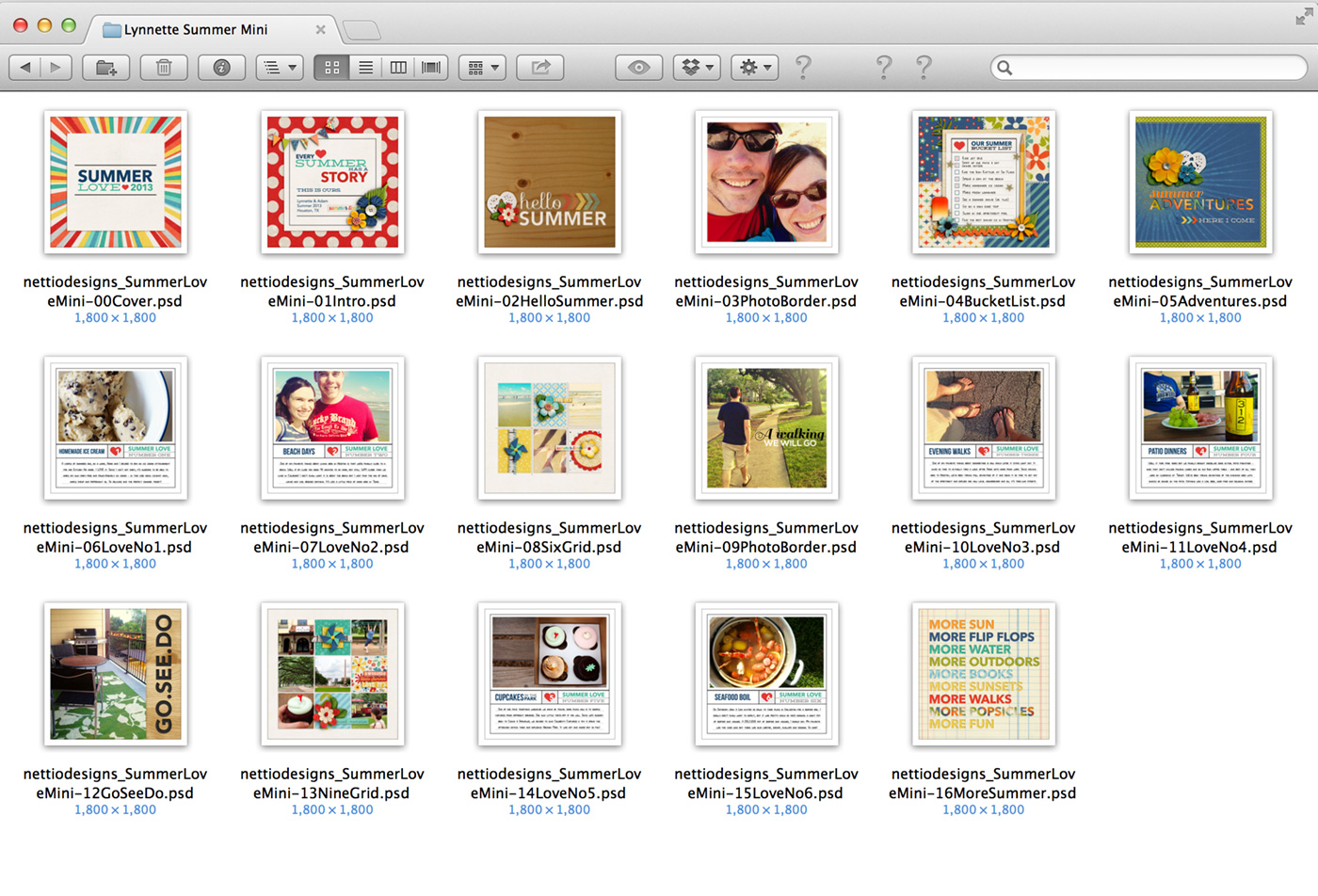
One trick I’ve found really helpful for designing my pages is to actually open the Finder window seen above as I’m working. This allows me to see all of my pages at once so I can keep track of how many times I’ve used a page and where I may need to add or subtract pops of color.

For example, on page 13, the Nine Grid layout, I’d originally left the background white but when I saw all the pages together like this, I decided to duplicate the cream background paper from the Six Grid layout on page 8 to add some cohesion and consistency to my mini design. So if you’re uncertain about how your mini album is shaping up, don’t be afraid to look back at your pages as you keep moving forward.

Now on to this week’s pages…

Summer Love | Summer Loves 5 & 6 Pages 13-16

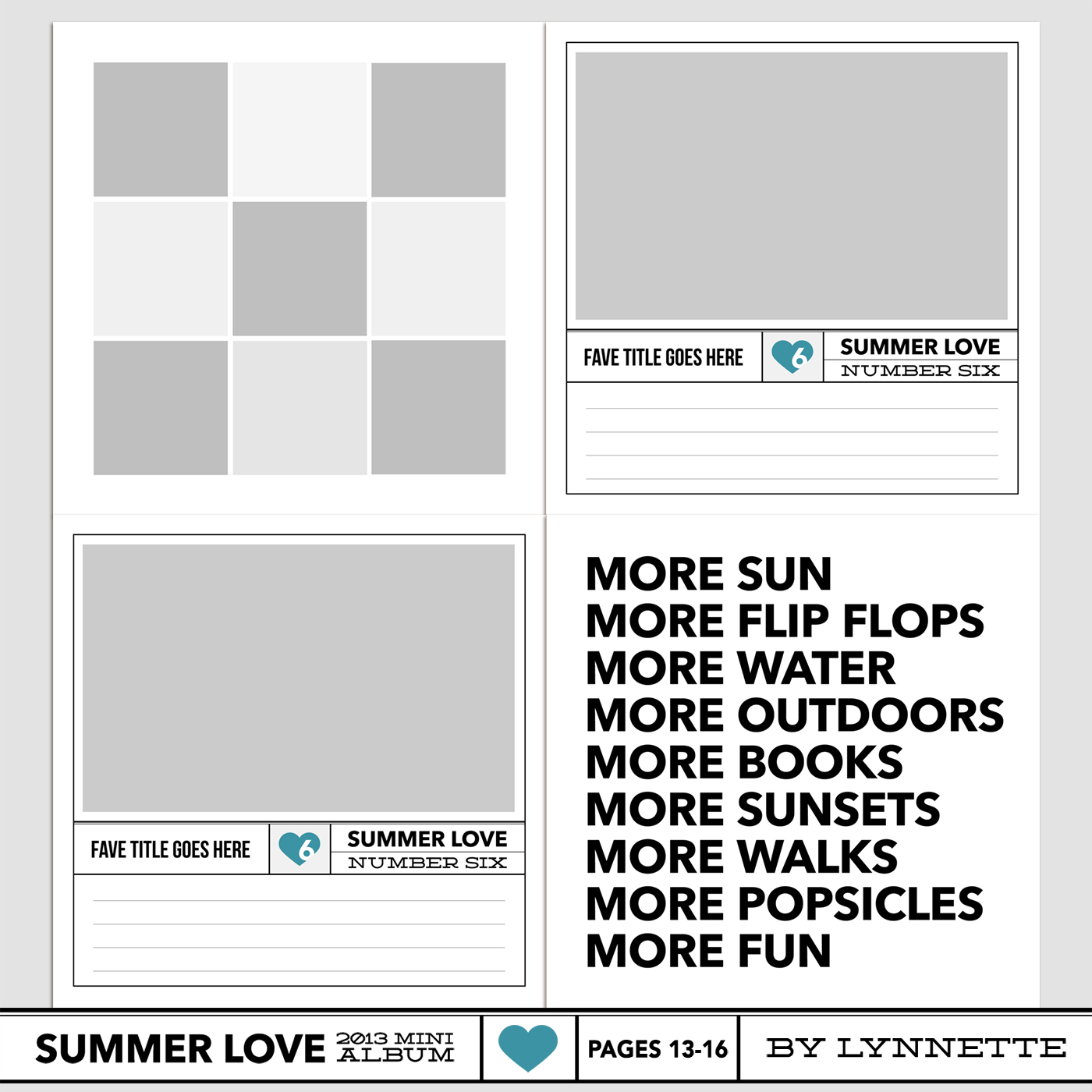
Here’s a look at the Summer Love 6×6 Mini Album templates for pages 13-16:

nettiodesigns_SummerLove-pg13-16-templates

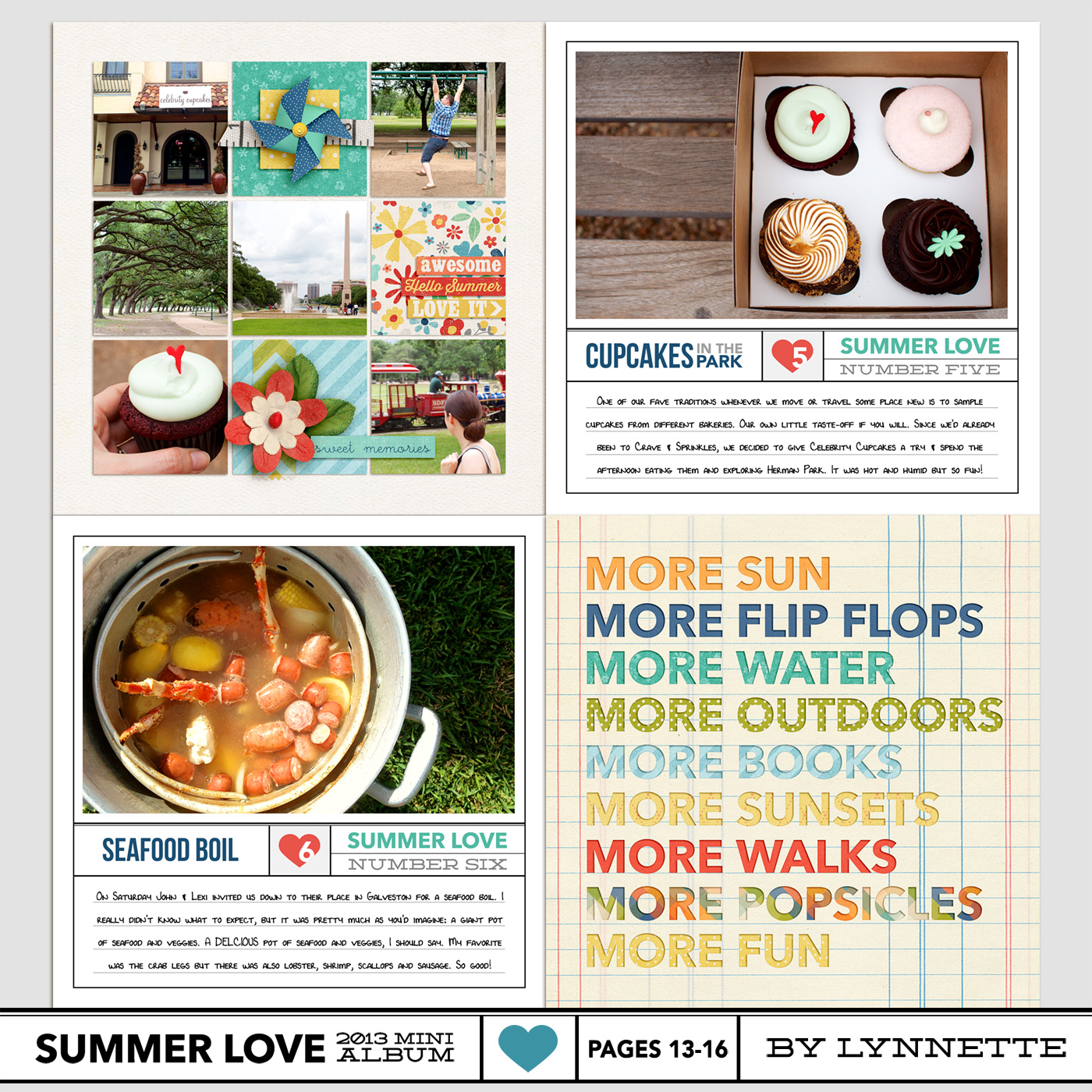
By Lynnette

Here’s a look at my page 13-16 layouts. I love grids so I was really excited that it was time to use this nine grid page. I’m also realizing that a lot of my Summer Loves have to do with food which I suppose shouldn’t be a surprise because we do love to eat, haha.

nettiodesigns_SummerLove-pg13-16-Lynnette

Here’s a look at Team Awesome’s pages 13-16:

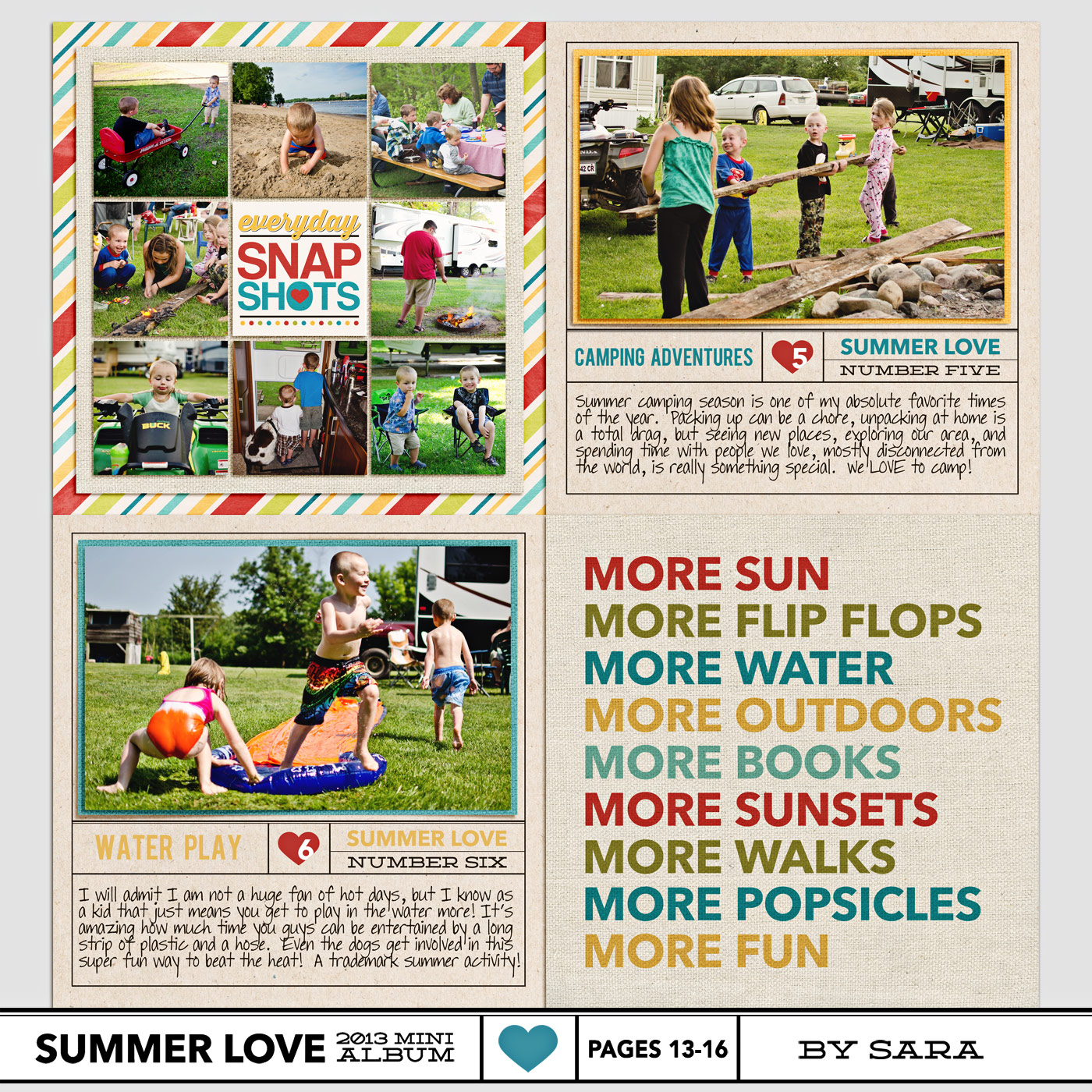
By Sara

I’m loving the way Sara’s matting all her photos with a solid paper – it’s a great way to add a pop of color to those pages.

nettiodesigns_SummerLove-pg13-16-sara

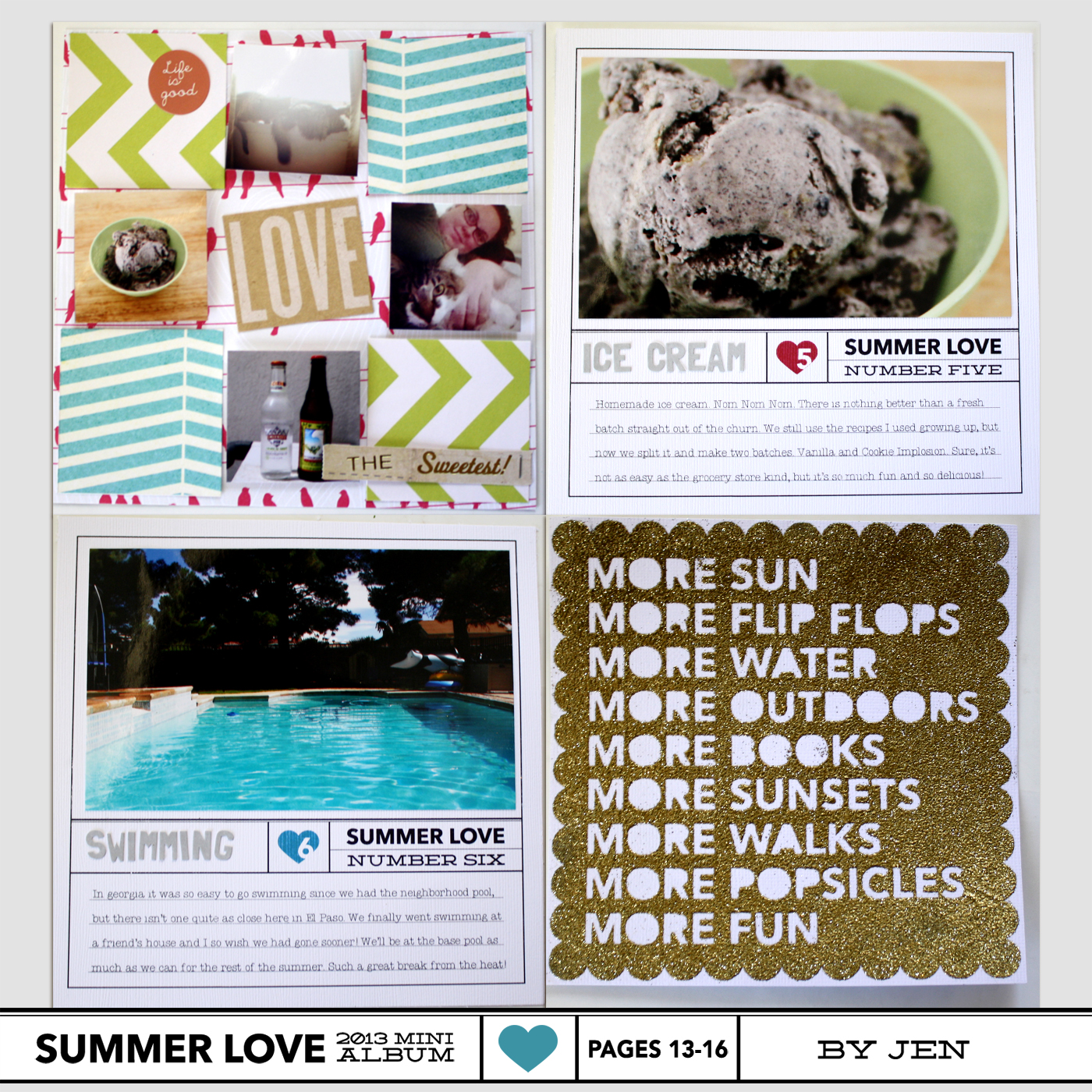
By Jen

Jen’s hybrid pages are so fun! If you’re curious how she’s creating her pages, be sure to check out the Silhouette tutorial she posted on Tuesday.

nettiodesigns_SummerLove-pg13-16-JEN

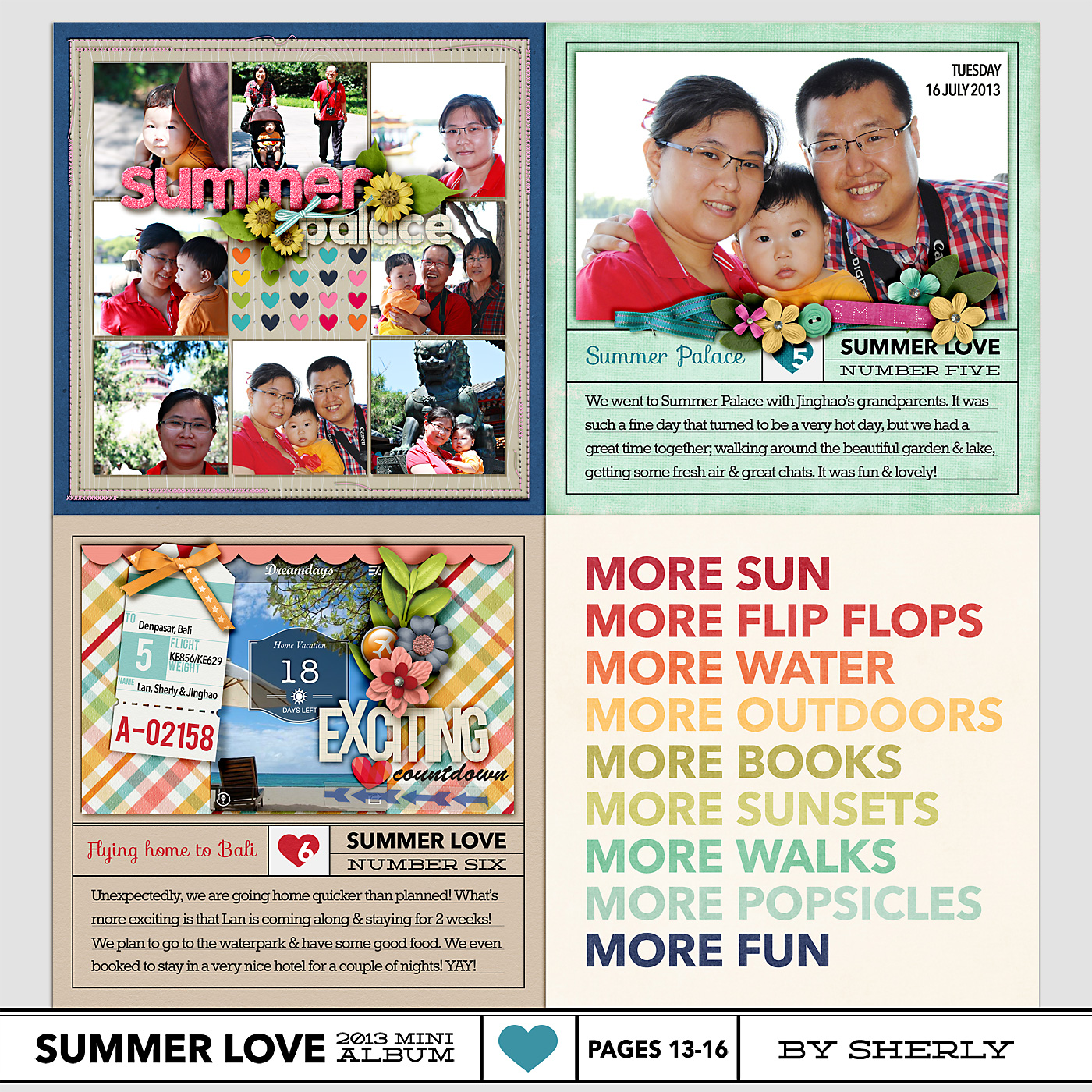
By Sherly

I’m SO in love with the rainbow effect Sherly did on page 16. So pretty!

sherly_SummerLove-pg13-16

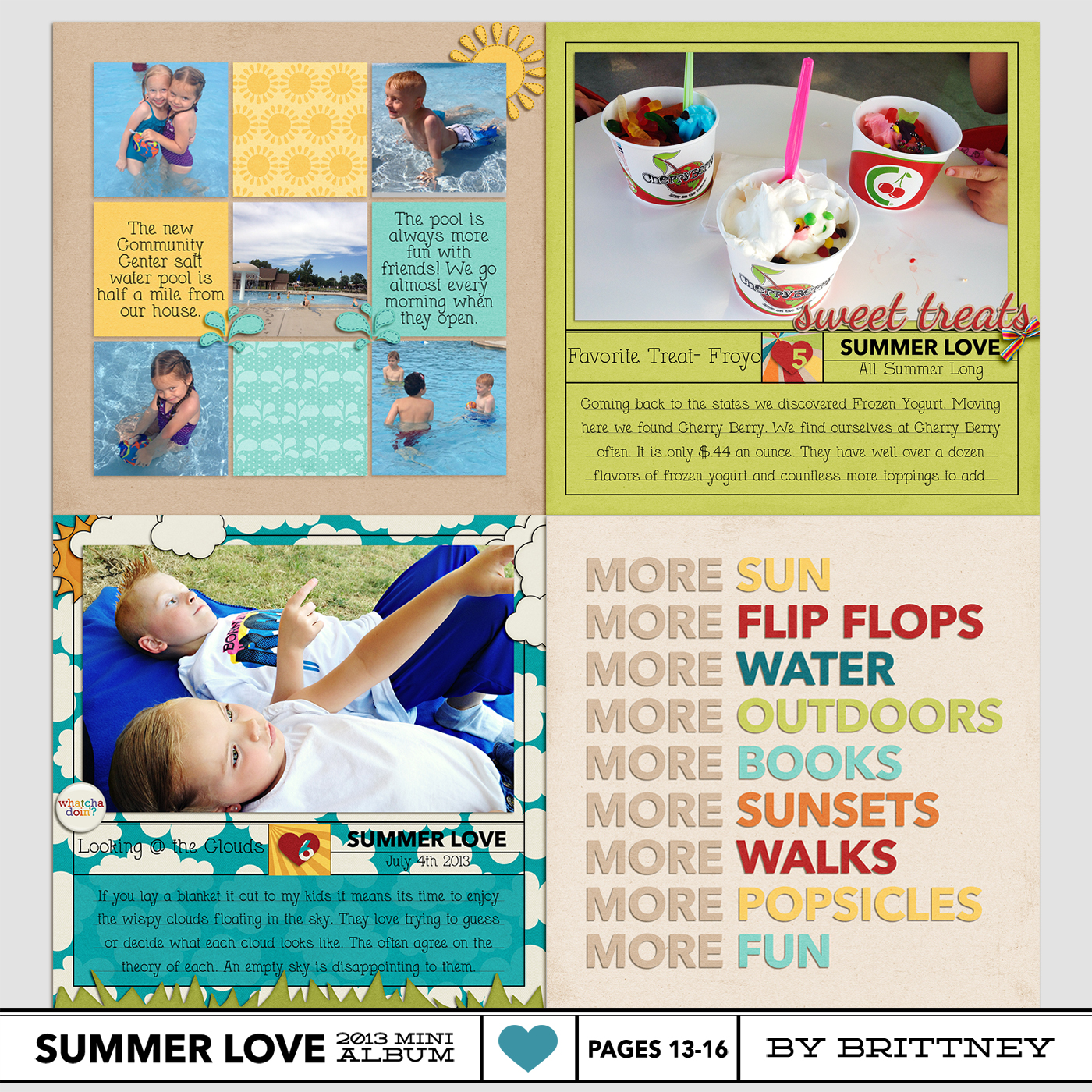
By Brittney

Brittney’s been swapping out the numbered text title under “Summer Love” in the templates to add in a date. Such a smart idea!

brittney_nettiodesigns_SummerLove-pg13-16

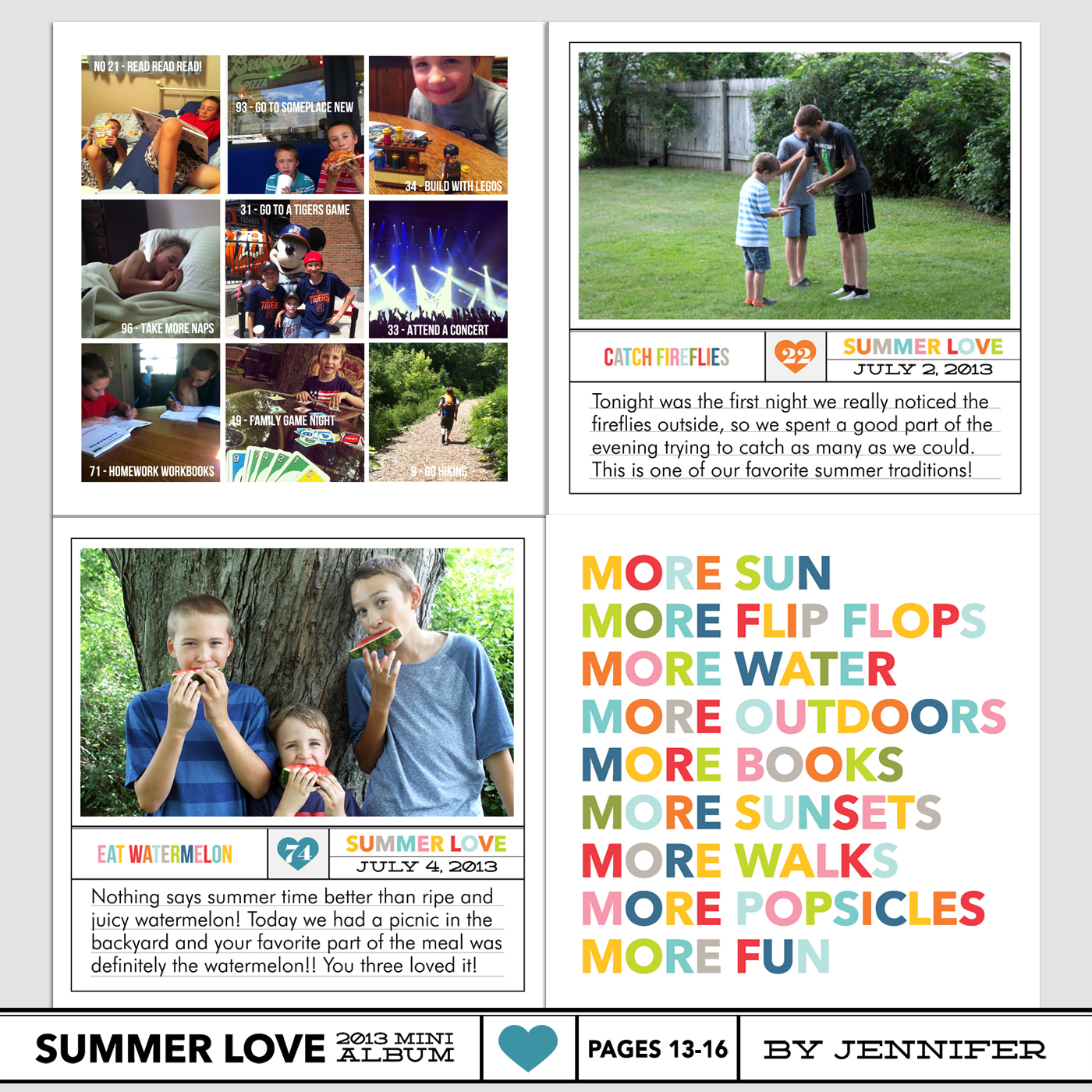
By Jennifer

Jennifer’s family looks like they’re having the best summer ever! I love how she used the nine grid page for all photos.

nettiodesigns_SummerLove-pg13-16-JenniferH

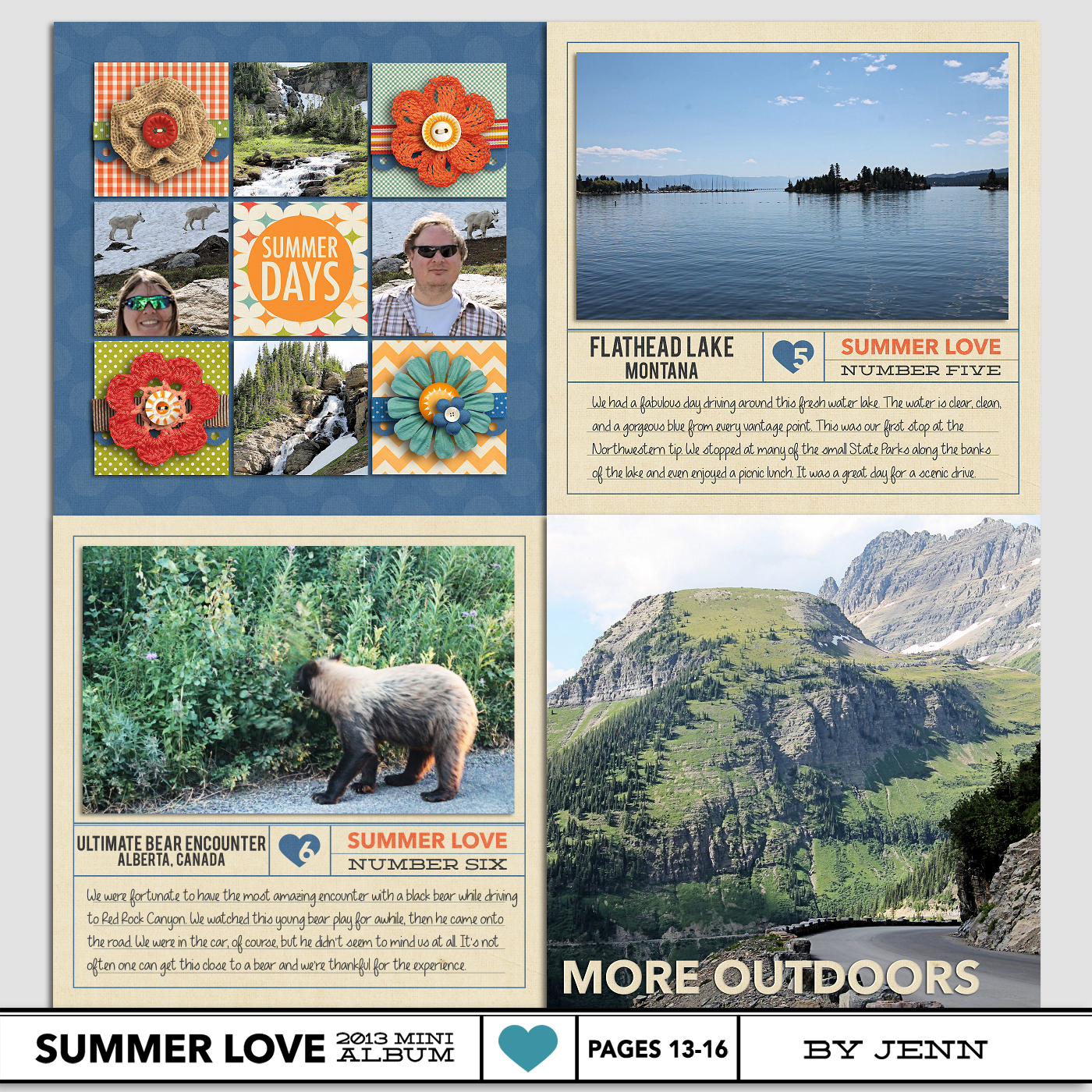
By Jenn

Jenn’s done a great job adding large photos to her album and this one is no exception. I love how she adapted the text on page 16 to fit with her photo and that bear photo – oh my!

nettiodesigns_SummerLove-pg13-16-JENN

Ok, well that’s it from us today, but now we’d love to hear from you! How are you feeling now that we’re halfway through our mini albums?

Want to share your mini album progress? Feel free to add them to my designer gallery at SSD and link us up in this thread at Sweet Shoppe Designs.

Coming up next…On Tuesday, July 30th, Team Awesome member Amy will be sharing tips for printing your albums. See you then!

[catalyst_hook_box name=”summerlovesignup”]

__________________________________________________________________

Previous Summer Love Mini Course posts:

  • Summer Photo List (free download)
  • Summer Loves No. 3 & 4
  • Silhouette Mini Album Tutorial

View all Summer Love Mini Course posts here.
How Can Customers Lower Their Remedy Costs

POSTED IN Summer Love 2013 Mini Course

Summer Love Mini Course | How To Use the Silhouette to Create Your Summer Love Mini Album

POSTED ON July 23, 2013 IN Summer Love 2013 Mini Course

summerlovemini-logoToday Team Awesome member Jen is sharing her tips for using the Summer Love Mini Album templates with your Silhouette Cameo or Portrait. I admit my Silhouette still kind of scares me but her tutorial makes it seem super easy. Take it away, Jen!

Hi everyone, it’s Jen! Earlier this summer when Lynnette introduced Team Awesome to the Summer Love Mini Album, I decided I wanted to be really crazy and do a hybrid album, rather than a digital album. Lynnette’s templates are very easy to use for hybrid and I love being able to combine my love of digital products with the messiness of paper scrapbooking. One of the best ways to do that is to use a Silhouette Cameo or Portrait to enhance your pages, and today I am here to show you how I am using the Silhouette with my album.

I am using a text page from this week’s sharing examples to show you the process.

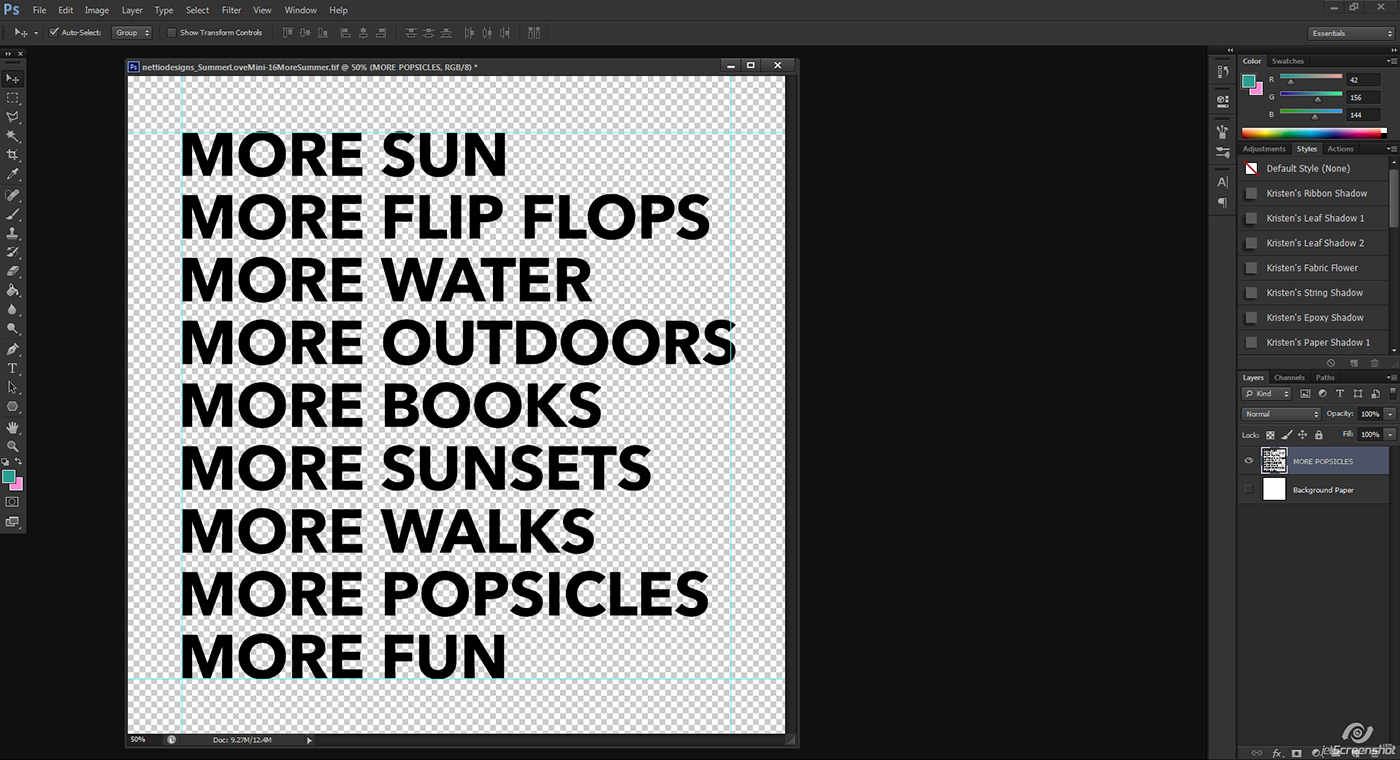
Step 1: Open the template in Photoshop or your editing program of choice. Turn OFF the white background layer so that the transparent background shows. Flatten all layers that you want to be able to cut out. Save as a PNG file and note the location where you saved it.

image 01

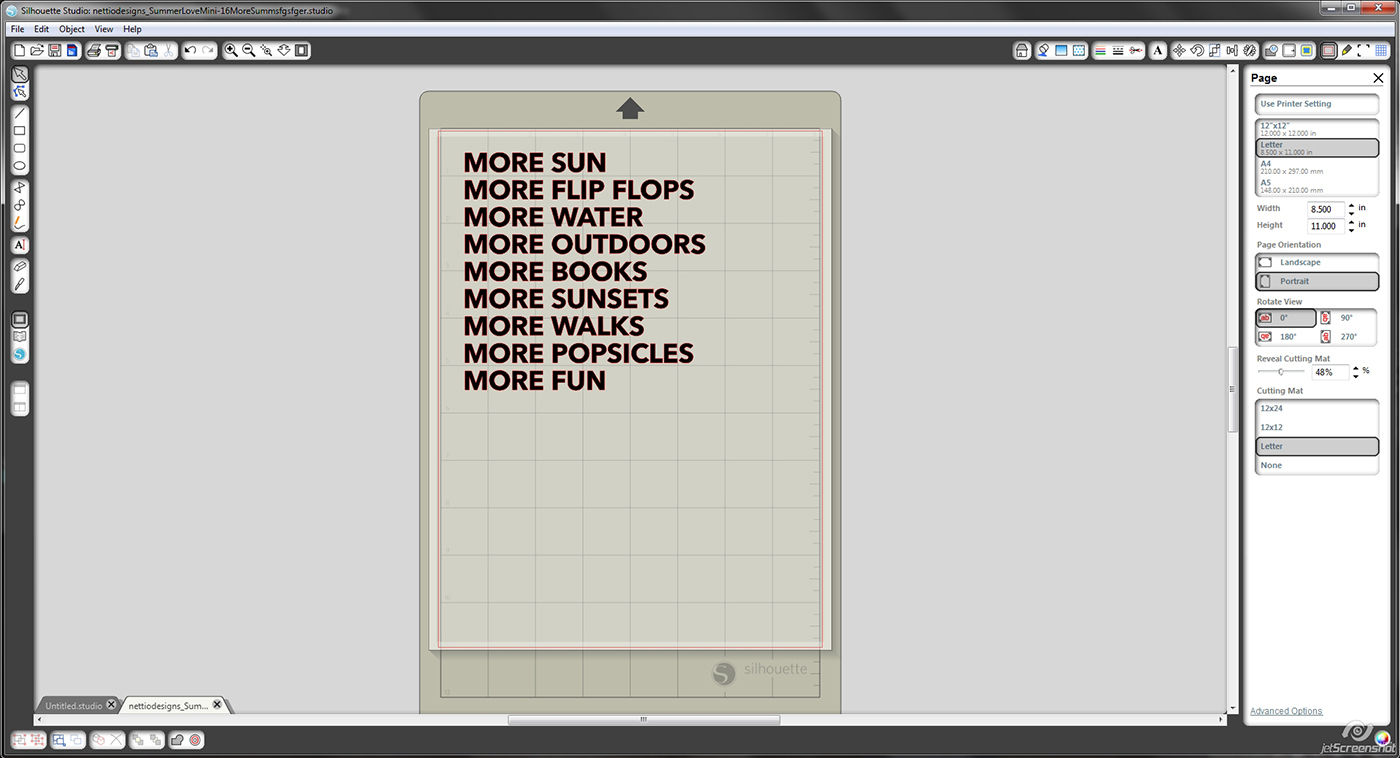
Step 2: Open the PNG file in your Silhouette Studio Software. Under Page tools, go down to the slider and reveal cutting mat until you can easily see the grid lines. This will allow you to ensure that your design is lined up properly for your paper on your cutting mat.

image 02

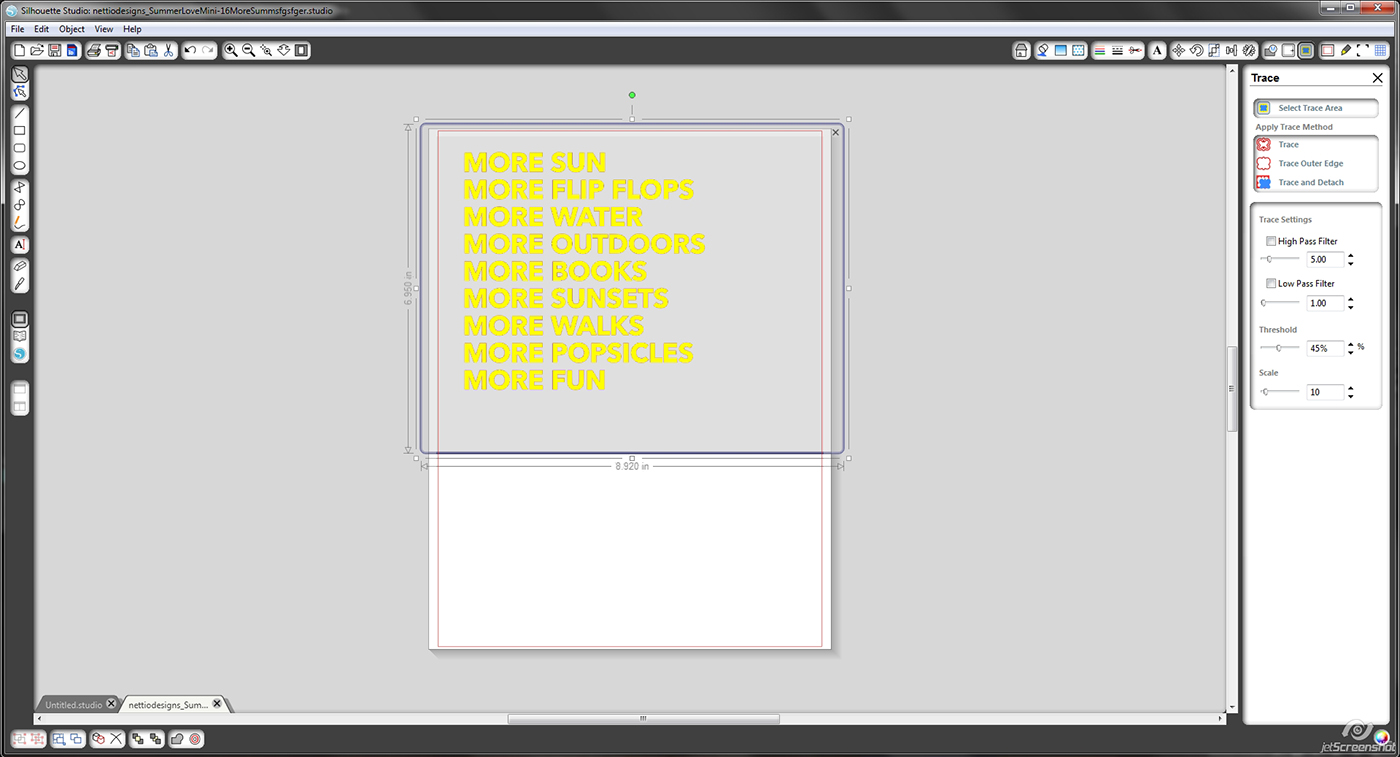
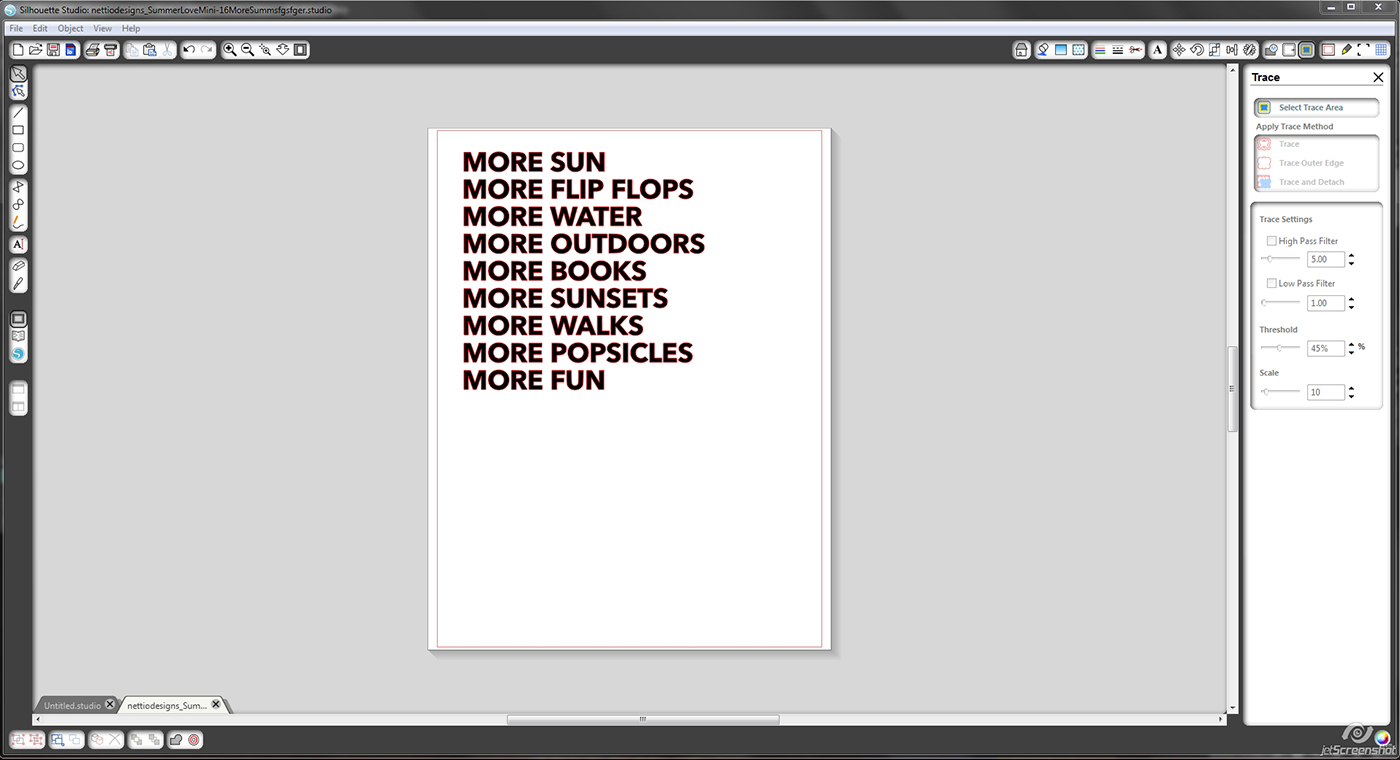
Step 3: Go to the trace menu and select trace area. Deselect the box that says High Pass Filter and choose Trace to complete the tracing. If this step is done correctly, you will see a faint red outline showing the cut lines.

image 03

image 04

Step 4: Make sure your paper is adhered to your mat in the right place and load it into the Silhouette. In the Silhouette cut menu, select your paper type and make sure you set your blade accordingly. Select cut, sit back, and let it do the hard work. It should only take a few minutes before it is done, then you can unload your cutting mat and it should look something like this.

image 05

Step 5: Remove cut design from the mat. You can back it with washi tape, paper, glitter, and so much more, or use the cut out letters and adhere them onto the background of your choice.

image 06

I decided to have a little fun with mine, so you’ll have to come back Thursday for the next Team Awesome page reveal day to see what I chose!

Don’t be afraid of your Silhouette. It’s very easy to use and makes doing hybrid scrapbooking so much easier. If you have any questions, ask away in the comments section and I will do my best to answer them!

Awesome, thanks Jen! Looks like I need to pull out my Silhouette and play!

Coming up next…On Thursday, July 25th, Team Awesome and I will be sharing our Summer Loves #5 & 6. See you then!

[catalyst_hook_box name=”summerlovesignup”]

__________________________________________________________________

Previous Summer Love Mini Course posts:

  • Summer Loves No. 1 & 2
  • Summer Photo List (free download)
  • Summer Loves No. 3 & 4

View all Summer Love Mini Course posts here.
Fraudulent Drugs Are A Huge Global Problem

POSTED IN Summer Love 2013 Mini Course

Summer Love Mini Course | Summer Loves 3 & 4

POSTED ON July 18, 2013 IN Summer Love 2013 Mini Course

summerlovemini-logoHello hello and welcome back to the Summer Love Mini Course! Today Team Awesome and I are sharing our second set of Summer Love journaling spreads, Summer Loves 3 & 4 or pages 9-12 in the mini album. Can you believe we’re almost halfway through our mini albums? Page 13 marks the midway of this 26-page mini album so we’re nearly there!

Summer Love | Summer Loves 3 & 4 Pages 9-12

Here’s a look at the Summer Love 6×6 Mini Album templates for pages 9-12:

Nettiodesigns SummerLove pg9 12 templates

By Lynnette

Here’s a look at my page 9-12 layouts. I decided to keep things simple this week and focus on my photos and stories:

Nettiodesigns SummerLove pg9 12 Lynnette 1400

I love the clean look of these pages but I admit, I had a moment of doubt when comparing them to my other more scrappy pages I’ve already made for my mini album. Would they really all flow together?

It was at this point I had to stop and remind myself that just like any other mini album or photo book, the whole is greater than the sum of its parts. So if you find yourself stressing out over each page or tiny details, don’t! No single page or detail is going to make or break your album. Because the magic of a mini album is not found in the individual pages, it’s found in the overall story the album tells. Always remember that.

Now let’s see what Team Awesome did with pages 9-12, shall we?

By Sara

I’m really loving Sara’s photos this week. Is it just me or does her summer seem totally fun?

Sara SummerLove pg9 12

By Jen

Jen’s rocking the hybrid again this week and I’m loving it! I’m especially smitten with her single word titles and her use of alphas.

Nettiodesigns SummerLove pg9 12 Jen

By Sherly

Sherly’s pages are always magic and this week’s are no exception. I love all the details she’s adding to each page.

Sherly SummerLove pg9 12

By Brittney

I love the way Brittney used the big photo page this week to add a photo with additional journaling over the top. That’s a great way to add in more story in a small mini album like this.

Brittney nettiodesigns SummerLove pg9 12

By Jennifer

Jennifer’s adapting the mini numbering system to go with her ambitious summer bucket list and I think it’s so fun! I especially the arrow details she added to the Go.See.Do page this week.

JenniferH SummerLove pg9 12 JenniferH

By Amy

Amy’s joining us for the first time this week and I’m happy to have her on board! I love the playfulness of her pages and that swing photo is so neat. You can practically hear the squeals of joy.

Nettiodesigns SummerLove pg9 12 AMY

By Jenn

Jen has some of the best scenery photos of all of us and I’m so jealous! Seriously, who wouldn’t want to spend their summer traipsing around Glacier National Park? Well if you’re not an outdoorsy person like me, then maybe you wouldn’t, haha, but I’d love it!

Nettiodesigns SummerLove pg9 12 JENN

Ok, well that’s it from us today, but now we’d love to hear from you! How’s your Summer Love mini album coming along so far? If you’ve found yourself falling behind our pace, no worries! There’s still plenty of time for summer scrapbooking.

Want to share your mini album progress? Feel free to add them to my designer gallery at SSD and link us up in this thread at Sweet Shoppe Designs.

Coming up next…On Tuesday, July 23rd, Team Awesome member Jen will be sharing how she’s using her Silhouette to create her hybrid mini album. As someone who’s Silhouette may still be packed away in a box from our move, I’m excited to see what she has in store! See you then!

[catalyst_hook_box name=”summerlovesignup”]

__________________________________________________________________

Previous Summer Love Mini Course posts:

  • Our Summer Bucket Lists
  • Summer Loves No. 1 & 2
  • Summer Photo List (free download)

View all Summer Love Mini Course posts here.
Benefits Of Using Canadian Pharmacy

POSTED IN Summer Love 2013 Mini Course

Summer Love Mini Course | Summer Love Photo List (Free Download)

POSTED ON July 16, 2013 IN Summer Love 2013 Mini Course

nettiodesigns_SummerLove-photo

summerlovemini-logoStuck in a summer photo rut? Well you’re in luck! In today’s installment of the Summer Love Mini Course, Team Awesome and I have put together a list of summer photo ideas and best of all, you can download it for FREE!

Just click on the download button below for a PDF version of the Summer Love Photo Sheet.

[wp_eStore_download_now_button id=55]

nettiodesigns_SummerLove-PhotoSheet

Coming up next… On Thursday, July 18th, Team Awesome and I will be sharing our Summer Loves Number 3 & 4. See you then!

[catalyst_hook_box name=”summerlovesignup”]

__________________________________________________________________

Previous Summer Love Mini Course posts:

  • Our Fave Summer Kits
  • Our Summer Bucket Lists
  • Summer Loves No. 1 & 2

View all Summer Love Mini Course posts here.
Can I take Levitra if I am taking other remedies at the same time

POSTED IN Summer Love 2013 Mini Course

  • « Previous Page
  • 1
  • …
  • 4
  • 5
  • 6
  • 7
  • 8
  • …
  • 18
  • Next Page »
HI I'M LYNNETTE. Graphic designer, tech-lovin’ memory keeper and lover of bold colors & patterns, good food and the great outdoors. Here at Nettio Designs, I share a behind the scenes peek at my own creative & life adventures. Read more...

KICKSTART YOUR CREATIVITY


By popular demand, photo book templates are back! Grab all three sets in the shop.
ADVENTURES IN ORGANIZING
GOAL-SETTING
MEMORY KEEPING
PROJECT LOVE
LIFE ADVENTURES
TIPS & TRICKS
BEHIND THE SCENES

POPULAR PROJECTS

TO SEE ALL MY PROJECTS, CLICK HERE

MUST READ POSTS

  • WHY EVERY SCRAPPER SHOULD SCRAP A FAVES PAGE
  • HOW TO CREATE A SCRAP-WORTHY MAP WITH PHOTOSHOP
  • REMEMBERING THE IMPORTANCE OF TELLING YOUR STORY
  • WHAT DOES IT MEAN TO CREATIVELY CAPTURE YOUR LIFE ADVENTURES?
  • BROWSE BY CATEGORY

    BROWSE THE ARCHIVES

    GET IT FOR FREE

    Testing testing

    links goes here

    Copyright © 2026 ·Dynamik Website Builder · Genesis Framework by StudioPress · WordPress · Log in